---
title: Adding and Managing New Pages
description: The home page is the initial point of contact for potential participants, and their decision to register or not may very well depend on the impression they get from it. This page serves as the central
---
[Skip to content](https://support.b2match.com/adding-and-managing-new-pages#main-content)
[](https://www.b2match.com/)
- [Log in](https://admin.b2match.com/cp/log-in)
Open main navigation
Close main navigation
- [Log in](https://admin.b2match.com/cp/log-in)
- [Contact us](http://www.b2match.com/contact-us)
[Contact us](http://www.b2match.com/contact-us)
How can we help you?
- There are no suggestions because the search field is empty.
1. [Help Center](https://support.b2match.com/?hsLang=en)
2. [Organizer Guide](https://support.b2match.com/organizer-guide?hsLang=en)
3. [Home Page Editor](https://support.b2match.com/organizer-guide?hsLang=en#home-page-editor)
# Adding and Managing New Pages
The home page is the initial point of contact for potential participants, and their decision to register or not may very well depend on the impression they get from it. This page serves as the central hub, providing vital information and offering a glimpse into the essence of your event.
That's why it's crucial to configure this page in a way that aligns with your objectives and enhances the overall impact of your event. And speaking of configuration, mastering the art of creating a new page is a crucial step in this process.
### How can I add a new page?
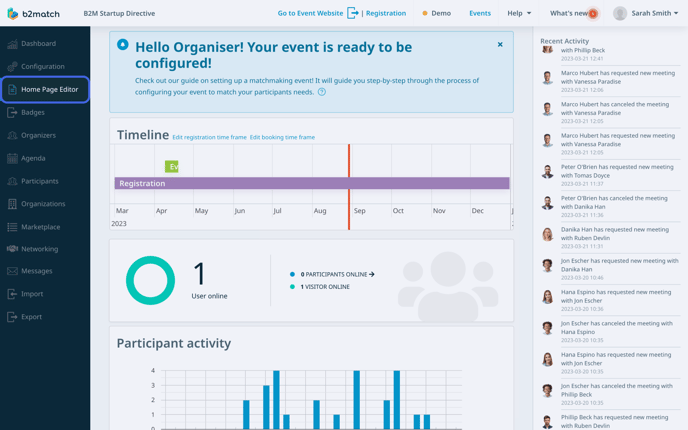
The first step is to click on ***Home Page Editor*** on the left sidebar of the Organizer's Tool to access the home page editor's interface.
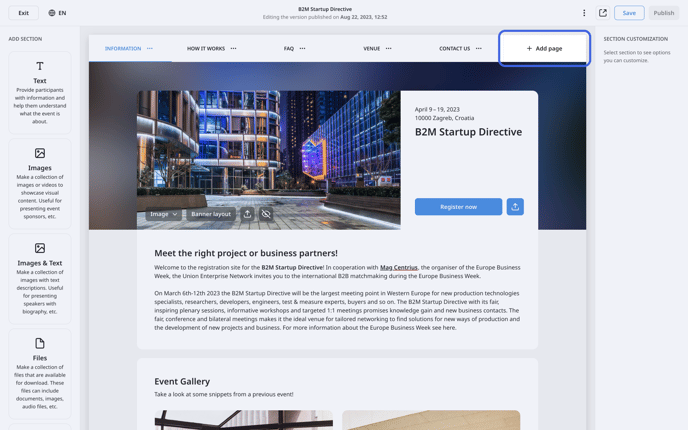
In the central part of the home page editor, where you design your website, a **header** displaying page titles will be visible.
To add a new page, just click on the ***Add page button*** located in the **header**.
This will open the **Create page modal**.
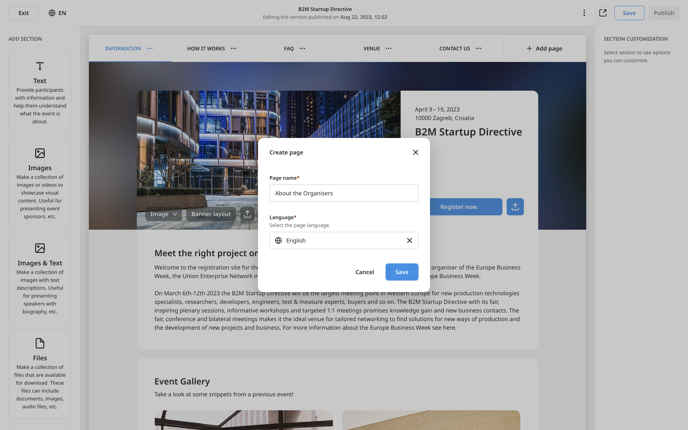
In the Create page modal, type in the name of the page, and click on ***Save***.
### How can I add a new page to a multilingual event?
First, access the **home page editor** from the left side of the Organizer’s Tool.
Then, click on the ***Add page button*** in the **header** of the home page editor to open the **Create page modal**.
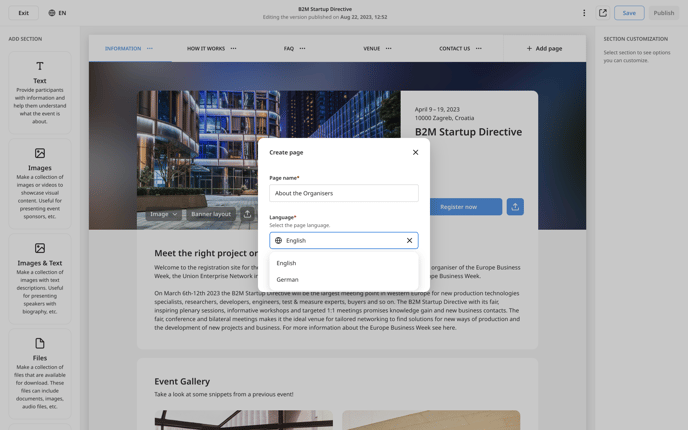
Here, type in the name of the page, and choose the page **language** from the drop-down menu.
After that, click on ***Save***.
This will automatically allocate the page to the chosen language.
### Managing Pages
After you have created pages, you can manage them by renaming, duplicating, reordering, or deleting them.
To manage a page, locate the page you wish to manage in the **header**.
Next, hover your mouse cursor over the page and click on the ***3 dots***.
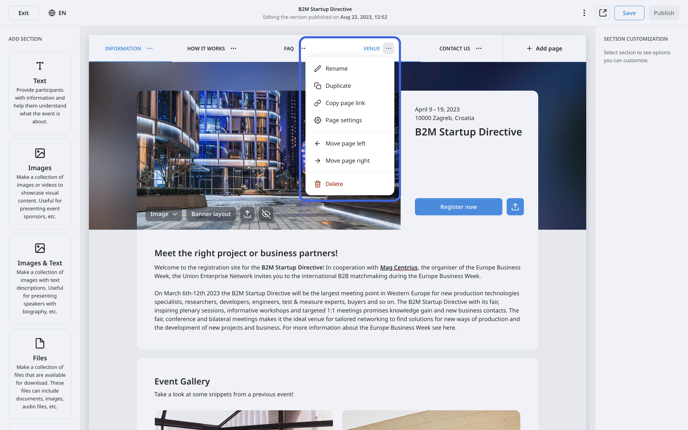
This will open a **drop-down menu** from which you can rename, reorder, duplicate, or delete the pages.
#### Renaming pages
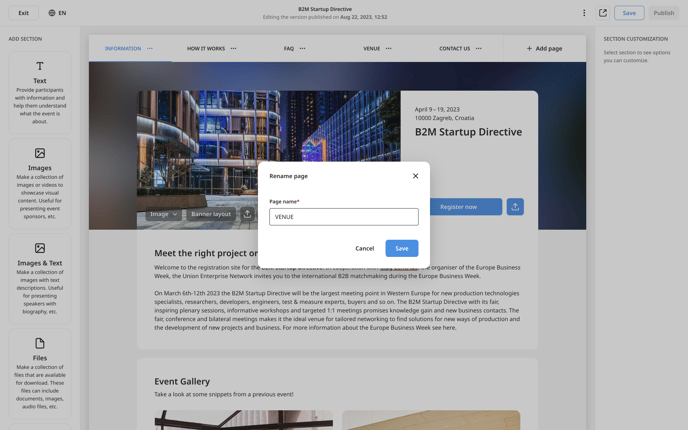
If you chose **Rename** from the drop-down menu, a **Rename page modal** will open. In the Page name field, type in the new name of the page and then click on ***Save***.
#### Duplicating pages
Selecting **Duplicate** from the drop-down menu will open the **Create page modal**. Here, you can rename your duplicated page and choose the language to connect the page to. After you’re done, click on ***Save***.
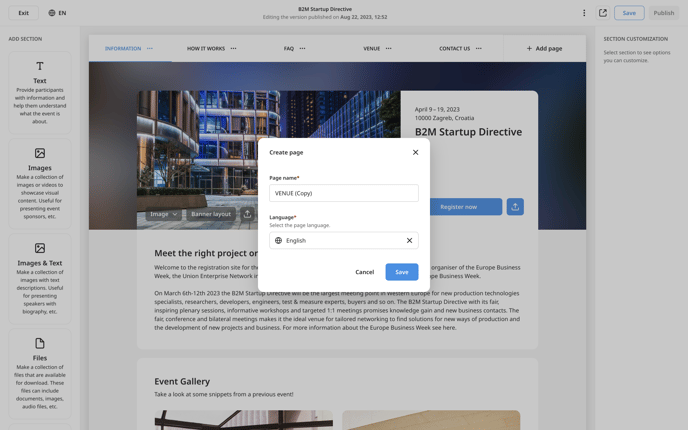
Tip: Duplicating can be especially useful if you're hosting a multilingual event, saving you the effort of starting from scratch. Additionally, if you mistakenly create a page in the wrong language, duplicating it and assigning the correct language can solve the problem in no time.
#### Reordering pages
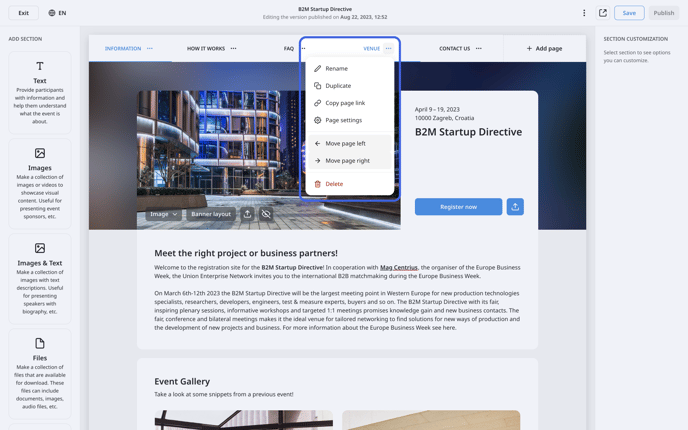
The drop-down menu will present you with two useful reorder options: **Move page left** and **Move page right**.
You can use these options to customize the order of pages displayed in the header of your event home page, granting you greater control over the organization and presentation of content.
#### Deleting pages
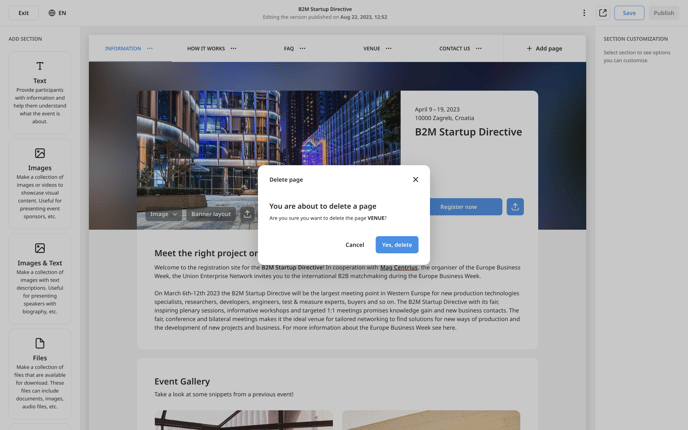
Selecting **Delete page** from the drop-down menu, a **Delete page modal** will appear to ensure you didn’t click on it by accident. This extra layer of precaution helps to ensure that the page is not accidentally deleted. To confirm the deletion, click ***Yes, delete***.
### Page Settings
From the same **drop-down menu**, you can also access page settings.
Here, you can configure your page with two different options.
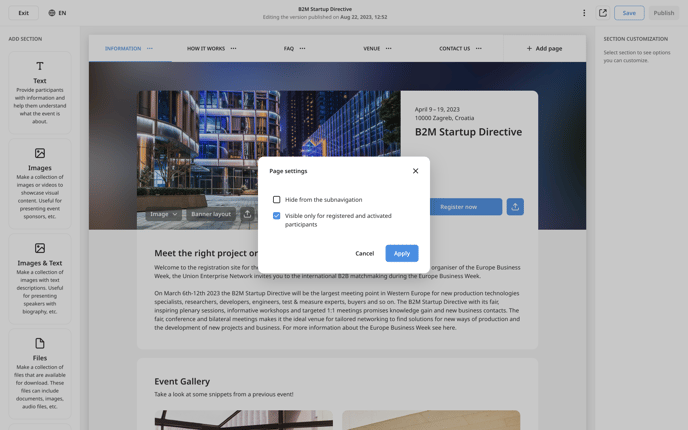
#### Hide from subnavigation
When you check this box, the page will not appear on the subnavigation of your event's home page. This feature allows you to create a "private" page, which can be accessed only via a link, for more controlled access.
#### Visible only for registered and activated participants
Ticking this box restricts the page to be visible and accessible only to registered and activated participants. This feature can be handy if you need to hide sensitive information or exclusive content from guest users.
*If you didn't find an answer to your questions, please get in touch with the Support Team* [***here***](https://www.b2match.com/contact-us/organizer-support?utm_source=knowledgebase&utm_medium=link&utm_campaign=&utm_content=knowledgebase_article)*.*
- [Organizer Guide](https://support.b2match.com/organizer-guide?hsLang=en#main-content)
- [Your Organizer Account](https://support.b2match.com/organizer-guide?hsLang=en#your-organizer-account)
- [Managing Organizers](https://support.b2match.com/organizer-guide?hsLang=en#managing-organizers)
- [Workspace Management](https://support.b2match.com/organizer-guide?hsLang=en#workspace-management)
- [Event Management](https://support.b2match.com/organizer-guide?hsLang=en#event-management)
- [Home Page Editor](https://support.b2match.com/organizer-guide?hsLang=en#home-page-editor)
- [Event Settings](https://support.b2match.com/organizer-guide?hsLang=en#event-settings)
- [Event Components](https://support.b2match.com/organizer-guide?hsLang=en#event-components)
- [Branding](https://support.b2match.com/organizer-guide?hsLang=en#branding)
- [Registration Settings](https://support.b2match.com/organizer-guide?hsLang=en#registration-settings)
- [Custom Questions](https://support.b2match.com/organizer-guide?hsLang=en#custom-questions)
- [Participant Types](https://support.b2match.com/organizer-guide?hsLang=en#participant-types)
- [Ticketing](https://support.b2match.com/organizer-guide?hsLang=en#ticketing)
- [Agenda: Sessions](https://support.b2match.com/organizer-guide?hsLang=en#agenda-sessions)
- [Agenda: Session Locations](https://support.b2match.com/organizer-guide?hsLang=en#agenda-session-locations)
- [Agenda: Tracks](https://support.b2match.com/organizer-guide?hsLang=en#agenda-tracks)
- [Agenda: Topics](https://support.b2match.com/organizer-guide?hsLang=en#agenda-topics)
- [Agenda: Live Streams](https://support.b2match.com/organizer-guide?hsLang=en#agenda-live-streams)
- [Participants: Managing participants](https://support.b2match.com/organizer-guide?hsLang=en#participants-managing-participants)
- [Participants: Participant Types](https://support.b2match.com/organizer-guide?hsLang=en#participants-participant-types)
- [Participants: Speakers](https://support.b2match.com/organizer-guide?hsLang=en#participants-speakers)
- [Organizations: Managing Organizations](https://support.b2match.com/organizer-guide?hsLang=en#organizations-managing-organizations)
- [Organizations: Organization Types](https://support.b2match.com/organizer-guide?hsLang=en#organizations-organization-types)
- [Organizations: Areas of Activity](https://support.b2match.com/organizer-guide?hsLang=en#organizations-areas-of-activity)
- [Organizations: Sponsors](https://support.b2match.com/organizer-guide?hsLang=en#organizations-sponsors)
- [Meetings](https://support.b2match.com/organizer-guide?hsLang=en#meetings)
- [Meetings: Settings](https://support.b2match.com/organizer-guide?hsLang=en#meetings-settings)
- [Meetings: Meeting Blocks](https://support.b2match.com/organizer-guide?hsLang=en#meetings-meeting-blocks)
- [Meetings: Meeting Locations](https://support.b2match.com/organizer-guide?hsLang=en#meetings-meeting-locations)
- [Marketplace](https://support.b2match.com/organizer-guide?hsLang=en#marketplace)
- [Emails & Notifications: Outbox Emails](https://support.b2match.com/organizer-guide?hsLang=en#emails-notifications-outbox-emails)
- [Emails & Notifications: Automated Email Notifications](https://support.b2match.com/organizer-guide?hsLang=en#emails-notifications-automated-email-notifications)
- [Emails & Notifications: Announcements](https://support.b2match.com/organizer-guide?hsLang=en#emails-notifications-announcements)
- [Advanced Search](https://support.b2match.com/organizer-guide?hsLang=en#advanced-search)
- [Data Import & Export](https://support.b2match.com/organizer-guide?hsLang=en#data-import-export)
- [In-Person Participant Management: Badges](https://support.b2match.com/organizer-guide?hsLang=en#in-person-participant-management-badges)
- [In-Person Participant Management: Check-In App](https://support.b2match.com/organizer-guide?hsLang=en#in-person-participant-management-check-in-app)
- [In-Person Participant Management: On-Site Support](https://support.b2match.com/organizer-guide?hsLang=en#in-person-participant-management-on-site-support)
- [Mobile Event App](https://support.b2match.com/organizer-guide?hsLang=en#mobile-event-app)
- [Community Management Platform](https://support.b2match.com/organizer-guide?hsLang=en#community-management-platform)
- [Registration Form](https://support.b2match.com/organizer-guide?hsLang=en#registration-form)
- [Participant Guide](https://support.b2match.com/participant-guide?hsLang=en#main-content)
- [Getting Started](https://support.b2match.com/participant-guide?hsLang=en#getting-started)
- [Account Settings](https://support.b2match.com/participant-guide?hsLang=en#account-settings)
- [Event Settings](https://support.b2match.com/participant-guide?hsLang=en#event-settings)
- [Profile](https://support.b2match.com/participant-guide?hsLang=en#profile)
- [Agenda](https://support.b2match.com/participant-guide?hsLang=en#agenda)
- [Networking: Meetings](https://support.b2match.com/participant-guide?hsLang=en#networking-meetings)
- [Networking: Conversations](https://support.b2match.com/participant-guide?hsLang=en#networking-conversations)
- [Marketplace](https://support.b2match.com/participant-guide?hsLang=en#marketplace)
- [Feedback](https://support.b2match.com/participant-guide?hsLang=en#feedback)
[](https://www.b2match.com)
Need more help? Contact us at support@b2match.com
[mailto:support@b2match.com](mailto:support@b2match.com)
Copyright © 2025, b2match GmbH