---
title: Adding Event Components
description: Event components play a crucial role in enhancing your event website's navigation, allowing visitors to easily explore valuable information you want to share about your event.
---
[Skip to content](https://support.b2match.com/adding-event-components#main-content)
[](https://www.b2match.com/)
- [Log in](https://admin.b2match.com/cp/log-in)
Open main navigation
Close main navigation
- [Log in](https://admin.b2match.com/cp/log-in)
- [Contact us](http://www.b2match.com/contact-us)
[Contact us](http://www.b2match.com/contact-us)
How can we help you?
- There are no suggestions because the search field is empty.
1. [Help Center](https://support.b2match.com/?hsLang=en)
2. [Organizer Guide](https://support.b2match.com/organizer-guide?hsLang=en)
3. [Event Components](https://support.b2match.com/organizer-guide?hsLang=en#event-components)
# Adding Event Components
Event components play a crucial role in enhancing your event website's navigation, allowing visitors to easily explore valuable information you want to share about your event. With the help of these components, visitors can effortlessly move between different pages and find relevant details.
In this article, we will provide you with a step-by-step guide on how to add event components to the navigation bar of your event website.
### How can I add event components?
First, click on ***Configuration*** on the **left sidebar** of the Organizer's tool.
In the **Event settings section**, access ***Event components***.
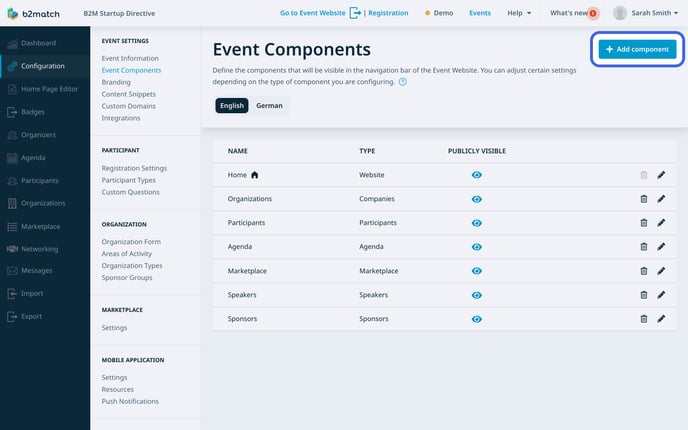
The **Event components page** will open, displaying predefined components such as Home, Participants, Organizations, Marketplace, and Agenda.
Click the ***Add component button*** to create a new component.
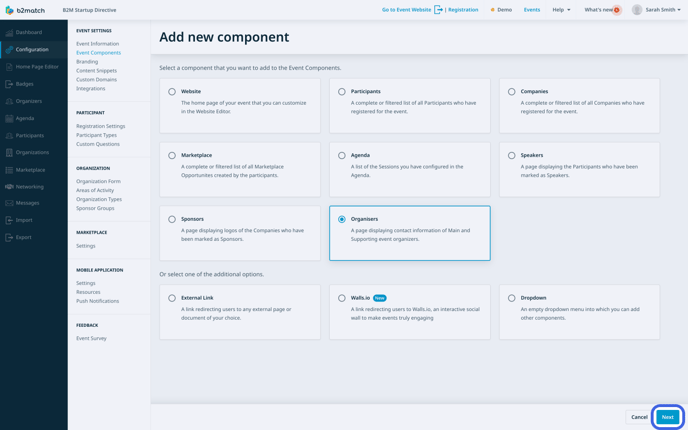
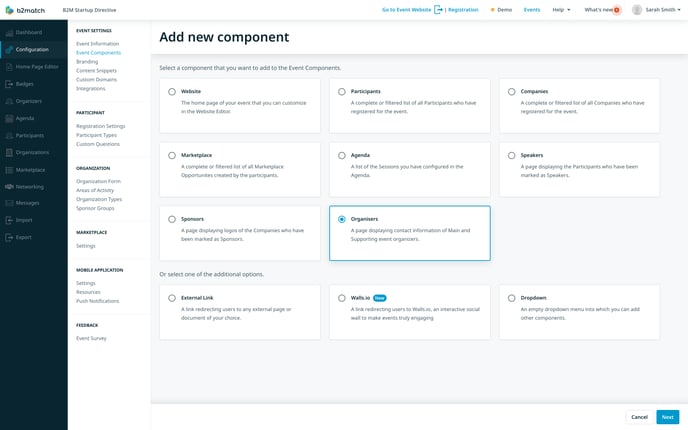
Next, choose the type of component you wish to add and click on ***Next***.
After selecting the type, you should now [**configure the event component**](https://support.b2match.com/en/exploring-configuring-components?hsLang=en) according to your needs.
### How can I add event components to a multilingual event?
For multilingual events, **language buttons** will be displayed at the top of the screen.
To add components to a specific language, simply click on the corresponding language button.
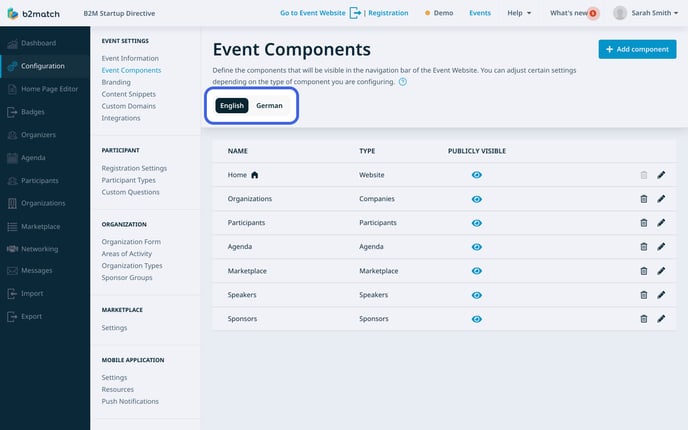
Then, click on the ***Add component button*** in the upper right corner to add a new component to the navigation bar.
### What types of event components can I add?
You have a diverse array of event components to choose from:
- Website: Leads visitors to the home page of your event you can customize by using the [**Home Page Editor.**](https://support.b2match.com/en/understanding-the-home-page-editor?hsLang=en)
- Participants: Directs users to the [**participant list**](https://support.b2match.com/en/understanding-b2match-participants?hsLang=en), displaying those who have registered for the event.
- Companies: Takes visitors to the [**organizations list**](https://support.b2match.com/en/understanding-b2match-organizations?hsLang=en), showcasing registered companies for the event.
- Marketplace: Leads to the [**marketplace**](https://support.b2match.com/en/understanding-b2match-marketplace-1?hsLang=en), showing opportunities created by participants.
- Agenda: Directs users to the [**event's agenda**](https://support.b2match.com/en/understanding-the-b2match-agenda?hsLang=en), displaying a list of all sessions you've created.
- Speakers: Opens the [**speakers' page**](https://support.b2match.com/en/understanding-b2match-speakers?hsLang=en), showcasing participants who will be speaking at the event.
- Sponsors: Opens the [**sponsors' page**](https://support.b2match.com/en/understanding-b2match-sponsors?hsLang=en), displaying logos of the organizations sponsoring your event.
- Organizers: Opens the organizers' page, providing contact information for main and supporting event organizers.
- External Link: Redirects users to any external page of your choice.
- Walls.io: Redirects users to [**Walls.io**](https://walls.io/), an interactive social wall where participants can share their event impressions.
- Dropdown: Creates an empty drop-down menu, allowing you to add other event components.
Once you've added event components to the navigation bar, you have the flexibility to [**configure**](https://support.b2match.com/en/exploring-configuring-components?hsLang=en) or [**delete**](https://support.b2match.com/en/deleting-event-components?hsLang=en)them as necessary.
*If you didn't find an answer to your questions, please get in touch with the Support Team* [***here***](https://www.b2match.com/contact-us/organizer-support?utm_source=knowledgebase&utm_medium=link&utm_content=knowledgebase_article)*.*
- [Organizer Guide](https://support.b2match.com/organizer-guide?hsLang=en#main-content)
- [Your Organizer Account](https://support.b2match.com/organizer-guide?hsLang=en#your-organizer-account)
- [Managing Organizers](https://support.b2match.com/organizer-guide?hsLang=en#managing-organizers)
- [Workspace Management](https://support.b2match.com/organizer-guide?hsLang=en#workspace-management)
- [Event Management](https://support.b2match.com/organizer-guide?hsLang=en#event-management)
- [Home Page Editor](https://support.b2match.com/organizer-guide?hsLang=en#home-page-editor)
- [Event Settings](https://support.b2match.com/organizer-guide?hsLang=en#event-settings)
- [Event Components](https://support.b2match.com/organizer-guide?hsLang=en#event-components)
- [Branding](https://support.b2match.com/organizer-guide?hsLang=en#branding)
- [Registration Settings](https://support.b2match.com/organizer-guide?hsLang=en#registration-settings)
- [Custom Questions](https://support.b2match.com/organizer-guide?hsLang=en#custom-questions)
- [Participant Types](https://support.b2match.com/organizer-guide?hsLang=en#participant-types)
- [Ticketing](https://support.b2match.com/organizer-guide?hsLang=en#ticketing)
- [Agenda: Sessions](https://support.b2match.com/organizer-guide?hsLang=en#agenda-sessions)
- [Agenda: Session Locations](https://support.b2match.com/organizer-guide?hsLang=en#agenda-session-locations)
- [Agenda: Tracks](https://support.b2match.com/organizer-guide?hsLang=en#agenda-tracks)
- [Agenda: Topics](https://support.b2match.com/organizer-guide?hsLang=en#agenda-topics)
- [Agenda: Live Streams](https://support.b2match.com/organizer-guide?hsLang=en#agenda-live-streams)
- [Participants: Managing participants](https://support.b2match.com/organizer-guide?hsLang=en#participants-managing-participants)
- [Participants: Participant Types](https://support.b2match.com/organizer-guide?hsLang=en#participants-participant-types)
- [Participants: Speakers](https://support.b2match.com/organizer-guide?hsLang=en#participants-speakers)
- [Organizations: Managing Organizations](https://support.b2match.com/organizer-guide?hsLang=en#organizations-managing-organizations)
- [Organizations: Organization Types](https://support.b2match.com/organizer-guide?hsLang=en#organizations-organization-types)
- [Organizations: Areas of Activity](https://support.b2match.com/organizer-guide?hsLang=en#organizations-areas-of-activity)
- [Organizations: Sponsors](https://support.b2match.com/organizer-guide?hsLang=en#organizations-sponsors)
- [Meetings](https://support.b2match.com/organizer-guide?hsLang=en#meetings)
- [Meetings: Settings](https://support.b2match.com/organizer-guide?hsLang=en#meetings-settings)
- [Meetings: Meeting Blocks](https://support.b2match.com/organizer-guide?hsLang=en#meetings-meeting-blocks)
- [Meetings: Meeting Locations](https://support.b2match.com/organizer-guide?hsLang=en#meetings-meeting-locations)
- [Marketplace](https://support.b2match.com/organizer-guide?hsLang=en#marketplace)
- [Emails & Notifications: Outbox Emails](https://support.b2match.com/organizer-guide?hsLang=en#emails-notifications-outbox-emails)
- [Emails & Notifications: Automated Email Notifications](https://support.b2match.com/organizer-guide?hsLang=en#emails-notifications-automated-email-notifications)
- [Emails & Notifications: Announcements](https://support.b2match.com/organizer-guide?hsLang=en#emails-notifications-announcements)
- [Advanced Search](https://support.b2match.com/organizer-guide?hsLang=en#advanced-search)
- [Data Import & Export](https://support.b2match.com/organizer-guide?hsLang=en#data-import-export)
- [In-Person Participant Management: Badges](https://support.b2match.com/organizer-guide?hsLang=en#in-person-participant-management-badges)
- [In-Person Participant Management: Check-In App](https://support.b2match.com/organizer-guide?hsLang=en#in-person-participant-management-check-in-app)
- [In-Person Participant Management: On-Site Support](https://support.b2match.com/organizer-guide?hsLang=en#in-person-participant-management-on-site-support)
- [Mobile Event App](https://support.b2match.com/organizer-guide?hsLang=en#mobile-event-app)
- [Community Management Platform](https://support.b2match.com/organizer-guide?hsLang=en#community-management-platform)
- [Registration Form](https://support.b2match.com/organizer-guide?hsLang=en#registration-form)
- [Participant Guide](https://support.b2match.com/participant-guide?hsLang=en#main-content)
- [Getting Started](https://support.b2match.com/participant-guide?hsLang=en#getting-started)
- [Account Settings](https://support.b2match.com/participant-guide?hsLang=en#account-settings)
- [Event Settings](https://support.b2match.com/participant-guide?hsLang=en#event-settings)
- [Profile](https://support.b2match.com/participant-guide?hsLang=en#profile)
- [Agenda](https://support.b2match.com/participant-guide?hsLang=en#agenda)
- [Networking: Meetings](https://support.b2match.com/participant-guide?hsLang=en#networking-meetings)
- [Networking: Conversations](https://support.b2match.com/participant-guide?hsLang=en#networking-conversations)
- [Marketplace](https://support.b2match.com/participant-guide?hsLang=en#marketplace)
- [Feedback](https://support.b2match.com/participant-guide?hsLang=en#feedback)
[](https://www.b2match.com)
Need more help? Contact us at support@b2match.com
[mailto:support@b2match.com](mailto:support@b2match.com)
Copyright © 2025, b2match GmbH