---
title: Adding Participants
description: In the world of event organization, ensuring a seamless registration process for participants is essential. However, it’s possible that individuals run into problems when trying to register themselves
---
[Skip to content](https://support.b2match.com/adding-participants-1#main-content)
[](https://www.b2match.com/)
- [Log in](https://admin.b2match.com/cp/log-in)
Open main navigation
Close main navigation
- [Log in](https://admin.b2match.com/cp/log-in)
- [Contact us](http://www.b2match.com/contact-us)
[Contact us](http://www.b2match.com/contact-us)
How can we help you?
- There are no suggestions because the search field is empty.
1. [Help Center](https://support.b2match.com/?hsLang=en)
2. [Organizer Guide](https://support.b2match.com/organizer-guide?hsLang=en)
3. [Participants: Managing participants](https://support.b2match.com/organizer-guide?hsLang=en#participants-managing-participants)
# Adding Participants
In the world of event organization, ensuring a seamless registration process for participants is essential. However, it’s possible that individuals run into problems when trying to register themselves.
As an event organizer, it is important to step in and assist in such scenarios. This article explores the practical solution of adding participants on behalf of attendees, streamlining the event management process, and ensuring a smooth experience for all involved.
### How can I add a new participant?
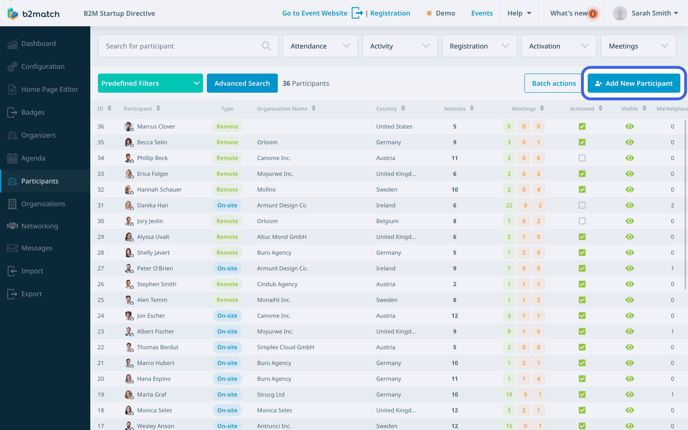
First, click on ***Participants*** on the **left sidebar** of the Organizer’s Tool.
This will open the participant’s list.
To add a new participant, click on the ***Add participant button*** located in the upper right corner.
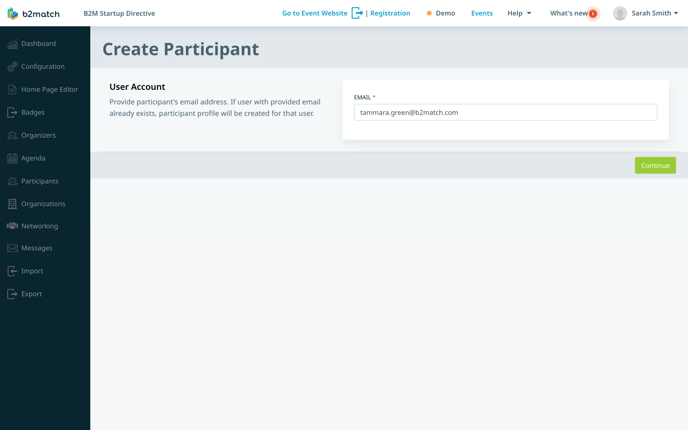
Then, enter the participant's email address in the **Email field** and click on ***Continue***.
#### The participant doesn’t have a b2match account
If the participant doesn’t already have a b2match account, by clicking Continue, you will be directed to the **Create Participant form**, which is divided into several sections.
- User Account: Provide the participant's first and last name.
- Attendance type: Choose the participant's attendance type.
- Participant Type: Select the participant’s participant type.
- Personal Information: Enter their job position, organization name, pitch, and biography.
- Location: Choose the participant's country and city.
- Attendance: Select the sessions the participant wishes to attend by ticking the boxes.
- Availability: Set up the participant's availability for meetings by ticking the boxes next to the meeting blocks.
- Support Office: Choose an organizer from the drop-down menu to associate with the participant.
- Custom Questions: If you created custom questions, answer them here on behalf of the participant.
- Visibility and Validation: Mark the participant as visible and validated.
- Confirm Authorization: Confirm that the participant has granted permission for you to register on their behalf.
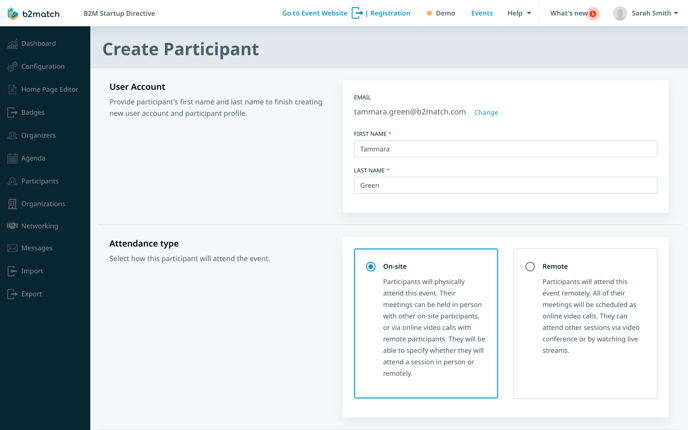
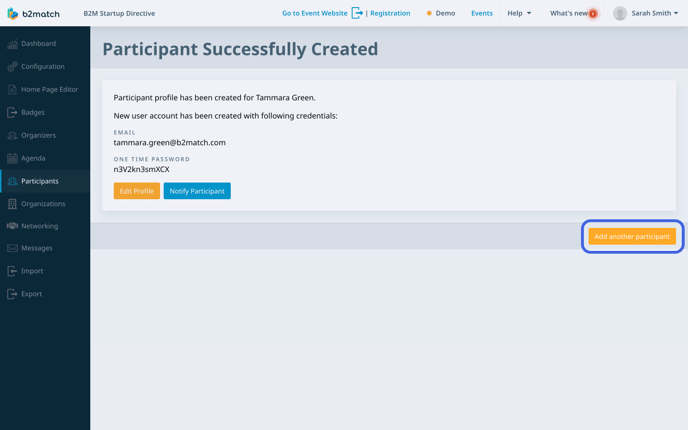
Lastly, click on ***Save*** to create the participant's profile. The system will automatically generate a password for them. Upon their first login, participants will be able to set up their own password.
Tip: If you forget to save the password and send it to participants, don't worry. You can still provide them with a one-time password by using our email tool. Just include the 'one\_time\_password' variable in your email, and this will generate a one-time password for participants to log in. For more information on using variables, check out our article on [**composing an email**](https://support.b2match.com/en/composing-an-email?hsLang=en).
To make further edits to the participant's profile, click on the ***Edit Profile button***. This will open the [**Participant's profile overview**](https://support.b2match.com/en/participants-profile-overview?hsLang=en), where you can modify their information. 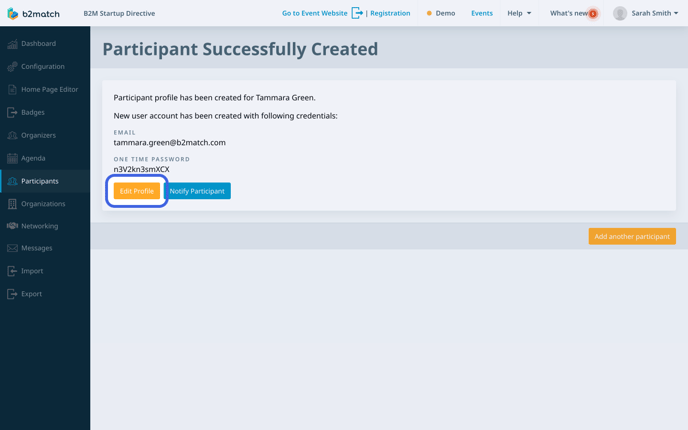
To inform the participant about their account creation, click on the ***Notify Participant button***. This action will launch your computer's designated email tool, such as Outlook, to send the notification.
Tip: You can also utilize the b2match outbox email tool to send participants the link to access their accounts. It’s advisable to include the link to their dashboard. Read more about our email tool in the article [**Composing an Email**](https://support.b2match.com/en/composing-an-email?hsLang=en).
To add another participant, simply click on ***Add another participant*** at the bottom right.
#### The participant already has a b2match account
If you entered the email address of a participant who already has a b2match account, the **Create Participant form** will automatically be pre-filled with their previously provided information, including their first and last name, job position, organization name, pitch, biography, and location.
However, you still need to select their attendance, availability, support office, answer custom questions, validate their profile, and confirm their authorization.
After that, click on ***Save***.
To make further edits to their profile, click on ***Edit Profile*** and to notify the participant about their profile creation for your new event, click on ***Notify Participant***.
#### The participant already participates at the event
In case you enter the email of a participant who already exists in your event, you will see the following message: “Participant with given email already exists. You can edit details here.”
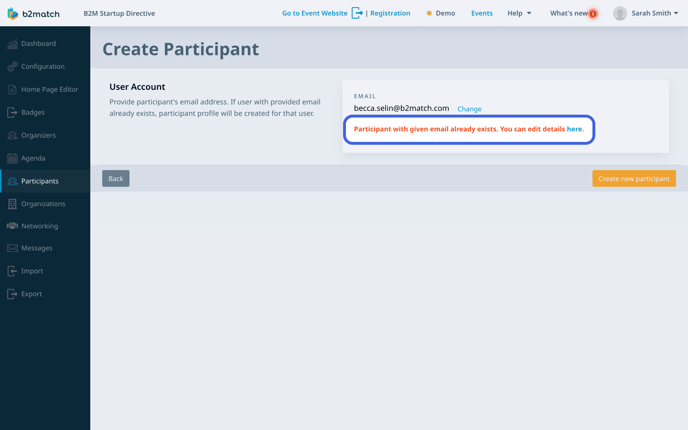
By clicking on the hyperlink associated with the word **here**, you will be directed to the participant's profile overview. From there, you can edit their information.
Note: If you are interested in adding a batch of participants from a previous event to your new event, you can refer to our article [**importing participants from previous events**](https://support.b2match.com/en/importing-participants-from-previous-events-2?hsLang=en). Another method to invite a batch of participants is [**importing them by using Microsoft Excel**](https://support.b2match.com/en/importing-participants-by-using-microsoft-excel?hsLang=en).
*If you didn't find an answer to your questions, please get in touch with the Support Team* [***here***](https://www.b2match.com/contact-us/organizer-support?utm_source=knowledgebase&utm_medium=link&utm_content=knowledgebase_article)*.*
- [Organizer Guide](https://support.b2match.com/organizer-guide?hsLang=en#main-content)
- [Your Organizer Account](https://support.b2match.com/organizer-guide?hsLang=en#your-organizer-account)
- [Managing Organizers](https://support.b2match.com/organizer-guide?hsLang=en#managing-organizers)
- [Workspace Management](https://support.b2match.com/organizer-guide?hsLang=en#workspace-management)
- [Event Management](https://support.b2match.com/organizer-guide?hsLang=en#event-management)
- [Home Page Editor](https://support.b2match.com/organizer-guide?hsLang=en#home-page-editor)
- [Event Settings](https://support.b2match.com/organizer-guide?hsLang=en#event-settings)
- [Event Components](https://support.b2match.com/organizer-guide?hsLang=en#event-components)
- [Branding](https://support.b2match.com/organizer-guide?hsLang=en#branding)
- [Registration Settings](https://support.b2match.com/organizer-guide?hsLang=en#registration-settings)
- [Custom Questions](https://support.b2match.com/organizer-guide?hsLang=en#custom-questions)
- [Participant Types](https://support.b2match.com/organizer-guide?hsLang=en#participant-types)
- [Ticketing](https://support.b2match.com/organizer-guide?hsLang=en#ticketing)
- [Agenda: Sessions](https://support.b2match.com/organizer-guide?hsLang=en#agenda-sessions)
- [Agenda: Session Locations](https://support.b2match.com/organizer-guide?hsLang=en#agenda-session-locations)
- [Agenda: Tracks](https://support.b2match.com/organizer-guide?hsLang=en#agenda-tracks)
- [Agenda: Topics](https://support.b2match.com/organizer-guide?hsLang=en#agenda-topics)
- [Agenda: Live Streams](https://support.b2match.com/organizer-guide?hsLang=en#agenda-live-streams)
- [Participants: Managing participants](https://support.b2match.com/organizer-guide?hsLang=en#participants-managing-participants)
- [Participants: Participant Types](https://support.b2match.com/organizer-guide?hsLang=en#participants-participant-types)
- [Participants: Speakers](https://support.b2match.com/organizer-guide?hsLang=en#participants-speakers)
- [Organizations: Managing Organizations](https://support.b2match.com/organizer-guide?hsLang=en#organizations-managing-organizations)
- [Organizations: Organization Types](https://support.b2match.com/organizer-guide?hsLang=en#organizations-organization-types)
- [Organizations: Areas of Activity](https://support.b2match.com/organizer-guide?hsLang=en#organizations-areas-of-activity)
- [Organizations: Sponsors](https://support.b2match.com/organizer-guide?hsLang=en#organizations-sponsors)
- [Meetings](https://support.b2match.com/organizer-guide?hsLang=en#meetings)
- [Meetings: Settings](https://support.b2match.com/organizer-guide?hsLang=en#meetings-settings)
- [Meetings: Meeting Blocks](https://support.b2match.com/organizer-guide?hsLang=en#meetings-meeting-blocks)
- [Meetings: Meeting Locations](https://support.b2match.com/organizer-guide?hsLang=en#meetings-meeting-locations)
- [Marketplace](https://support.b2match.com/organizer-guide?hsLang=en#marketplace)
- [Emails & Notifications: Outbox Emails](https://support.b2match.com/organizer-guide?hsLang=en#emails-notifications-outbox-emails)
- [Emails & Notifications: Automated Email Notifications](https://support.b2match.com/organizer-guide?hsLang=en#emails-notifications-automated-email-notifications)
- [Emails & Notifications: Announcements](https://support.b2match.com/organizer-guide?hsLang=en#emails-notifications-announcements)
- [Advanced Search](https://support.b2match.com/organizer-guide?hsLang=en#advanced-search)
- [Data Import & Export](https://support.b2match.com/organizer-guide?hsLang=en#data-import-export)
- [In-Person Participant Management: Badges](https://support.b2match.com/organizer-guide?hsLang=en#in-person-participant-management-badges)
- [In-Person Participant Management: Check-In App](https://support.b2match.com/organizer-guide?hsLang=en#in-person-participant-management-check-in-app)
- [In-Person Participant Management: On-Site Support](https://support.b2match.com/organizer-guide?hsLang=en#in-person-participant-management-on-site-support)
- [Mobile Event App](https://support.b2match.com/organizer-guide?hsLang=en#mobile-event-app)
- [Community Management Platform](https://support.b2match.com/organizer-guide?hsLang=en#community-management-platform)
- [Registration Form](https://support.b2match.com/organizer-guide?hsLang=en#registration-form)
- [Participant Guide](https://support.b2match.com/participant-guide?hsLang=en#main-content)
- [Getting Started](https://support.b2match.com/participant-guide?hsLang=en#getting-started)
- [Account Settings](https://support.b2match.com/participant-guide?hsLang=en#account-settings)
- [Event Settings](https://support.b2match.com/participant-guide?hsLang=en#event-settings)
- [Profile](https://support.b2match.com/participant-guide?hsLang=en#profile)
- [Agenda](https://support.b2match.com/participant-guide?hsLang=en#agenda)
- [Networking: Meetings](https://support.b2match.com/participant-guide?hsLang=en#networking-meetings)
- [Networking: Conversations](https://support.b2match.com/participant-guide?hsLang=en#networking-conversations)
- [Marketplace](https://support.b2match.com/participant-guide?hsLang=en#marketplace)
- [Feedback](https://support.b2match.com/participant-guide?hsLang=en#feedback)
[](https://www.b2match.com)
Need more help? Contact us at support@b2match.com
[mailto:support@b2match.com](mailto:support@b2match.com)
Copyright © 2025, b2match GmbH