---
title: Creating & Editing My Profile
description: Creating and editing your profile is one of the most basic and crucial steps when participating in an event. Since your profile is the first thing other participants see, they decide whether to book a
---
[Skip to content](https://support.b2match.com/creating-editing-my-profile#main-content)
[](https://www.b2match.com/)
- [Log in](https://admin.b2match.com/cp/log-in)
Open main navigation
Close main navigation
- [Log in](https://admin.b2match.com/cp/log-in)
- [Contact us](http://www.b2match.com/contact-us)
[Contact us](http://www.b2match.com/contact-us)
How can we help you?
- There are no suggestions because the search field is empty.
1. [Help Center](https://support.b2match.com/?hsLang=en)
2. [Participant Guide](https://support.b2match.com/participant-guide?hsLang=en)
3. [Profile](https://support.b2match.com/participant-guide?hsLang=en#profile)
# Creating & Editing My Profile
Creating and editing your profile is one of the most basic and crucial steps when participating in an event.
Since your profile is the first thing other participants see, they decide whether to book a meeting with you based on the information you provide. Therefore, you should invest more time in creating and editing your profile.
### How can I create my profile?
Creating your profile is the first step in registering for an event.
When you are registering for an event, the first step you need to do is to create your profile. The good news is that b2match makes this process streamlined by incorporating the creation of your profile in the registration process.
Learn more about this topic in our article [**Creating a b2match account**](https://support.b2match.com/en/creating-a-b2match-account-1?hsLang=en).
### How can I edit my profile?
Although you create your b2match profile when registering for an event, you can always edit your profile later. To ensure that you have the best experience possible during the event, we recommend that you devote more time and attention when editing your profile.
There are two ways to access profile editing; from the dashboard and from the profile page.
#### Edit my profile from Dashboard
Click on your ***avatar*** in the upper right corner of the event navigation, and from the drop-down menu select ***Dashboard***.
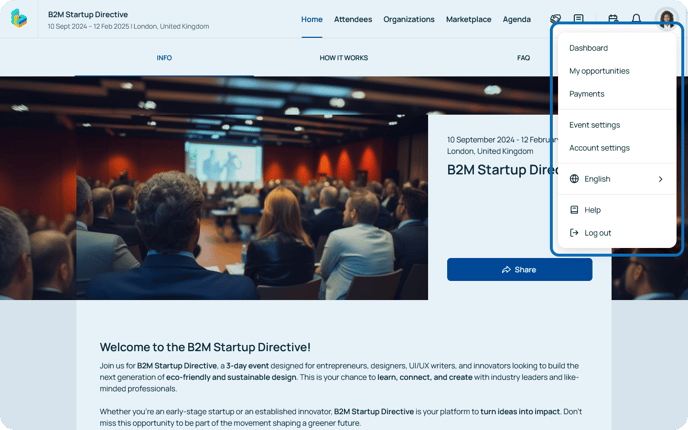
On the left sidebar of the dashboard, in the **User info**widget, click on the ***pencil* *icon*** to edit your profile.
.png?width=688&height=430&name=Pencil%20icon%20(1).png)
#### Edit my profile from Profile page
To access your profile page, first access the **Dashboard**. Then, in the left sidebar click on ***Go to my profile.***
.png?width=688&height=430&name=Go%20to%20my%20profile%20button%20(1).png)
Once you’re on your profile page, click on the ***Edit profile*** button to access the **Edit your profile** form.
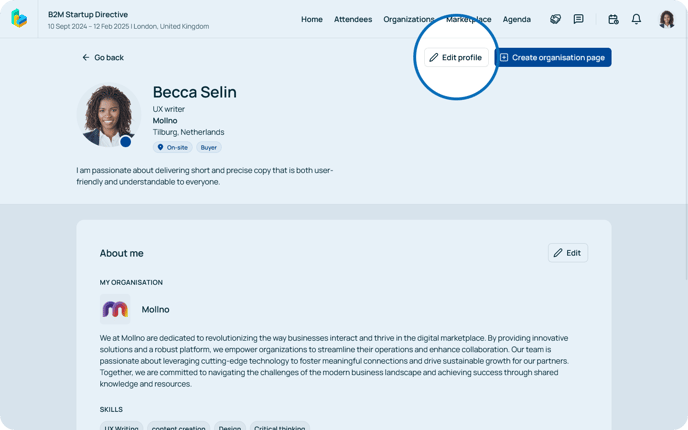
### What can you find in the Edit profile form?
The **Edit profile** form consists of the following sections:
#### About me section
In the**About me section**, you should first enter your basic information such as first and last name, occupation, country, and city.
Write your pitch! Introduce yourself to other participants with a summary of who you are, and what you can offer, as well as other information that could be important to other participants. Your pitch should be short and can contain a maximum of 160 characters. Your pitch will be visible to other participants on the participant list, which is why it is important that your pitch is captivating and engaging in order to stand out from other participants.
Here, you can also upload your profile picture in JPG or PNG format and add your phone number.
#### Organization details
In the **Organization details section**, you can enter basic information about your organization.
Enter your organization name, write a description or generate one with AI by clicking on the **Generate with AI button** and upload your organization's logo.
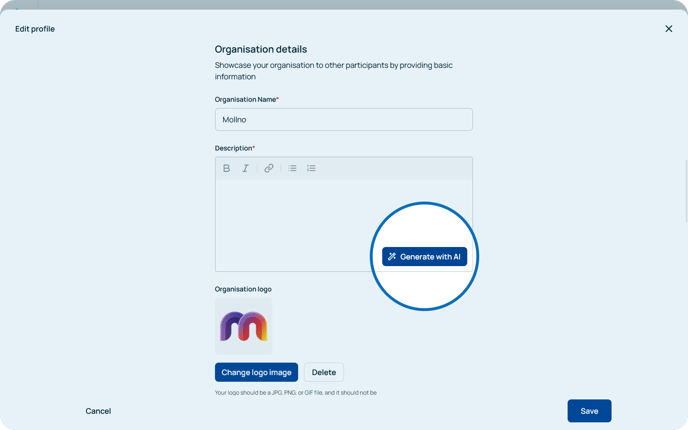
Note: Keep in mind that entering details about your organization while editing your profile is not the same as creating an organization page. To create a page for your organization, refer to our article **[Creating & editing organization page](https://support.b2match.com/en/creating-editing-organization-page?hsLang=en)**.
#### Personal details
In the **Personal details section** you can show who you are and peak interest of other participants at the event.
Present yourself better by writing your **biography** by using a maximum of 5000 characters. Include everything you believe other participants should know about, or would find interesting. Since the pitch is just a summary of who you are, devote more time to your biography.
In the **My skills** field, type in skills that show what you are especially good at and would appeal to other participants. Your skills will show in the form of tags and will be shown on the participant list. You can create up to 15 tags, each with a maximum of 50 characters.
The **My interests** field has the same structure as the**My skills** field, but you should fill it up with information about your interests. This information may serve as an ice-breaker during your meetings.
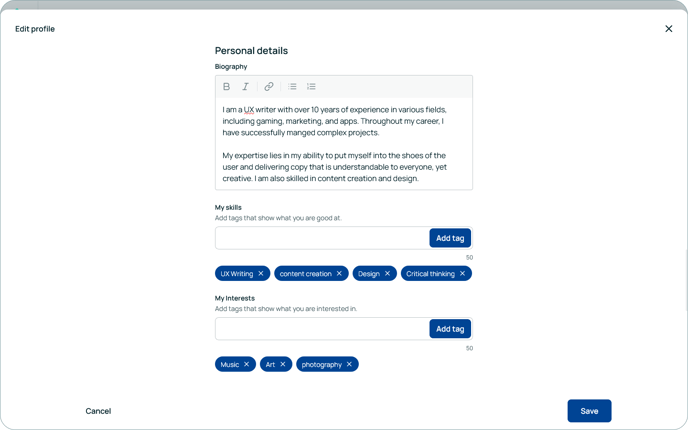
Tip: Try to provide as much useful information as possible about yourself, your skills, and your interests so that our AI Recommender can suggest more relevant participants.
#### Social links
In the *Website and socials* section, you can add your Twitter, Facebook, LinkedIn, or Instagram account to your b2match profile.
#### Additional information (Optional)
Some event organizers require you to fill out additional questions during the registration process. These questions may differ depending on your participation type.
Although not every field is mandatory, we suggest you answer all questions to ensure the event runs as smoothly as possible.
*If you didn’t find an answer to your questions, please get in touch with the Event Organizers. Their contact details can be found on the Contact page of the event website.*
- [Organizer Guide](https://support.b2match.com/organizer-guide?hsLang=en#main-content)
- [Your Organizer Account](https://support.b2match.com/organizer-guide?hsLang=en#your-organizer-account)
- [Managing Organizers](https://support.b2match.com/organizer-guide?hsLang=en#managing-organizers)
- [Workspace Management](https://support.b2match.com/organizer-guide?hsLang=en#workspace-management)
- [Event Management](https://support.b2match.com/organizer-guide?hsLang=en#event-management)
- [Home Page Editor](https://support.b2match.com/organizer-guide?hsLang=en#home-page-editor)
- [Event Settings](https://support.b2match.com/organizer-guide?hsLang=en#event-settings)
- [Event Components](https://support.b2match.com/organizer-guide?hsLang=en#event-components)
- [Branding](https://support.b2match.com/organizer-guide?hsLang=en#branding)
- [Registration Settings](https://support.b2match.com/organizer-guide?hsLang=en#registration-settings)
- [Custom Questions](https://support.b2match.com/organizer-guide?hsLang=en#custom-questions)
- [Participant Types](https://support.b2match.com/organizer-guide?hsLang=en#participant-types)
- [Ticketing](https://support.b2match.com/organizer-guide?hsLang=en#ticketing)
- [Agenda: Sessions](https://support.b2match.com/organizer-guide?hsLang=en#agenda-sessions)
- [Agenda: Session Locations](https://support.b2match.com/organizer-guide?hsLang=en#agenda-session-locations)
- [Agenda: Tracks](https://support.b2match.com/organizer-guide?hsLang=en#agenda-tracks)
- [Agenda: Topics](https://support.b2match.com/organizer-guide?hsLang=en#agenda-topics)
- [Agenda: Live Streams](https://support.b2match.com/organizer-guide?hsLang=en#agenda-live-streams)
- [Participants: Managing participants](https://support.b2match.com/organizer-guide?hsLang=en#participants-managing-participants)
- [Participants: Participant Types](https://support.b2match.com/organizer-guide?hsLang=en#participants-participant-types)
- [Participants: Speakers](https://support.b2match.com/organizer-guide?hsLang=en#participants-speakers)
- [Organizations: Managing Organizations](https://support.b2match.com/organizer-guide?hsLang=en#organizations-managing-organizations)
- [Organizations: Organization Types](https://support.b2match.com/organizer-guide?hsLang=en#organizations-organization-types)
- [Organizations: Areas of Activity](https://support.b2match.com/organizer-guide?hsLang=en#organizations-areas-of-activity)
- [Organizations: Sponsors](https://support.b2match.com/organizer-guide?hsLang=en#organizations-sponsors)
- [Meetings](https://support.b2match.com/organizer-guide?hsLang=en#meetings)
- [Meetings: Settings](https://support.b2match.com/organizer-guide?hsLang=en#meetings-settings)
- [Meetings: Meeting Blocks](https://support.b2match.com/organizer-guide?hsLang=en#meetings-meeting-blocks)
- [Meetings: Meeting Locations](https://support.b2match.com/organizer-guide?hsLang=en#meetings-meeting-locations)
- [Marketplace](https://support.b2match.com/organizer-guide?hsLang=en#marketplace)
- [Emails & Notifications: Outbox Emails](https://support.b2match.com/organizer-guide?hsLang=en#emails-notifications-outbox-emails)
- [Emails & Notifications: Automated Email Notifications](https://support.b2match.com/organizer-guide?hsLang=en#emails-notifications-automated-email-notifications)
- [Emails & Notifications: Announcements](https://support.b2match.com/organizer-guide?hsLang=en#emails-notifications-announcements)
- [Advanced Search](https://support.b2match.com/organizer-guide?hsLang=en#advanced-search)
- [Data Import & Export](https://support.b2match.com/organizer-guide?hsLang=en#data-import-export)
- [In-Person Participant Management: Badges](https://support.b2match.com/organizer-guide?hsLang=en#in-person-participant-management-badges)
- [In-Person Participant Management: Check-In App](https://support.b2match.com/organizer-guide?hsLang=en#in-person-participant-management-check-in-app)
- [In-Person Participant Management: On-Site Support](https://support.b2match.com/organizer-guide?hsLang=en#in-person-participant-management-on-site-support)
- [Mobile Event App](https://support.b2match.com/organizer-guide?hsLang=en#mobile-event-app)
- [Community Management Platform](https://support.b2match.com/organizer-guide?hsLang=en#community-management-platform)
- [Registration Form](https://support.b2match.com/organizer-guide?hsLang=en#registration-form)
- [Participant Guide](https://support.b2match.com/participant-guide?hsLang=en#main-content)
- [Getting Started](https://support.b2match.com/participant-guide?hsLang=en#getting-started)
- [Account Settings](https://support.b2match.com/participant-guide?hsLang=en#account-settings)
- [Event Settings](https://support.b2match.com/participant-guide?hsLang=en#event-settings)
- [Profile](https://support.b2match.com/participant-guide?hsLang=en#profile)
- [Agenda](https://support.b2match.com/participant-guide?hsLang=en#agenda)
- [Networking: Meetings](https://support.b2match.com/participant-guide?hsLang=en#networking-meetings)
- [Networking: Conversations](https://support.b2match.com/participant-guide?hsLang=en#networking-conversations)
- [Marketplace](https://support.b2match.com/participant-guide?hsLang=en#marketplace)
- [Feedback](https://support.b2match.com/participant-guide?hsLang=en#feedback)
[](https://www.b2match.com)
Need more help? Contact us at support@b2match.com
[mailto:support@b2match.com](mailto:support@b2match.com)
Copyright © 2025, b2match GmbH