---
title: Creating Meetings
description: In most cases, participants initiate meetings by sending a request to others based on their mutual availability. However, there might be situations where you, as the event organizer, need to create a
---
[Skip to content](https://support.b2match.com/creating-meetings-1#main-content)
[](https://www.b2match.com/)
- [Log in](https://admin.b2match.com/cp/log-in)
Open main navigation
Close main navigation
- [Log in](https://admin.b2match.com/cp/log-in)
- [Contact us](http://www.b2match.com/contact-us)
[Contact us](http://www.b2match.com/contact-us)
How can we help you?
- There are no suggestions because the search field is empty.
1. [Help Center](https://support.b2match.com/?hsLang=en)
2. [Organizer Guide](https://support.b2match.com/organizer-guide?hsLang=en)
3. [Meetings](https://support.b2match.com/organizer-guide?hsLang=en#meetings)
# Creating Meetings
In most cases, participants initiate meetings by sending a request to others based on their mutual availability.
However, there might be situations where you, as the event organizer, need to create a meeting between participants.
### How can I create a meeting?
#### Creating a meeting from the Meetings page
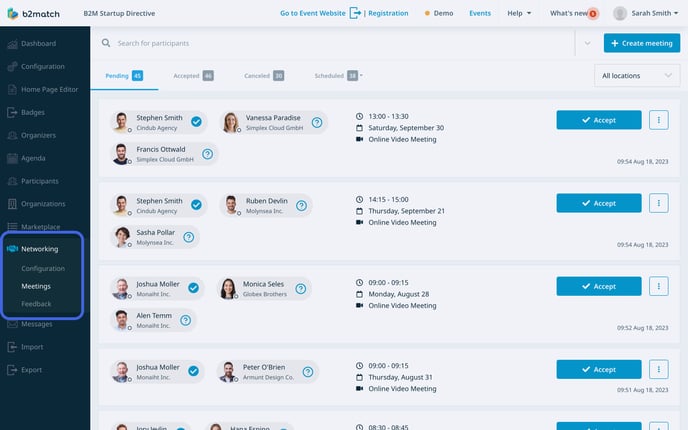
First, click on ***Networking*** on the **left sidebar** of the Organizer’s tool.
From the **Networking drop-down menu** on the left sidebar, choose ***Meetings*** to open the **Meetings page**.
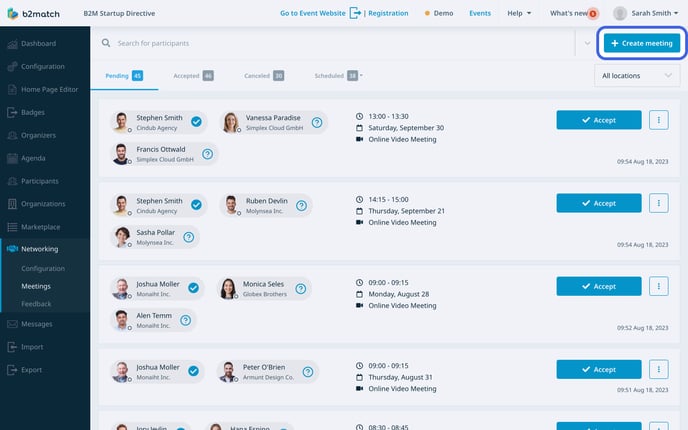
To create a new meeting, click on the ***Create Meeting button*** located in the upper right corner. This will open the **Create Meeting sidebar**.
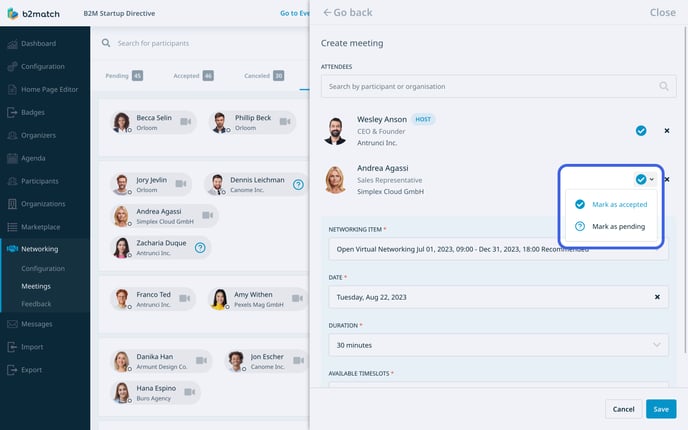
In the **Attendees field**, type the name of the participant you wish to include in the meeting. Then, select that participant from the **drop-down menu**.
Note: The first participant you add will automatically become the host of the meeting.
You will notice a **blue checkmark** next to the participant's name, meaning the meeting will be automatically accepted. If you don't want that a meeting is automatically accepted when creating it, click on the small arrow next to it and mark it as pending. This will require the participants to accept or decline the meeting request.
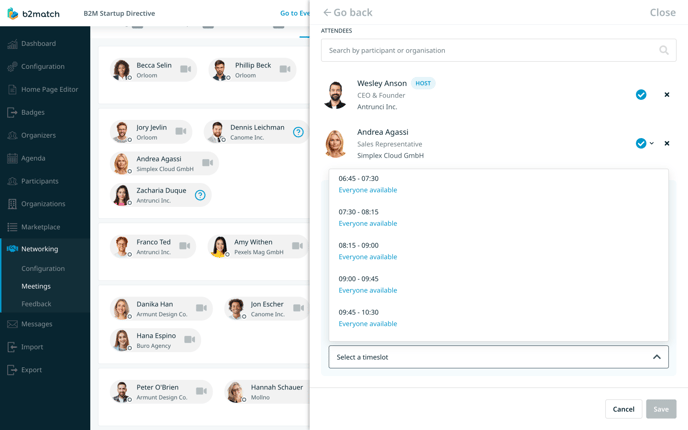
After adding all the participants, choose the [**meeting block**](https://support.b2match.com/en/understanding-meeting-blocks?hsLang=en) during which the meeting will take place from the **Networking item field**.
In the **Available Timeslots field**, you will see all the available timeslots within that meeting block. Select the preferred timeslot from the drop-down menu.
Note: If you have [**open virtual networking**](https://support.b2match.com/en/setting-up-open-virtual-networking?hsLang=en) configured and the time of the meeting blocks has already passed, you won't be able to select a networking item. In this case, it's assumed that the meeting will take place during open virtual networking, given that there are no upcoming meeting blocks scheduled.
If the meeting is an on-site meeting, you will notice the **Location field**.
Within this field, choose the meeting point from the available options in the drop-down menu.
If the selected [**meeting point has already been assigned**](https://support.b2match.com/en/assigning-participants-to-meeting-points?hsLang=en) to one or more participants in this meeting, the system will bookmark the assigned meeting point.
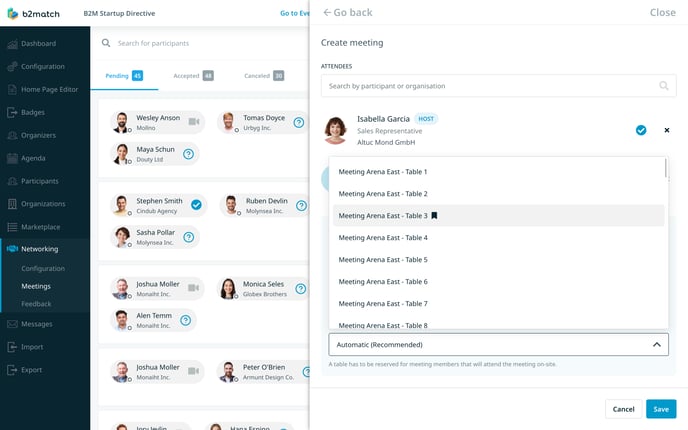
Once you've set the participants and timeslot, click the ***Save button*** to create the meeting.
#### Creating a meeting from the Participant Profile Overview
You can also create a meeting in the [**participant profile overview**](https://support.b2match.com/en/participants-profile-overview?hsLang=en).
First, navigate to ***Participants*** on the **left sidebar** of the Organizer’s tool.
Then, from the **Participants page**, select a participant who will be part of the meeting. This will open their **profile overview**.
Within their participant profile overview, navigate to the **Meetings tab**.
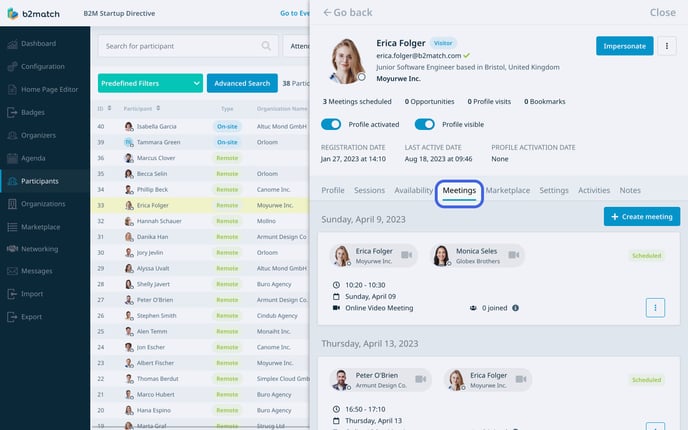
Here, Click on the **Create meeting button**.
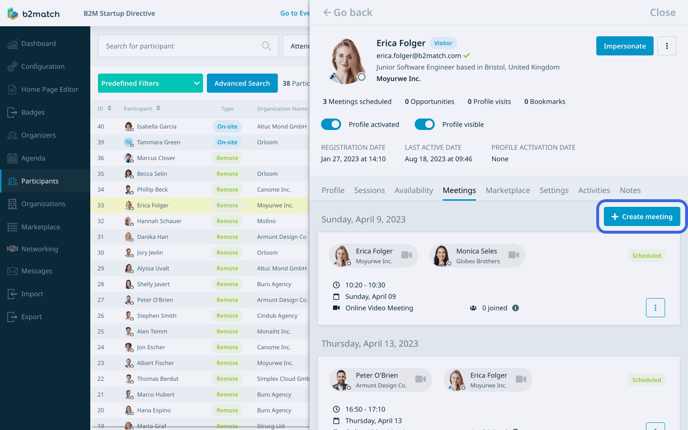
After that, add at least one more participant to the meeting and configure the rest of the fields. Once you’re done, click on ***Save***.
*If you didn't find an answer to your questions, please get in touch with the Support Team* [***here***](https://www.b2match.com/contact-us/organizer-support?utm_source=knowledgebase&utm_medium=link&utm_content=knowledgebase_article)*.*
- [Organizer Guide](https://support.b2match.com/organizer-guide?hsLang=en#main-content)
- [Your Organizer Account](https://support.b2match.com/organizer-guide?hsLang=en#your-organizer-account)
- [Managing Organizers](https://support.b2match.com/organizer-guide?hsLang=en#managing-organizers)
- [Workspace Management](https://support.b2match.com/organizer-guide?hsLang=en#workspace-management)
- [Event Management](https://support.b2match.com/organizer-guide?hsLang=en#event-management)
- [Home Page Editor](https://support.b2match.com/organizer-guide?hsLang=en#home-page-editor)
- [Event Settings](https://support.b2match.com/organizer-guide?hsLang=en#event-settings)
- [Event Components](https://support.b2match.com/organizer-guide?hsLang=en#event-components)
- [Branding](https://support.b2match.com/organizer-guide?hsLang=en#branding)
- [Registration Settings](https://support.b2match.com/organizer-guide?hsLang=en#registration-settings)
- [Custom Questions](https://support.b2match.com/organizer-guide?hsLang=en#custom-questions)
- [Participant Types](https://support.b2match.com/organizer-guide?hsLang=en#participant-types)
- [Ticketing](https://support.b2match.com/organizer-guide?hsLang=en#ticketing)
- [Agenda: Sessions](https://support.b2match.com/organizer-guide?hsLang=en#agenda-sessions)
- [Agenda: Session Locations](https://support.b2match.com/organizer-guide?hsLang=en#agenda-session-locations)
- [Agenda: Tracks](https://support.b2match.com/organizer-guide?hsLang=en#agenda-tracks)
- [Agenda: Topics](https://support.b2match.com/organizer-guide?hsLang=en#agenda-topics)
- [Agenda: Live Streams](https://support.b2match.com/organizer-guide?hsLang=en#agenda-live-streams)
- [Participants: Managing participants](https://support.b2match.com/organizer-guide?hsLang=en#participants-managing-participants)
- [Participants: Participant Types](https://support.b2match.com/organizer-guide?hsLang=en#participants-participant-types)
- [Participants: Speakers](https://support.b2match.com/organizer-guide?hsLang=en#participants-speakers)
- [Organizations: Managing Organizations](https://support.b2match.com/organizer-guide?hsLang=en#organizations-managing-organizations)
- [Organizations: Organization Types](https://support.b2match.com/organizer-guide?hsLang=en#organizations-organization-types)
- [Organizations: Areas of Activity](https://support.b2match.com/organizer-guide?hsLang=en#organizations-areas-of-activity)
- [Organizations: Sponsors](https://support.b2match.com/organizer-guide?hsLang=en#organizations-sponsors)
- [Meetings](https://support.b2match.com/organizer-guide?hsLang=en#meetings)
- [Meetings: Settings](https://support.b2match.com/organizer-guide?hsLang=en#meetings-settings)
- [Meetings: Meeting Blocks](https://support.b2match.com/organizer-guide?hsLang=en#meetings-meeting-blocks)
- [Meetings: Meeting Locations](https://support.b2match.com/organizer-guide?hsLang=en#meetings-meeting-locations)
- [Marketplace](https://support.b2match.com/organizer-guide?hsLang=en#marketplace)
- [Emails & Notifications: Outbox Emails](https://support.b2match.com/organizer-guide?hsLang=en#emails-notifications-outbox-emails)
- [Emails & Notifications: Automated Email Notifications](https://support.b2match.com/organizer-guide?hsLang=en#emails-notifications-automated-email-notifications)
- [Emails & Notifications: Announcements](https://support.b2match.com/organizer-guide?hsLang=en#emails-notifications-announcements)
- [Advanced Search](https://support.b2match.com/organizer-guide?hsLang=en#advanced-search)
- [Data Import & Export](https://support.b2match.com/organizer-guide?hsLang=en#data-import-export)
- [In-Person Participant Management: Badges](https://support.b2match.com/organizer-guide?hsLang=en#in-person-participant-management-badges)
- [In-Person Participant Management: Check-In App](https://support.b2match.com/organizer-guide?hsLang=en#in-person-participant-management-check-in-app)
- [In-Person Participant Management: On-Site Support](https://support.b2match.com/organizer-guide?hsLang=en#in-person-participant-management-on-site-support)
- [Mobile Event App](https://support.b2match.com/organizer-guide?hsLang=en#mobile-event-app)
- [Community Management Platform](https://support.b2match.com/organizer-guide?hsLang=en#community-management-platform)
- [Registration Form](https://support.b2match.com/organizer-guide?hsLang=en#registration-form)
- [Participant Guide](https://support.b2match.com/participant-guide?hsLang=en#main-content)
- [Getting Started](https://support.b2match.com/participant-guide?hsLang=en#getting-started)
- [Account Settings](https://support.b2match.com/participant-guide?hsLang=en#account-settings)
- [Event Settings](https://support.b2match.com/participant-guide?hsLang=en#event-settings)
- [Profile](https://support.b2match.com/participant-guide?hsLang=en#profile)
- [Agenda](https://support.b2match.com/participant-guide?hsLang=en#agenda)
- [Networking: Meetings](https://support.b2match.com/participant-guide?hsLang=en#networking-meetings)
- [Networking: Conversations](https://support.b2match.com/participant-guide?hsLang=en#networking-conversations)
- [Marketplace](https://support.b2match.com/participant-guide?hsLang=en#marketplace)
- [Feedback](https://support.b2match.com/participant-guide?hsLang=en#feedback)
[](https://www.b2match.com)
Need more help? Contact us at support@b2match.com
[mailto:support@b2match.com](mailto:support@b2match.com)
Copyright © 2025, b2match GmbH