---
title: Finding Meeting Partners
description: You probably already know that networking is the most important part of attending events. But since there are so many participants, it’s impossible to meet with everyone. This is why it is important
---
[Skip to content](https://support.b2match.com/finding-meeting-partners#main-content)
[](https://www.b2match.com/)
- [Log in](https://admin.b2match.com/cp/log-in)
Open main navigation
Close main navigation
- [Log in](https://admin.b2match.com/cp/log-in)
- [Contact us](http://www.b2match.com/contact-us)
[Contact us](http://www.b2match.com/contact-us)
How can we help you?
- There are no suggestions because the search field is empty.
1. [Help Center](https://support.b2match.com/?hsLang=en)
2. [Participant Guide](https://support.b2match.com/participant-guide?hsLang=en)
3. [Networking: Meetings](https://support.b2match.com/participant-guide?hsLang=en#networking-meetings)
# Finding Meeting Partners
You probably already know that networking is the most important part of attending events.
But since there are so many participants, it’s impossible to meet with everyone.
This is why it is important not to waste time and connect with just the right people for you.
### Where can I find meeting partners?
#### Finding meeting partners through the Participant list
You can find all your potential meeting partners through the **Participant list**. The Participant list contains information about all participants at the event.
If you find an interesting profile and want to schedule a meeting with that participant, simply click on the ***plus icon*** next to their name.
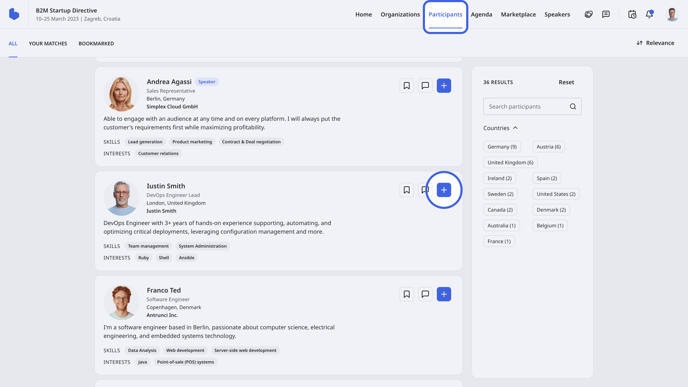
Tip: You can also click on the name of the participant to see their full profile and learn more about them. You can also schedule a meeting on their participant profile, under the pitch, by clicking on ***Request meeting***.
#### Finding meeting partners through the Marketplace
While scrolling through the Marketplace, you may find interesting opportunities you want to learn more about. The good news is you can schedule a meeting with the person who posted the opportunity directly from the Marketplace.
Find the **Marketplace** on the event navigation.
Next to the name of the participant on the **Opportunity card**, click on the ***plus icon*** to open the ***Request a meeting*** modal.
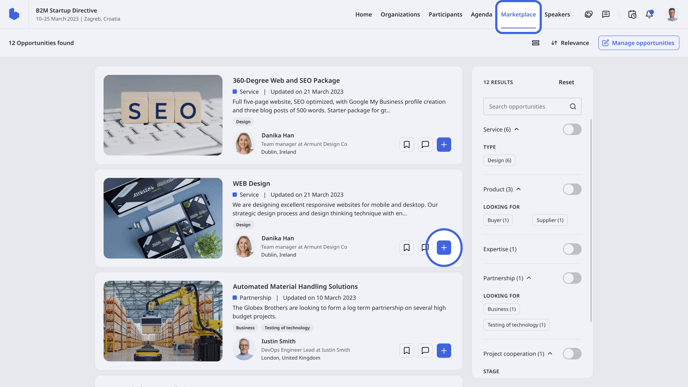
Tip: The pitch text, skills, and interests can help a lot in finding the perfect meeting partner, which is why it is advisable to spend more time editing your profile.
But what if there are thousands and thousands of participants attending the event? Don’t worry, you don’t need to scroll all the way down to find your perfect meeting partner.
Try using filters!
### How do I use filters?
There are a lot of filters you can use on the b2match platform to find the right meeting partners more easily.
Filters you can use on the participant list:
- Participant type
- Country
- Custom question filter – this filter is defined by the organizer
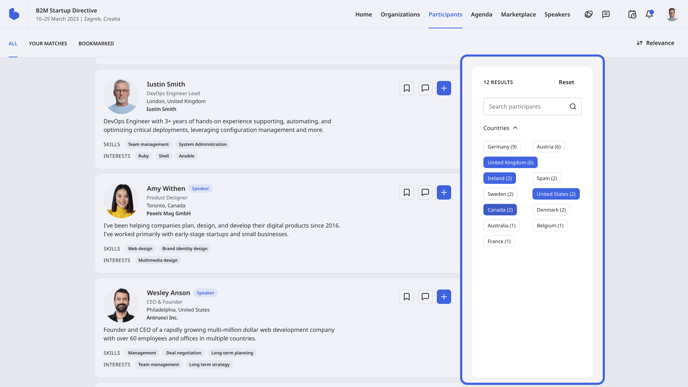
Filters on the marketplace:
- Opportunity type
You can filter the opportunities further by the fields specific to the opportunity type. If you're for example looking for a product, you can also further specify your search by using tags provided from the specific fields as filters. In this case, the tags will be grouped in the **Looking for** and **Applies to** categories.
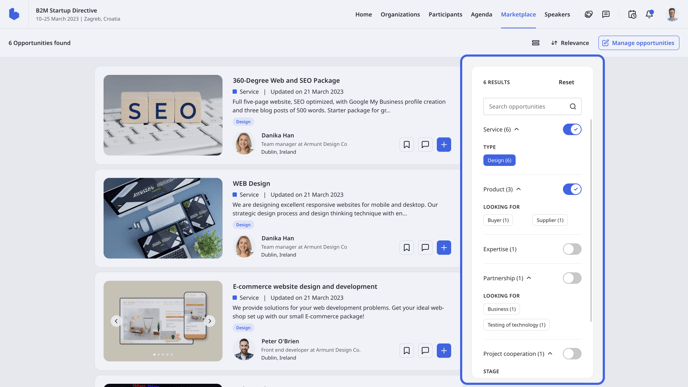
Read more about opportunity types in the [**Creating & editing opportunities**](https://support.b2match.com/en/creating-editing-opportunities?hsLang=en) article.
Tip: You can bookmark participants you consider potential meeting candidates so that you can access them later on the **Bookmarked** tab from the Participants list and decide whether to send them a meeting request.
The fundamental part of matchmaking on the b2match platform is the AI Meeting Recommender, which suggests the best meeting partners for you.
You can find your AI Meeting recommendations in the **Your matches** tab on the Participant list.
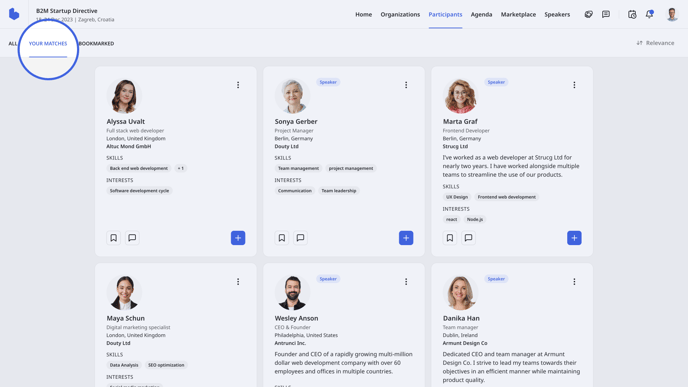
Learn more about our AI Meeting Recommender system in our article [**AI Meeting recommendations**](https://support.b2match.com/en/ai-meeting-recommendations?hsLang=en).
*If you didn’t find an answer to your questions, please get in touch with the Event Organizers. Their contact details can be found on the Contact page of the event website.*
- [Organizer Guide](https://support.b2match.com/organizer-guide?hsLang=en#main-content)
- [Your Organizer Account](https://support.b2match.com/organizer-guide?hsLang=en#your-organizer-account)
- [Managing Organizers](https://support.b2match.com/organizer-guide?hsLang=en#managing-organizers)
- [Workspace Management](https://support.b2match.com/organizer-guide?hsLang=en#workspace-management)
- [Event Management](https://support.b2match.com/organizer-guide?hsLang=en#event-management)
- [Home Page Editor](https://support.b2match.com/organizer-guide?hsLang=en#home-page-editor)
- [Event Settings](https://support.b2match.com/organizer-guide?hsLang=en#event-settings)
- [Event Components](https://support.b2match.com/organizer-guide?hsLang=en#event-components)
- [Branding](https://support.b2match.com/organizer-guide?hsLang=en#branding)
- [Registration Settings](https://support.b2match.com/organizer-guide?hsLang=en#registration-settings)
- [Custom Questions](https://support.b2match.com/organizer-guide?hsLang=en#custom-questions)
- [Participant Types](https://support.b2match.com/organizer-guide?hsLang=en#participant-types)
- [Ticketing](https://support.b2match.com/organizer-guide?hsLang=en#ticketing)
- [Agenda: Sessions](https://support.b2match.com/organizer-guide?hsLang=en#agenda-sessions)
- [Agenda: Session Locations](https://support.b2match.com/organizer-guide?hsLang=en#agenda-session-locations)
- [Agenda: Tracks](https://support.b2match.com/organizer-guide?hsLang=en#agenda-tracks)
- [Agenda: Topics](https://support.b2match.com/organizer-guide?hsLang=en#agenda-topics)
- [Agenda: Live Streams](https://support.b2match.com/organizer-guide?hsLang=en#agenda-live-streams)
- [Participants: Managing participants](https://support.b2match.com/organizer-guide?hsLang=en#participants-managing-participants)
- [Participants: Participant Types](https://support.b2match.com/organizer-guide?hsLang=en#participants-participant-types)
- [Participants: Speakers](https://support.b2match.com/organizer-guide?hsLang=en#participants-speakers)
- [Organizations: Managing Organizations](https://support.b2match.com/organizer-guide?hsLang=en#organizations-managing-organizations)
- [Organizations: Organization Types](https://support.b2match.com/organizer-guide?hsLang=en#organizations-organization-types)
- [Organizations: Areas of Activity](https://support.b2match.com/organizer-guide?hsLang=en#organizations-areas-of-activity)
- [Organizations: Sponsors](https://support.b2match.com/organizer-guide?hsLang=en#organizations-sponsors)
- [Meetings](https://support.b2match.com/organizer-guide?hsLang=en#meetings)
- [Meetings: Settings](https://support.b2match.com/organizer-guide?hsLang=en#meetings-settings)
- [Meetings: Meeting Blocks](https://support.b2match.com/organizer-guide?hsLang=en#meetings-meeting-blocks)
- [Meetings: Meeting Locations](https://support.b2match.com/organizer-guide?hsLang=en#meetings-meeting-locations)
- [Marketplace](https://support.b2match.com/organizer-guide?hsLang=en#marketplace)
- [Emails & Notifications: Outbox Emails](https://support.b2match.com/organizer-guide?hsLang=en#emails-notifications-outbox-emails)
- [Emails & Notifications: Automated Email Notifications](https://support.b2match.com/organizer-guide?hsLang=en#emails-notifications-automated-email-notifications)
- [Emails & Notifications: Announcements](https://support.b2match.com/organizer-guide?hsLang=en#emails-notifications-announcements)
- [Advanced Search](https://support.b2match.com/organizer-guide?hsLang=en#advanced-search)
- [Data Import & Export](https://support.b2match.com/organizer-guide?hsLang=en#data-import-export)
- [In-Person Participant Management: Badges](https://support.b2match.com/organizer-guide?hsLang=en#in-person-participant-management-badges)
- [In-Person Participant Management: Check-In App](https://support.b2match.com/organizer-guide?hsLang=en#in-person-participant-management-check-in-app)
- [In-Person Participant Management: On-Site Support](https://support.b2match.com/organizer-guide?hsLang=en#in-person-participant-management-on-site-support)
- [Mobile Event App](https://support.b2match.com/organizer-guide?hsLang=en#mobile-event-app)
- [Community Management Platform](https://support.b2match.com/organizer-guide?hsLang=en#community-management-platform)
- [Registration Form](https://support.b2match.com/organizer-guide?hsLang=en#registration-form)
- [Participant Guide](https://support.b2match.com/participant-guide?hsLang=en#main-content)
- [Getting Started](https://support.b2match.com/participant-guide?hsLang=en#getting-started)
- [Account Settings](https://support.b2match.com/participant-guide?hsLang=en#account-settings)
- [Event Settings](https://support.b2match.com/participant-guide?hsLang=en#event-settings)
- [Profile](https://support.b2match.com/participant-guide?hsLang=en#profile)
- [Agenda](https://support.b2match.com/participant-guide?hsLang=en#agenda)
- [Networking: Meetings](https://support.b2match.com/participant-guide?hsLang=en#networking-meetings)
- [Networking: Conversations](https://support.b2match.com/participant-guide?hsLang=en#networking-conversations)
- [Marketplace](https://support.b2match.com/participant-guide?hsLang=en#marketplace)
- [Feedback](https://support.b2match.com/participant-guide?hsLang=en#feedback)
[](https://www.b2match.com)
Need more help? Contact us at support@b2match.com
[mailto:support@b2match.com](mailto:support@b2match.com)
Copyright © 2025, b2match GmbH