---
title: Impersonating Participants
description: For participants who may be less familiar with the b2match platform, you, as an organizer, can assist them by impersonating their accounts. This feature allows you to perform certain actions on their
---
[Skip to content](https://support.b2match.com/impersonating-participants-1#main-content)
[](https://www.b2match.com/)
- [Log in](https://admin.b2match.com/cp/log-in)
Open main navigation
Close main navigation
- [Log in](https://admin.b2match.com/cp/log-in)
- [Contact us](http://www.b2match.com/contact-us)
[Contact us](http://www.b2match.com/contact-us)
How can we help you?
- There are no suggestions because the search field is empty.
1. [Help Center](https://support.b2match.com/?hsLang=en)
2. [Organizer Guide](https://support.b2match.com/organizer-guide?hsLang=en)
3. [Participants: Managing participants](https://support.b2match.com/organizer-guide?hsLang=en#participants-managing-participants)
# Impersonating Participants
For participants who may be less familiar with the b2match platform, you, as an organizer, can assist them by impersonating their accounts. This feature allows you to perform certain actions on their behalf, ensuring a smoother experience for your participants.
In addition to providing the [**Participant's Guide**](https://support.b2match.com/en/v7-participant-guide?hsLang=en), the ability to impersonate participants empowers you to support and troubleshoot any difficulties your participants may encounter while navigating the event software.
### How can I impersonate participants?
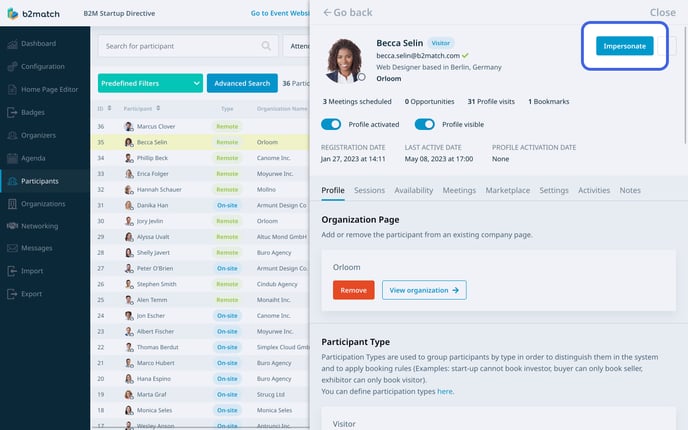
First, click on ***Participants*** on the **left sidebar** of the Organizer’s tool and select the ***participant*** you want to impersonate.
This will open the **participant’s profile overview**.
To begin impersonating the participant, click on the ***Impersonate*** button.
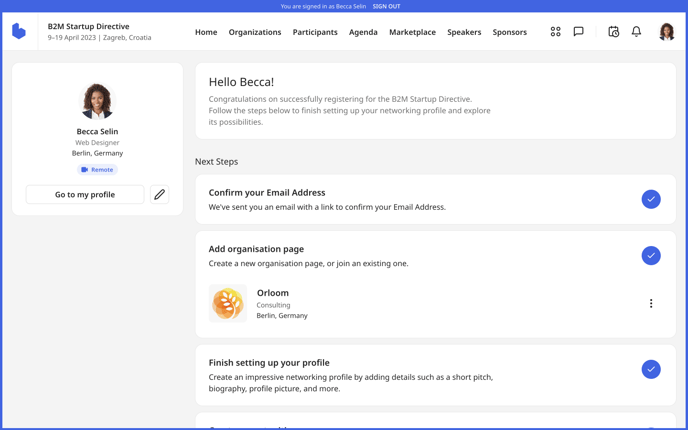
This action will redirect you to the participant’s **dashboard**.
At the top of the screen, a header with the name of the impersonated participant will be visible for the entire duration of the impersonating process, as well as the participant's profile picture in the upper right corner.
### What can I edit when impersonating a participant?
While impersonating a participant, you have the ability to edit various aspects of their account. Here are the actions you can perform:
**Edit Profile**: On the participant's dashboard, click on the ***pencil icon*** located in the user info widget to modify their profile information. This also includes answering custom questions integrated into the profile editing process.
**Create and Edit Marketplace Opportunities**: Access the participant's dashboard and click on ***Add opportunities*** to create marketplace opportunities associated with their account.
**Add Sessions to "My Schedule"**: From the **Event Agenda**, simply click the ***Add*** button next to the desired session to include it in the participant's personal agenda, known as My Schedule.
**Edit Company Page**: Navigate to the participant's dashboard and click on their associated ***company*** to access and edit the corresponding company page.
**Configure Availability**: Access the participant's dashboard and click on ***My availability*** within the **Book meetings section** to adjust their availability settings for scheduling meetings.
**Edit/Give Meeting Feedback**: Access the meetings section by clicking on the ***4*** ***dots*** in the event navigation. Then, navigate to the **Past meetings tab** and click on ***Give/Edit feedback*** to provide or modify meeting feedback.
**Event Settings**: Click on the participant's ***avatar*** located in the upper right corner to access the **Event settings**, allowing you to make changes specific to the participant's event experience.
**Request a Meeting**: Access the participant's list and click on the ***plus icon*** to initiate a meeting request.
**Accept/Cancel Meetings**: Navigate to the meetings section by clicking on the ***4* *dots.*** From there, you can accept the meeting by clicking ***Accept*** or cancel a meeting by clicking the ***3 dots.***
As an event organizer, you do not have the ability to modify participant's account settings such as their email address, password, or deactivate their account. Additionally, you are unable to access their conversations.
*If you didn't find an answer to your questions, please get in touch with the Support Team* [***here***](https://www.b2match.com/contact-us/organizer-support?utm_source=knowledgebase&utm_medium=link&utm_content=knowledgebase_article)*.*
- [Organizer Guide](https://support.b2match.com/organizer-guide?hsLang=en#main-content)
- [Your Organizer Account](https://support.b2match.com/organizer-guide?hsLang=en#your-organizer-account)
- [Managing Organizers](https://support.b2match.com/organizer-guide?hsLang=en#managing-organizers)
- [Workspace Management](https://support.b2match.com/organizer-guide?hsLang=en#workspace-management)
- [Event Management](https://support.b2match.com/organizer-guide?hsLang=en#event-management)
- [Home Page Editor](https://support.b2match.com/organizer-guide?hsLang=en#home-page-editor)
- [Event Settings](https://support.b2match.com/organizer-guide?hsLang=en#event-settings)
- [Event Components](https://support.b2match.com/organizer-guide?hsLang=en#event-components)
- [Branding](https://support.b2match.com/organizer-guide?hsLang=en#branding)
- [Registration Settings](https://support.b2match.com/organizer-guide?hsLang=en#registration-settings)
- [Custom Questions](https://support.b2match.com/organizer-guide?hsLang=en#custom-questions)
- [Participant Types](https://support.b2match.com/organizer-guide?hsLang=en#participant-types)
- [Ticketing](https://support.b2match.com/organizer-guide?hsLang=en#ticketing)
- [Agenda: Sessions](https://support.b2match.com/organizer-guide?hsLang=en#agenda-sessions)
- [Agenda: Session Locations](https://support.b2match.com/organizer-guide?hsLang=en#agenda-session-locations)
- [Agenda: Tracks](https://support.b2match.com/organizer-guide?hsLang=en#agenda-tracks)
- [Agenda: Topics](https://support.b2match.com/organizer-guide?hsLang=en#agenda-topics)
- [Agenda: Live Streams](https://support.b2match.com/organizer-guide?hsLang=en#agenda-live-streams)
- [Participants: Managing participants](https://support.b2match.com/organizer-guide?hsLang=en#participants-managing-participants)
- [Participants: Participant Types](https://support.b2match.com/organizer-guide?hsLang=en#participants-participant-types)
- [Participants: Speakers](https://support.b2match.com/organizer-guide?hsLang=en#participants-speakers)
- [Organizations: Managing Organizations](https://support.b2match.com/organizer-guide?hsLang=en#organizations-managing-organizations)
- [Organizations: Organization Types](https://support.b2match.com/organizer-guide?hsLang=en#organizations-organization-types)
- [Organizations: Areas of Activity](https://support.b2match.com/organizer-guide?hsLang=en#organizations-areas-of-activity)
- [Organizations: Sponsors](https://support.b2match.com/organizer-guide?hsLang=en#organizations-sponsors)
- [Meetings](https://support.b2match.com/organizer-guide?hsLang=en#meetings)
- [Meetings: Settings](https://support.b2match.com/organizer-guide?hsLang=en#meetings-settings)
- [Meetings: Meeting Blocks](https://support.b2match.com/organizer-guide?hsLang=en#meetings-meeting-blocks)
- [Meetings: Meeting Locations](https://support.b2match.com/organizer-guide?hsLang=en#meetings-meeting-locations)
- [Marketplace](https://support.b2match.com/organizer-guide?hsLang=en#marketplace)
- [Emails & Notifications: Outbox Emails](https://support.b2match.com/organizer-guide?hsLang=en#emails-notifications-outbox-emails)
- [Emails & Notifications: Automated Email Notifications](https://support.b2match.com/organizer-guide?hsLang=en#emails-notifications-automated-email-notifications)
- [Emails & Notifications: Announcements](https://support.b2match.com/organizer-guide?hsLang=en#emails-notifications-announcements)
- [Advanced Search](https://support.b2match.com/organizer-guide?hsLang=en#advanced-search)
- [Data Import & Export](https://support.b2match.com/organizer-guide?hsLang=en#data-import-export)
- [In-Person Participant Management: Badges](https://support.b2match.com/organizer-guide?hsLang=en#in-person-participant-management-badges)
- [In-Person Participant Management: Check-In App](https://support.b2match.com/organizer-guide?hsLang=en#in-person-participant-management-check-in-app)
- [In-Person Participant Management: On-Site Support](https://support.b2match.com/organizer-guide?hsLang=en#in-person-participant-management-on-site-support)
- [Mobile Event App](https://support.b2match.com/organizer-guide?hsLang=en#mobile-event-app)
- [Community Management Platform](https://support.b2match.com/organizer-guide?hsLang=en#community-management-platform)
- [Registration Form](https://support.b2match.com/organizer-guide?hsLang=en#registration-form)
- [Participant Guide](https://support.b2match.com/participant-guide?hsLang=en#main-content)
- [Getting Started](https://support.b2match.com/participant-guide?hsLang=en#getting-started)
- [Account Settings](https://support.b2match.com/participant-guide?hsLang=en#account-settings)
- [Event Settings](https://support.b2match.com/participant-guide?hsLang=en#event-settings)
- [Profile](https://support.b2match.com/participant-guide?hsLang=en#profile)
- [Agenda](https://support.b2match.com/participant-guide?hsLang=en#agenda)
- [Networking: Meetings](https://support.b2match.com/participant-guide?hsLang=en#networking-meetings)
- [Networking: Conversations](https://support.b2match.com/participant-guide?hsLang=en#networking-conversations)
- [Marketplace](https://support.b2match.com/participant-guide?hsLang=en#marketplace)
- [Feedback](https://support.b2match.com/participant-guide?hsLang=en#feedback)
[](https://www.b2match.com)
Need more help? Contact us at support@b2match.com
[mailto:support@b2match.com](mailto:support@b2match.com)
Copyright © 2025, b2match GmbH