---
title: Organization's Profile Overview
description: The Organizer's Tool provides an organization’s profile overview, where you can conveniently access all the information in one place. First, click on Organizations on the left sidebar of the Organizer
---
[Skip to content](https://support.b2match.com/organizations-profile-overview#main-content)
[](https://www.b2match.com/)
- [Log in](https://admin.b2match.com/cp/log-in)
Open main navigation
Close main navigation
- [Log in](https://admin.b2match.com/cp/log-in)
- [Contact us](http://www.b2match.com/contact-us)
[Contact us](http://www.b2match.com/contact-us)
How can we help you?
- There are no suggestions because the search field is empty.
1. [Help Center](https://support.b2match.com/?hsLang=en)
2. [Organizer Guide](https://support.b2match.com/organizer-guide?hsLang=en)
3. [Organizations: Managing Organizations](https://support.b2match.com/organizer-guide?hsLang=en#organizations-managing-organizations)
# Organization's Profile Overview
The Organizer's Tool provides an organization’s profile overview, where you can conveniently access all the information in one place.
### How can I access an organization’s profile overview?
First, click on ***Organizations*** on the **left sidebar** of the Organizer’s Tool.
This will open the organizations' list.
Select an organization to open their **organization’s profile overview**.
### What does the organization’s profile overview look like?
#### Organization Information
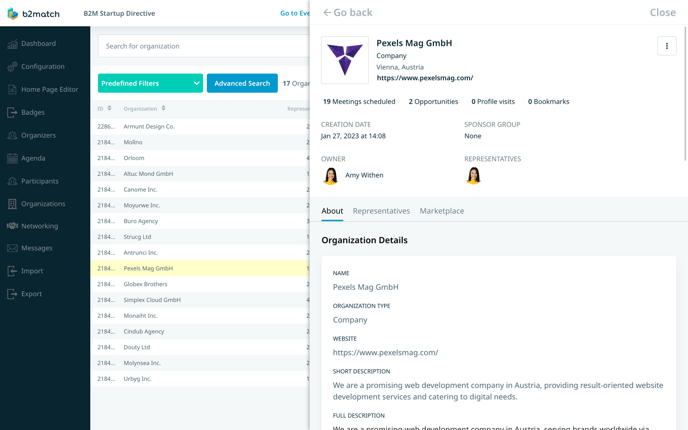
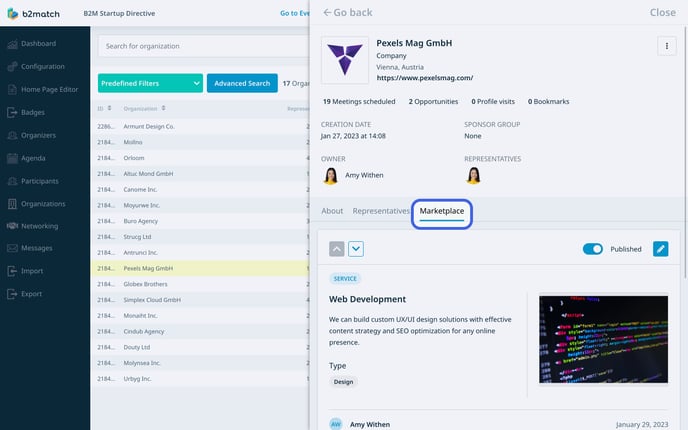
At the top of the organization’s profile overview, you will find comprehensive details such as the organization’s name, logo, organization type, city, country, and organization’s website.
Additionally, you can see specific information about their activity on the platform, including the number of scheduled meetings, added opportunities in the marketplace, profile visits, and bookmarks.
Next, you will find the organization's profile creation date and time, along with its sponsor group. Additionally, here, you can see the organization owner's name and profile picture, as well as the organization representatives, each accompanied by their respective profile pictures.
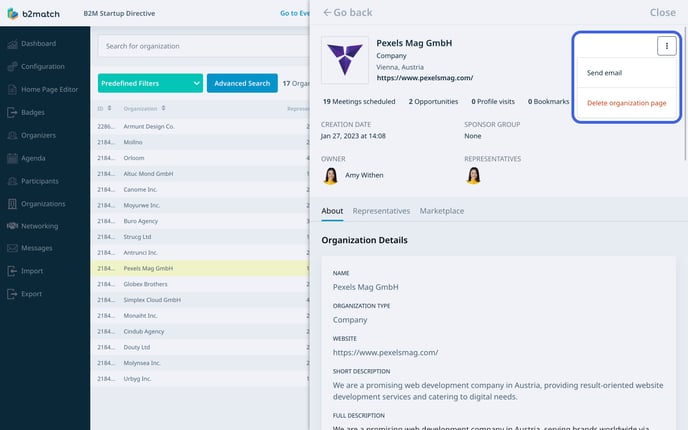
In the upper right corner, you will notice **3 dots**. By clicking on ***3 dots***, a **drop-down** will appear. From this drop-down, you can either send an email to the organization or delete their page.
#### Organization’s Profile Overview Menu
As an organizer, you can access and edit various elements of the organization's profile, such as organization details, sponsor group, page ownership, organization representatives’ management, and marketplace opportunity management.
#### About tab
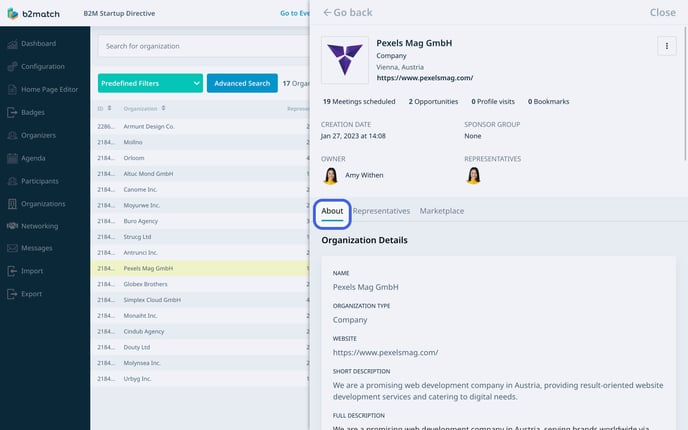
The **About tab** is organized into multiple sections:
- Organization Details: This section allows you to edit general information regarding the organization, including its name, [**organization type**](https://support.b2match.com/en/understanding-organization-types?hsLang=en), short and full description, website, country, city, phone number, and social links.
- Page Admin: Here, you can designate the page admin, also known as the owner.
- Custom Questions: In this section, you have the ability to edit the organization's responses to custom questions.
- [**Areas of Activity**](https://support.b2match.com/en/understanding-areas-of-activity?hsLang=en): You can choose the organization's areas of activity that were previously configured for the event.
- [**Sponsor Group**](https://support.b2match.com/en/understanding-b2match-sponsors?hsLang=en): Within this section, you can select the sponsor group to which the organization belongs and assign its position within the group.
#### Representatives tab
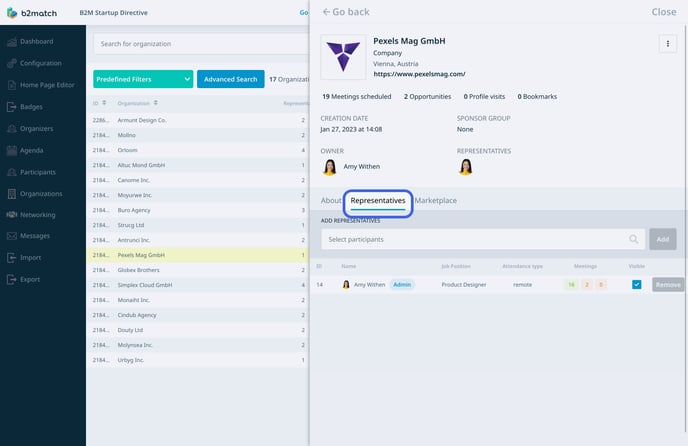
The **Representatives tab** displays participants who serve as organization representatives at the event.
Here, you can view the participant's ID, name, job position, attendance type, meeting information, and visibility status on the organization page. Additionally, you can add or remove representatives from this tab.
#### Marketplace tab
In the **Marketplace tab**, you will find information about the organization’s marketplace opportunities.
Marketplace opportunities are displayed in opportunity cards, providing information such as the opportunity type, name, short description, full description, what the participant is looking for, market application keywords, as well as any associated image, file, or video, and lastly which representative created the opportunity.
You can publish or unpublish an opportunity by ***toggling the switch*** next to the pencil icon.
To edit an opportunity, simply click on the ***pencil icon***, allowing you to edit all the information on the card. You can choose to make the opportunity visible or invisible on the event website.
Note: Remember to click the ***Save* *button*** when making edits on a specific tab. If you switch to another tab before saving the changes on the current tab, the changes will not be saved.
*If you didn't find an answer to your questions, please get in touch with the Support Team* [***here***](https://www.b2match.com/contact-us/organizer-support?utm_source=knowledgebase&utm_medium=link&utm_content=knowledgebase_article)*.*
- [Organizer Guide](https://support.b2match.com/organizer-guide?hsLang=en#main-content)
- [Your Organizer Account](https://support.b2match.com/organizer-guide?hsLang=en#your-organizer-account)
- [Managing Organizers](https://support.b2match.com/organizer-guide?hsLang=en#managing-organizers)
- [Workspace Management](https://support.b2match.com/organizer-guide?hsLang=en#workspace-management)
- [Event Management](https://support.b2match.com/organizer-guide?hsLang=en#event-management)
- [Home Page Editor](https://support.b2match.com/organizer-guide?hsLang=en#home-page-editor)
- [Event Settings](https://support.b2match.com/organizer-guide?hsLang=en#event-settings)
- [Event Components](https://support.b2match.com/organizer-guide?hsLang=en#event-components)
- [Branding](https://support.b2match.com/organizer-guide?hsLang=en#branding)
- [Registration Settings](https://support.b2match.com/organizer-guide?hsLang=en#registration-settings)
- [Custom Questions](https://support.b2match.com/organizer-guide?hsLang=en#custom-questions)
- [Participant Types](https://support.b2match.com/organizer-guide?hsLang=en#participant-types)
- [Ticketing](https://support.b2match.com/organizer-guide?hsLang=en#ticketing)
- [Agenda: Sessions](https://support.b2match.com/organizer-guide?hsLang=en#agenda-sessions)
- [Agenda: Session Locations](https://support.b2match.com/organizer-guide?hsLang=en#agenda-session-locations)
- [Agenda: Tracks](https://support.b2match.com/organizer-guide?hsLang=en#agenda-tracks)
- [Agenda: Topics](https://support.b2match.com/organizer-guide?hsLang=en#agenda-topics)
- [Agenda: Live Streams](https://support.b2match.com/organizer-guide?hsLang=en#agenda-live-streams)
- [Participants: Managing participants](https://support.b2match.com/organizer-guide?hsLang=en#participants-managing-participants)
- [Participants: Participant Types](https://support.b2match.com/organizer-guide?hsLang=en#participants-participant-types)
- [Participants: Speakers](https://support.b2match.com/organizer-guide?hsLang=en#participants-speakers)
- [Organizations: Managing Organizations](https://support.b2match.com/organizer-guide?hsLang=en#organizations-managing-organizations)
- [Organizations: Organization Types](https://support.b2match.com/organizer-guide?hsLang=en#organizations-organization-types)
- [Organizations: Areas of Activity](https://support.b2match.com/organizer-guide?hsLang=en#organizations-areas-of-activity)
- [Organizations: Sponsors](https://support.b2match.com/organizer-guide?hsLang=en#organizations-sponsors)
- [Meetings](https://support.b2match.com/organizer-guide?hsLang=en#meetings)
- [Meetings: Settings](https://support.b2match.com/organizer-guide?hsLang=en#meetings-settings)
- [Meetings: Meeting Blocks](https://support.b2match.com/organizer-guide?hsLang=en#meetings-meeting-blocks)
- [Meetings: Meeting Locations](https://support.b2match.com/organizer-guide?hsLang=en#meetings-meeting-locations)
- [Marketplace](https://support.b2match.com/organizer-guide?hsLang=en#marketplace)
- [Emails & Notifications: Outbox Emails](https://support.b2match.com/organizer-guide?hsLang=en#emails-notifications-outbox-emails)
- [Emails & Notifications: Automated Email Notifications](https://support.b2match.com/organizer-guide?hsLang=en#emails-notifications-automated-email-notifications)
- [Emails & Notifications: Announcements](https://support.b2match.com/organizer-guide?hsLang=en#emails-notifications-announcements)
- [Advanced Search](https://support.b2match.com/organizer-guide?hsLang=en#advanced-search)
- [Data Import & Export](https://support.b2match.com/organizer-guide?hsLang=en#data-import-export)
- [In-Person Participant Management: Badges](https://support.b2match.com/organizer-guide?hsLang=en#in-person-participant-management-badges)
- [In-Person Participant Management: Check-In App](https://support.b2match.com/organizer-guide?hsLang=en#in-person-participant-management-check-in-app)
- [In-Person Participant Management: On-Site Support](https://support.b2match.com/organizer-guide?hsLang=en#in-person-participant-management-on-site-support)
- [Mobile Event App](https://support.b2match.com/organizer-guide?hsLang=en#mobile-event-app)
- [Community Management Platform](https://support.b2match.com/organizer-guide?hsLang=en#community-management-platform)
- [Registration Form](https://support.b2match.com/organizer-guide?hsLang=en#registration-form)
- [Participant Guide](https://support.b2match.com/participant-guide?hsLang=en#main-content)
- [Getting Started](https://support.b2match.com/participant-guide?hsLang=en#getting-started)
- [Account Settings](https://support.b2match.com/participant-guide?hsLang=en#account-settings)
- [Event Settings](https://support.b2match.com/participant-guide?hsLang=en#event-settings)
- [Profile](https://support.b2match.com/participant-guide?hsLang=en#profile)
- [Agenda](https://support.b2match.com/participant-guide?hsLang=en#agenda)
- [Networking: Meetings](https://support.b2match.com/participant-guide?hsLang=en#networking-meetings)
- [Networking: Conversations](https://support.b2match.com/participant-guide?hsLang=en#networking-conversations)
- [Marketplace](https://support.b2match.com/participant-guide?hsLang=en#marketplace)
- [Feedback](https://support.b2match.com/participant-guide?hsLang=en#feedback)
[](https://www.b2match.com)
Need more help? Contact us at support@b2match.com
[mailto:support@b2match.com](mailto:support@b2match.com)
Copyright © 2025, b2match GmbH