---
title: Previewing, Saving and Publishing Event Home Page
description: Creating an engaging and informative event website is a critical step in promoting your upcoming event and driving attendance.
---
[Skip to content](https://support.b2match.com/previewing-saving-and-publishing-event-home-page#main-content)
[](https://www.b2match.com/)
- [Log in](https://admin.b2match.com/cp/log-in)
Open main navigation
Close main navigation
- [Log in](https://admin.b2match.com/cp/log-in)
- [Contact us](http://www.b2match.com/contact-us)
[Contact us](http://www.b2match.com/contact-us)
How can we help you?
- There are no suggestions because the search field is empty.
1. [Help Center](https://support.b2match.com/?hsLang=en)
2. [Organizer Guide](https://support.b2match.com/organizer-guide?hsLang=en)
3. [Home Page Editor](https://support.b2match.com/organizer-guide?hsLang=en#home-page-editor)
# Previewing, Saving and Publishing Event Home Page
Creating an engaging and informative event website is a critical step in promoting your upcoming event and driving attendance. To ensure that your website accurately represents your brand and effectively communicates your message, it's essential to preview, save, and publish your event home page with care.
In this article, we will explore the key steps involved in previewing, saving, and publishing your event home page. But first, learn more about [**building and editing pages content**](https://support.b2match.com/en/building-and-editing-pages-content?hsLang=en).
### Where can I access the preview, save, and publish options?
To access the preview, save, and publish options for your event home page, start by opening the **Home page editor** from the Organizer's Tool **left sidebar**.
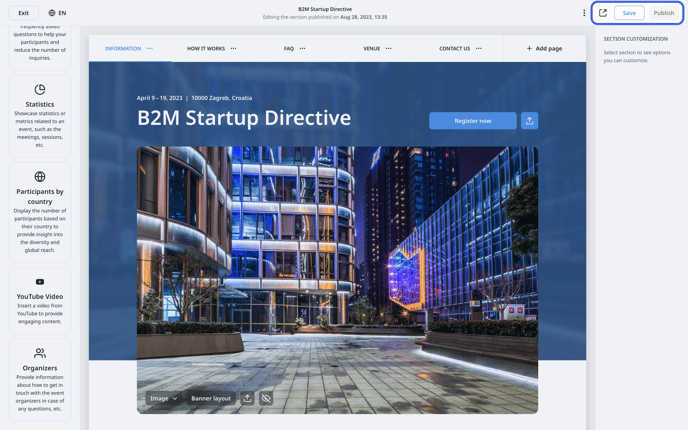
Once inside the editor, you will find the **preview**, **save**, and **publish** buttons at the **upper right corner of the right sidebar**.
### How can I preview my event home page?
**Previewing** your event home page allows you to test and refine the design and content before publishing, ensuring that your event website effectively communicates your message and engages your target audience.
Before previewing your event home page, it is essential to save any changes you have made. This ensures that your preview accurately reflects the most recent version of your event home page.
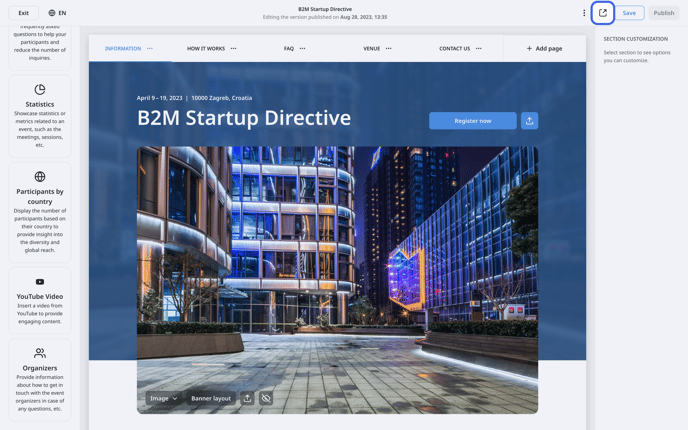
For a preview of your event website, click on the ***Preview button*** positioned to the left of the **Save button** in the **upper right corner**.
### How can I save and publish my event home page?
While editing your home page, you have the flexibility to move between pages without the need to save each one individually. Instead, you can add or remove pages, edit their contents, and once you have completed making changes for the day, you can save everything in one click.
The ***Save* *button*** is conveniently located at the **upper right corner of the home page editor**. Simply click on it to save all your changes at once.
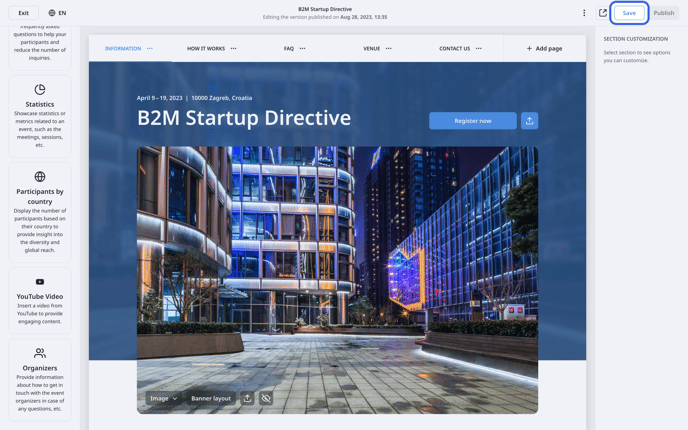
Warning: The **Save button** will be disabled until you make changes to the event home page. After you make a change, the Save button will become enabled, indicating that you can now save your work.
After making all changes and saving your work, you can make your event home page live by clicking the ***Publish button*** positioned next to the Save button in the **upper right corner**.
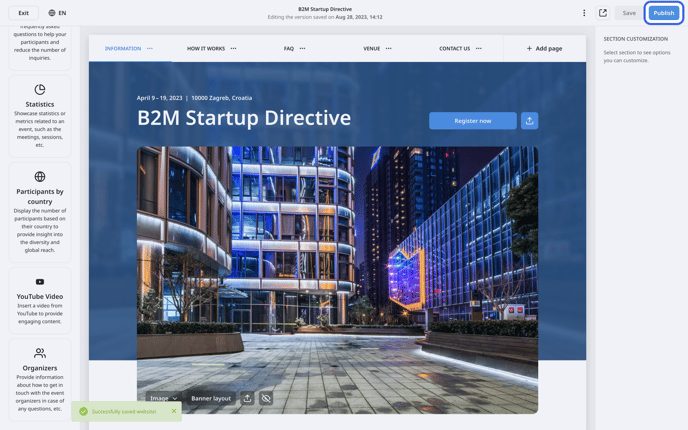
Publishing your event home page makes it live and accessible to your target audience, allowing you to promote your event and drive attendance.
Warning: It is recommended that only one person edits, saves, and publishes the home page at a time. If two or more individuals work in the home page editor simultaneously, they will overwrite the other one's changes.
### Where can I access additional options?
The home page editor offers a wide range of options to customize your event's home page and make it stand out.
In addition to the preview, save, and publish buttons, you can access additional options by clicking on the ***3 dots*** in the **header**.
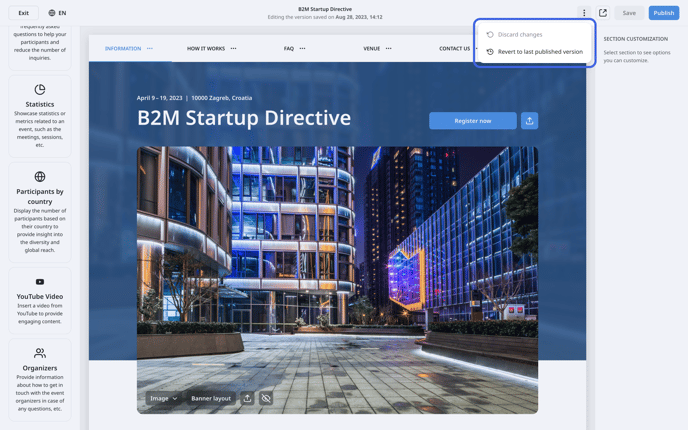
These options include **discard changes** and **revert to last published version**.
#### Discard changes
**Discard Changes** allows you to erase all the changes you made while editing the saved version of your event's home page. This may be useful when you have made several changes and want to undo them in one click.
#### Revert to last published version
**Revert to last published version** option is handy when you have saved a version of your event's home page and then decide that you liked it better the way it was before. Simply click on this option, and you can go back to your last published version.
*If you didn't find an answer to your questions, please get in touch with the Support Team* [***here***](https://www.b2match.com/contact-us/organizer-support?utm_source=knowledgebase&utm_medium=link&utm_campaign=&utm_content=knowledgebase_article)*.*
- [Organizer Guide](https://support.b2match.com/organizer-guide?hsLang=en#main-content)
- [Your Organizer Account](https://support.b2match.com/organizer-guide?hsLang=en#your-organizer-account)
- [Managing Organizers](https://support.b2match.com/organizer-guide?hsLang=en#managing-organizers)
- [Workspace Management](https://support.b2match.com/organizer-guide?hsLang=en#workspace-management)
- [Event Management](https://support.b2match.com/organizer-guide?hsLang=en#event-management)
- [Home Page Editor](https://support.b2match.com/organizer-guide?hsLang=en#home-page-editor)
- [Event Settings](https://support.b2match.com/organizer-guide?hsLang=en#event-settings)
- [Event Components](https://support.b2match.com/organizer-guide?hsLang=en#event-components)
- [Branding](https://support.b2match.com/organizer-guide?hsLang=en#branding)
- [Registration Settings](https://support.b2match.com/organizer-guide?hsLang=en#registration-settings)
- [Custom Questions](https://support.b2match.com/organizer-guide?hsLang=en#custom-questions)
- [Participant Types](https://support.b2match.com/organizer-guide?hsLang=en#participant-types)
- [Ticketing](https://support.b2match.com/organizer-guide?hsLang=en#ticketing)
- [Agenda: Sessions](https://support.b2match.com/organizer-guide?hsLang=en#agenda-sessions)
- [Agenda: Session Locations](https://support.b2match.com/organizer-guide?hsLang=en#agenda-session-locations)
- [Agenda: Tracks](https://support.b2match.com/organizer-guide?hsLang=en#agenda-tracks)
- [Agenda: Topics](https://support.b2match.com/organizer-guide?hsLang=en#agenda-topics)
- [Agenda: Live Streams](https://support.b2match.com/organizer-guide?hsLang=en#agenda-live-streams)
- [Participants: Managing participants](https://support.b2match.com/organizer-guide?hsLang=en#participants-managing-participants)
- [Participants: Participant Types](https://support.b2match.com/organizer-guide?hsLang=en#participants-participant-types)
- [Participants: Speakers](https://support.b2match.com/organizer-guide?hsLang=en#participants-speakers)
- [Organizations: Managing Organizations](https://support.b2match.com/organizer-guide?hsLang=en#organizations-managing-organizations)
- [Organizations: Organization Types](https://support.b2match.com/organizer-guide?hsLang=en#organizations-organization-types)
- [Organizations: Areas of Activity](https://support.b2match.com/organizer-guide?hsLang=en#organizations-areas-of-activity)
- [Organizations: Sponsors](https://support.b2match.com/organizer-guide?hsLang=en#organizations-sponsors)
- [Meetings](https://support.b2match.com/organizer-guide?hsLang=en#meetings)
- [Meetings: Settings](https://support.b2match.com/organizer-guide?hsLang=en#meetings-settings)
- [Meetings: Meeting Blocks](https://support.b2match.com/organizer-guide?hsLang=en#meetings-meeting-blocks)
- [Meetings: Meeting Locations](https://support.b2match.com/organizer-guide?hsLang=en#meetings-meeting-locations)
- [Marketplace](https://support.b2match.com/organizer-guide?hsLang=en#marketplace)
- [Emails & Notifications: Outbox Emails](https://support.b2match.com/organizer-guide?hsLang=en#emails-notifications-outbox-emails)
- [Emails & Notifications: Automated Email Notifications](https://support.b2match.com/organizer-guide?hsLang=en#emails-notifications-automated-email-notifications)
- [Emails & Notifications: Announcements](https://support.b2match.com/organizer-guide?hsLang=en#emails-notifications-announcements)
- [Advanced Search](https://support.b2match.com/organizer-guide?hsLang=en#advanced-search)
- [Data Import & Export](https://support.b2match.com/organizer-guide?hsLang=en#data-import-export)
- [In-Person Participant Management: Badges](https://support.b2match.com/organizer-guide?hsLang=en#in-person-participant-management-badges)
- [In-Person Participant Management: Check-In App](https://support.b2match.com/organizer-guide?hsLang=en#in-person-participant-management-check-in-app)
- [In-Person Participant Management: On-Site Support](https://support.b2match.com/organizer-guide?hsLang=en#in-person-participant-management-on-site-support)
- [Mobile Event App](https://support.b2match.com/organizer-guide?hsLang=en#mobile-event-app)
- [Community Management Platform](https://support.b2match.com/organizer-guide?hsLang=en#community-management-platform)
- [Registration Form](https://support.b2match.com/organizer-guide?hsLang=en#registration-form)
- [Participant Guide](https://support.b2match.com/participant-guide?hsLang=en#main-content)
- [Getting Started](https://support.b2match.com/participant-guide?hsLang=en#getting-started)
- [Account Settings](https://support.b2match.com/participant-guide?hsLang=en#account-settings)
- [Event Settings](https://support.b2match.com/participant-guide?hsLang=en#event-settings)
- [Profile](https://support.b2match.com/participant-guide?hsLang=en#profile)
- [Agenda](https://support.b2match.com/participant-guide?hsLang=en#agenda)
- [Networking: Meetings](https://support.b2match.com/participant-guide?hsLang=en#networking-meetings)
- [Networking: Conversations](https://support.b2match.com/participant-guide?hsLang=en#networking-conversations)
- [Marketplace](https://support.b2match.com/participant-guide?hsLang=en#marketplace)
- [Feedback](https://support.b2match.com/participant-guide?hsLang=en#feedback)
[](https://www.b2match.com)
Need more help? Contact us at support@b2match.com
[mailto:support@b2match.com](mailto:support@b2match.com)
Copyright © 2025, b2match GmbH