---
title: Registering for an Event
description: "The process of registering for an event consists of several steps: This article will cover the whole registration process in detail, including how to register as a first-time participant, and how to r"
---
[Skip to content](https://support.b2match.com/registering-for-an-event#main-content)
[](https://www.b2match.com/)
- [Log in](https://admin.b2match.com/cp/log-in)
Open main navigation
Close main navigation
- [Log in](https://admin.b2match.com/cp/log-in)
- [Contact us](http://www.b2match.com/contact-us)
[Contact us](http://www.b2match.com/contact-us)
How can we help you?
- There are no suggestions because the search field is empty.
1. [Help Center](https://support.b2match.com/?hsLang=en)
2. [Participant Guide](https://support.b2match.com/participant-guide?hsLang=en)
3. [Getting Started](https://support.b2match.com/participant-guide?hsLang=en#getting-started)
# Registering for an Event
The process of registering for an event consists of several steps:
1. [**Creating a b2match account**](https://support.b2match.com/en/creating-a-b2match-account-1?hsLang=en)
2. Selecting attendance and participant type (an integral part of creating an account)
3. [**Creating your profile**](https://support.b2match.com/en/creating-editing-my-profile?hsLang=en)
This article will cover the whole registration process in detail, including how to register as a first-time participant, and how to register using an existing b2match account.
### First-time registration
If you're registering for the first time for an event on the b2match platform, you are able to create the account and register for the event in the same place!
On the event landing page, click on ***Register*** in the upper right corner. Fill in all the necessary information, tick the box to agree to the [**Terms of service**](https://admin.b2match.com/terms/en/terms-of-use-participants) and [**Privacy policy**](https://admin.b2match.com/terms/en/privacy-policy), and then click on ***Continue***.
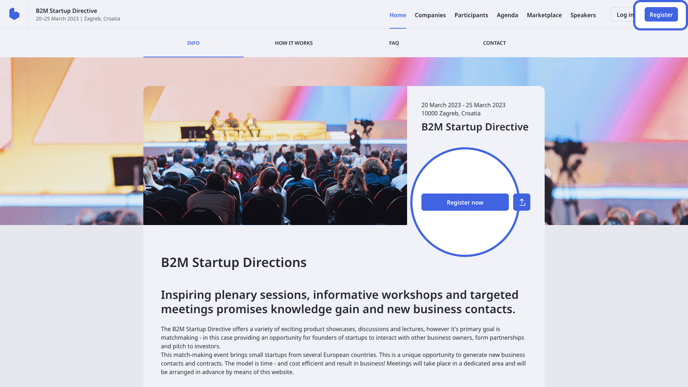
An integral part of creating an account is selecting the attendance and participant type.
In the **Attend as...** section choose your attendance type.
You can choose between:
- On-site - if you choose on-site attendance, your 1:1 meetings can be held in person with other on-site participants, or via online video calls with remote participants.
- Remote - if you choose remote attendance, all of your 1:1 meetings will be scheduled as online video calls. You can attend other sessions via video conference, or by watching live streams.
After that, choose the participation type in the **Register as...** section.
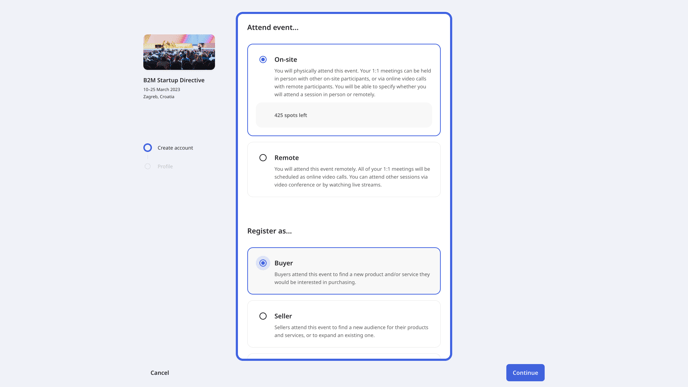
Depending on the event, you can choose between different participation types that are determined by the event organizer:
A few examples of participation types:
- At **Hosted buyer events** possible participation types to choose from can be Buyer, Seller, or Exhibitor
- At **Startup investor events**, for example, there might be Startup, Investor, or Visitor participation types.
With this, you have completed the first step of the registration process.
### Create your profile
After you filled in all the information, click on ***Continue*** to create your profile after which you will be successfully registered for the event.
The **Create your profile**section consists of several fields that should be filled to make the profile as attractive as possible to other participants:
- Profile picture
- Occupation
- Organization Name
- Pitch - this is a short description of who you are, what you can do, and what you are looking for
- Country
- City
- About me section
- Biography
- My skills - here you can write what you are good at in the form of tags
- My interests - here you can write about your interests in the form of tags
- Website and socials - add your Twitter, Facebook, LinkedIn, or Instagram account to your b2match profile
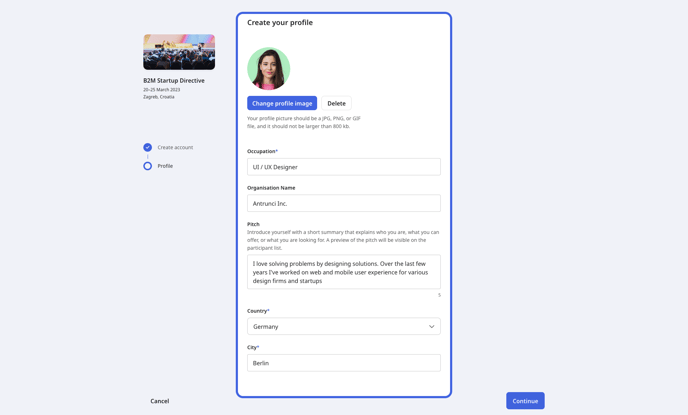
Note: Some organizers will include some additional questions in the registration form that you should provide answers to.
### Registering with an existing b2match account
You can always register for new events with your existing b2match account.
On the event landing page, click on ***Register*** in the upper right corner. Click on ***log in with your existing b2match account***, and fill in your log in credentials.
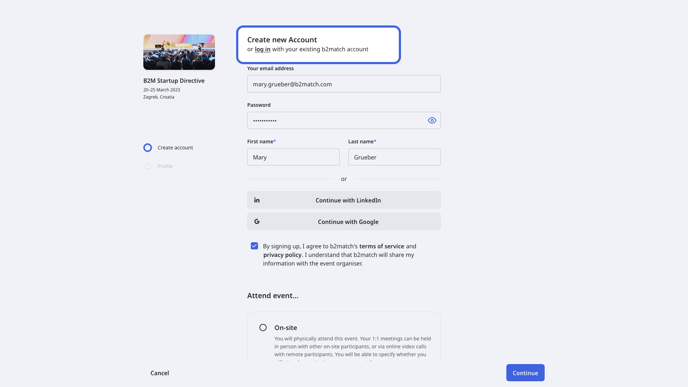
Once you have entered your credentials and successfully logged in, you can start the process of registering for the event.
The first step is to choose your attendance type in the **Attend as...** section.
You can choose between:
- On-site - if you choose on-site attendance, your 1:1 meetings can be held in person with other on-site participants, or via online video calls with remote participants. Later, you will be able to specify your attendance type for individual sessions.
- Remote - if you choose remote attendance, all of your 1:1 meetings will be scheduled as online video calls. You can attend other sessions via video conference or by watching live streams.
Next, choose your participation type in the **Register as...** section.
After that, click on the ***Continue*** button to access the second step of the registration process and create your profile.
An alternative way to register with an existing b2match account is to click on the ***Log in*** button in the upper right corner and fill in your login credentials.
After you logged into your b2match account, click on the ***Register***button in the event navigation.
Note: If you already have an account with b2match, the information is prefilled, but if you decide to change your information, it will automatically change for the new event as for every old event you participated in.
*If you didn’t find an answer to your questions, please get in touch with the Event Organizers. Their contact details can be found on the Contact page of the event website.*
- [Organizer Guide](https://support.b2match.com/organizer-guide?hsLang=en#main-content)
- [Your Organizer Account](https://support.b2match.com/organizer-guide?hsLang=en#your-organizer-account)
- [Managing Organizers](https://support.b2match.com/organizer-guide?hsLang=en#managing-organizers)
- [Workspace Management](https://support.b2match.com/organizer-guide?hsLang=en#workspace-management)
- [Event Management](https://support.b2match.com/organizer-guide?hsLang=en#event-management)
- [Home Page Editor](https://support.b2match.com/organizer-guide?hsLang=en#home-page-editor)
- [Event Settings](https://support.b2match.com/organizer-guide?hsLang=en#event-settings)
- [Event Components](https://support.b2match.com/organizer-guide?hsLang=en#event-components)
- [Branding](https://support.b2match.com/organizer-guide?hsLang=en#branding)
- [Registration Settings](https://support.b2match.com/organizer-guide?hsLang=en#registration-settings)
- [Custom Questions](https://support.b2match.com/organizer-guide?hsLang=en#custom-questions)
- [Participant Types](https://support.b2match.com/organizer-guide?hsLang=en#participant-types)
- [Ticketing](https://support.b2match.com/organizer-guide?hsLang=en#ticketing)
- [Agenda: Sessions](https://support.b2match.com/organizer-guide?hsLang=en#agenda-sessions)
- [Agenda: Session Locations](https://support.b2match.com/organizer-guide?hsLang=en#agenda-session-locations)
- [Agenda: Tracks](https://support.b2match.com/organizer-guide?hsLang=en#agenda-tracks)
- [Agenda: Topics](https://support.b2match.com/organizer-guide?hsLang=en#agenda-topics)
- [Agenda: Live Streams](https://support.b2match.com/organizer-guide?hsLang=en#agenda-live-streams)
- [Participants: Managing participants](https://support.b2match.com/organizer-guide?hsLang=en#participants-managing-participants)
- [Participants: Participant Types](https://support.b2match.com/organizer-guide?hsLang=en#participants-participant-types)
- [Participants: Speakers](https://support.b2match.com/organizer-guide?hsLang=en#participants-speakers)
- [Organizations: Managing Organizations](https://support.b2match.com/organizer-guide?hsLang=en#organizations-managing-organizations)
- [Organizations: Organization Types](https://support.b2match.com/organizer-guide?hsLang=en#organizations-organization-types)
- [Organizations: Areas of Activity](https://support.b2match.com/organizer-guide?hsLang=en#organizations-areas-of-activity)
- [Organizations: Sponsors](https://support.b2match.com/organizer-guide?hsLang=en#organizations-sponsors)
- [Meetings](https://support.b2match.com/organizer-guide?hsLang=en#meetings)
- [Meetings: Settings](https://support.b2match.com/organizer-guide?hsLang=en#meetings-settings)
- [Meetings: Meeting Blocks](https://support.b2match.com/organizer-guide?hsLang=en#meetings-meeting-blocks)
- [Meetings: Meeting Locations](https://support.b2match.com/organizer-guide?hsLang=en#meetings-meeting-locations)
- [Marketplace](https://support.b2match.com/organizer-guide?hsLang=en#marketplace)
- [Emails & Notifications: Outbox Emails](https://support.b2match.com/organizer-guide?hsLang=en#emails-notifications-outbox-emails)
- [Emails & Notifications: Automated Email Notifications](https://support.b2match.com/organizer-guide?hsLang=en#emails-notifications-automated-email-notifications)
- [Emails & Notifications: Announcements](https://support.b2match.com/organizer-guide?hsLang=en#emails-notifications-announcements)
- [Advanced Search](https://support.b2match.com/organizer-guide?hsLang=en#advanced-search)
- [Data Import & Export](https://support.b2match.com/organizer-guide?hsLang=en#data-import-export)
- [In-Person Participant Management: Badges](https://support.b2match.com/organizer-guide?hsLang=en#in-person-participant-management-badges)
- [In-Person Participant Management: Check-In App](https://support.b2match.com/organizer-guide?hsLang=en#in-person-participant-management-check-in-app)
- [In-Person Participant Management: On-Site Support](https://support.b2match.com/organizer-guide?hsLang=en#in-person-participant-management-on-site-support)
- [Mobile Event App](https://support.b2match.com/organizer-guide?hsLang=en#mobile-event-app)
- [Community Management Platform](https://support.b2match.com/organizer-guide?hsLang=en#community-management-platform)
- [Registration Form](https://support.b2match.com/organizer-guide?hsLang=en#registration-form)
- [Participant Guide](https://support.b2match.com/participant-guide?hsLang=en#main-content)
- [Getting Started](https://support.b2match.com/participant-guide?hsLang=en#getting-started)
- [Account Settings](https://support.b2match.com/participant-guide?hsLang=en#account-settings)
- [Event Settings](https://support.b2match.com/participant-guide?hsLang=en#event-settings)
- [Profile](https://support.b2match.com/participant-guide?hsLang=en#profile)
- [Agenda](https://support.b2match.com/participant-guide?hsLang=en#agenda)
- [Networking: Meetings](https://support.b2match.com/participant-guide?hsLang=en#networking-meetings)
- [Networking: Conversations](https://support.b2match.com/participant-guide?hsLang=en#networking-conversations)
- [Marketplace](https://support.b2match.com/participant-guide?hsLang=en#marketplace)
- [Feedback](https://support.b2match.com/participant-guide?hsLang=en#feedback)
[](https://www.b2match.com)
Need more help? Contact us at support@b2match.com
[mailto:support@b2match.com](mailto:support@b2match.com)
Copyright © 2025, b2match GmbH