---
title: Requesting Meetings
description: Attending meetings with valuable people is one of the main activities at every event. But how can you schedule a meeting between you and another participant with whom you wish to discuss? Naturally, b
---
[Skip to content](https://support.b2match.com/requesting-meetings#main-content)
[](https://www.b2match.com/)
- [Log in](https://admin.b2match.com/cp/log-in)
Open main navigation
Close main navigation
- [Log in](https://admin.b2match.com/cp/log-in)
- [Contact us](http://www.b2match.com/contact-us)
[Contact us](http://www.b2match.com/contact-us)
How can we help you?
- There are no suggestions because the search field is empty.
1. [Help Center](https://support.b2match.com/?hsLang=en)
2. [Participant Guide](https://support.b2match.com/participant-guide?hsLang=en)
3. [Networking: Meetings](https://support.b2match.com/participant-guide?hsLang=en#networking-meetings)
# Requesting Meetings
Attending meetings with valuable people is one of the main activities at every event.
But how can you schedule a meeting between you and another participant with whom you wish to discuss?
Naturally, by sending them a meeting request.
Tip: Make sure you made yourself available for meetings. Read more about meeting availability in our article [**Setting up your meeting availability**](https://support.b2match.com/en/setting-up-your-meeting-availability?hsLang=en).
### Where can I request a meeting?
There are several different pages where you can request a meeting.
#### Request a meeting through the Participant list
Navigate to the Participant list with all participants attending the event by clicking on ***Participants*** on the event navigation.
You can also access the participant list through your Dashboard. On your Dashboard, click on the ***Book meetings button***. This will redirect you to the participant list.
#### Request a meeting through the organization page
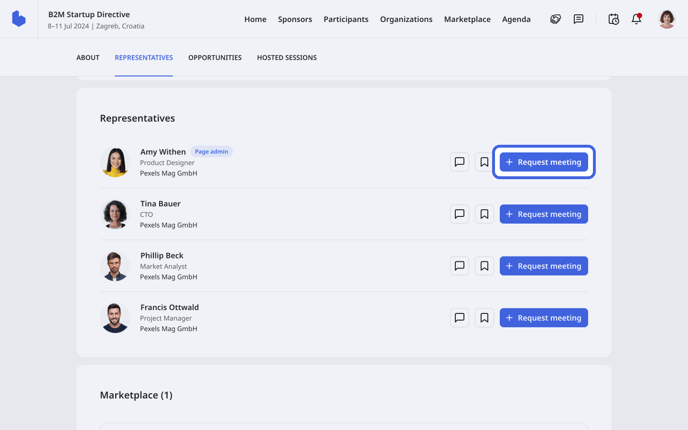
On the organization page, click on the **Representatives** tab. Find the company representative you want to schedule a meeting with, and click on the ***Request meeting*** button to send a meeting request.
#### Request a meeting through the Marketplace
On the Marketplace, you will see all opportunities added to the event.
To schedule a meeting with the participant who posted the opportunity, click on the ***plus icon*** next to their name on the opportunity card.
Learn more about requesting meetings with other participants in our article [**Finding meeting partners**](https://support.b2match.com/en/finding-meeting-partners?hsLang=en)*.*
### How can I request a meeting?
After you click on ***Request a meeting***, a meeting modal will open.
By default, meetings are configured as one-on-one meetings. If the organizer enabled group meetings, then you can add up to 6 more members to the meeting.
In the **Request a meeting** modal, you can add more members and select the meeting date and meeting time.
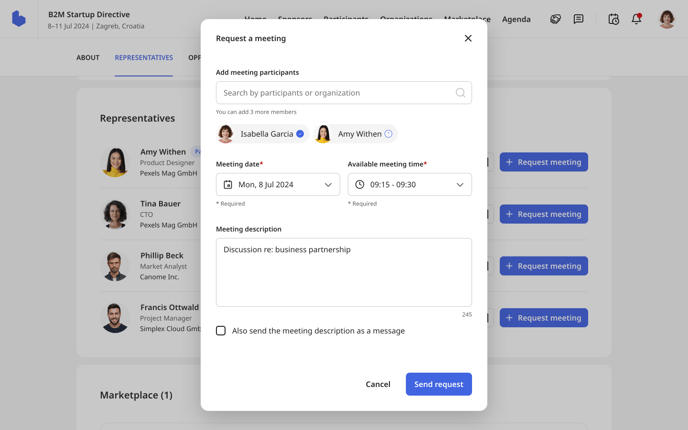
Note: The meeting date and time will be preselected based on the availability of the participants in the meeting.
Available meeting dates will be highlighted with the color of the event on the calendar.
When you're selecting the meeting time, you will see a short note that shows which participants are available or unavailable at that time. If some participants are unavailable at a specific time, you won't be able to select that time slot.
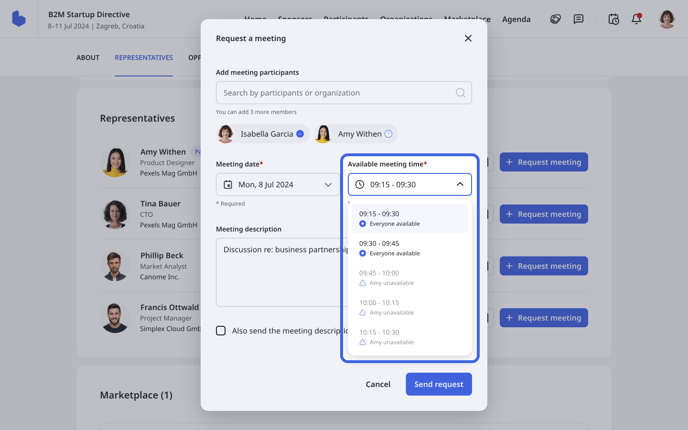
Note: The meeting date and available meeting time are mandatory to state.
You may also write a meeting description so that the participant receiving the request has a general idea of what the meeting will be about.
The meeting description can also be sent as a message, allowing you and the participant to start the conversation even before the meeting begins.
To send the meeting description as a message, ***tick the box***.
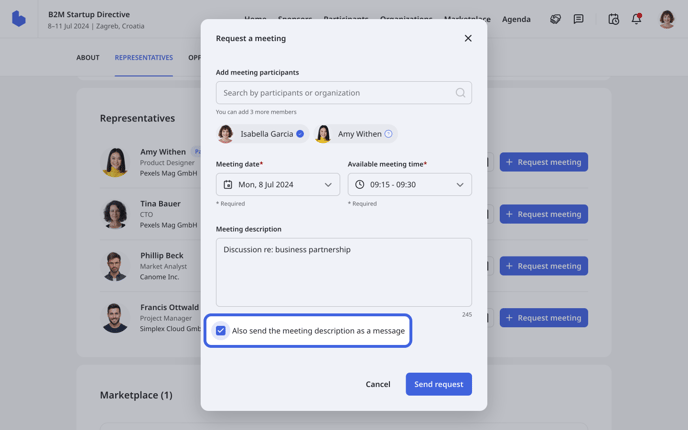
After you filled in all the fields, click on ***Send request***.
After that, a new **info** modal will be displayed with all the details about the meeting.
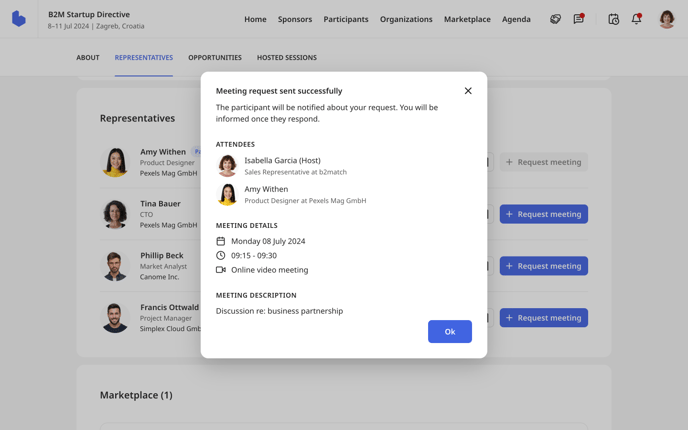
The other participants will be notified of your meeting request when you send it, and they may decide whether to accept it or not. After they respond to your meeting request, you will get a notification of their response.
If you want to learn more about meetings, read our article [**Understanding b2match meetings**](https://support.b2match.com/en/understanding-b2match-meetings?hsLang=en).
*If you didn’t find an answer to your questions, please get in touch with the Event Organizers. Their contact details can be found on the Contact page of the event website.*
- [Organizer Guide](https://support.b2match.com/organizer-guide?hsLang=en#main-content)
- [Your Organizer Account](https://support.b2match.com/organizer-guide?hsLang=en#your-organizer-account)
- [Managing Organizers](https://support.b2match.com/organizer-guide?hsLang=en#managing-organizers)
- [Workspace Management](https://support.b2match.com/organizer-guide?hsLang=en#workspace-management)
- [Event Management](https://support.b2match.com/organizer-guide?hsLang=en#event-management)
- [Home Page Editor](https://support.b2match.com/organizer-guide?hsLang=en#home-page-editor)
- [Event Settings](https://support.b2match.com/organizer-guide?hsLang=en#event-settings)
- [Event Components](https://support.b2match.com/organizer-guide?hsLang=en#event-components)
- [Branding](https://support.b2match.com/organizer-guide?hsLang=en#branding)
- [Registration Settings](https://support.b2match.com/organizer-guide?hsLang=en#registration-settings)
- [Custom Questions](https://support.b2match.com/organizer-guide?hsLang=en#custom-questions)
- [Participant Types](https://support.b2match.com/organizer-guide?hsLang=en#participant-types)
- [Ticketing](https://support.b2match.com/organizer-guide?hsLang=en#ticketing)
- [Agenda: Sessions](https://support.b2match.com/organizer-guide?hsLang=en#agenda-sessions)
- [Agenda: Session Locations](https://support.b2match.com/organizer-guide?hsLang=en#agenda-session-locations)
- [Agenda: Tracks](https://support.b2match.com/organizer-guide?hsLang=en#agenda-tracks)
- [Agenda: Topics](https://support.b2match.com/organizer-guide?hsLang=en#agenda-topics)
- [Agenda: Live Streams](https://support.b2match.com/organizer-guide?hsLang=en#agenda-live-streams)
- [Participants: Managing participants](https://support.b2match.com/organizer-guide?hsLang=en#participants-managing-participants)
- [Participants: Participant Types](https://support.b2match.com/organizer-guide?hsLang=en#participants-participant-types)
- [Participants: Speakers](https://support.b2match.com/organizer-guide?hsLang=en#participants-speakers)
- [Organizations: Managing Organizations](https://support.b2match.com/organizer-guide?hsLang=en#organizations-managing-organizations)
- [Organizations: Organization Types](https://support.b2match.com/organizer-guide?hsLang=en#organizations-organization-types)
- [Organizations: Areas of Activity](https://support.b2match.com/organizer-guide?hsLang=en#organizations-areas-of-activity)
- [Organizations: Sponsors](https://support.b2match.com/organizer-guide?hsLang=en#organizations-sponsors)
- [Meetings](https://support.b2match.com/organizer-guide?hsLang=en#meetings)
- [Meetings: Settings](https://support.b2match.com/organizer-guide?hsLang=en#meetings-settings)
- [Meetings: Meeting Blocks](https://support.b2match.com/organizer-guide?hsLang=en#meetings-meeting-blocks)
- [Meetings: Meeting Locations](https://support.b2match.com/organizer-guide?hsLang=en#meetings-meeting-locations)
- [Marketplace](https://support.b2match.com/organizer-guide?hsLang=en#marketplace)
- [Emails & Notifications: Outbox Emails](https://support.b2match.com/organizer-guide?hsLang=en#emails-notifications-outbox-emails)
- [Emails & Notifications: Automated Email Notifications](https://support.b2match.com/organizer-guide?hsLang=en#emails-notifications-automated-email-notifications)
- [Emails & Notifications: Announcements](https://support.b2match.com/organizer-guide?hsLang=en#emails-notifications-announcements)
- [Advanced Search](https://support.b2match.com/organizer-guide?hsLang=en#advanced-search)
- [Data Import & Export](https://support.b2match.com/organizer-guide?hsLang=en#data-import-export)
- [In-Person Participant Management: Badges](https://support.b2match.com/organizer-guide?hsLang=en#in-person-participant-management-badges)
- [In-Person Participant Management: Check-In App](https://support.b2match.com/organizer-guide?hsLang=en#in-person-participant-management-check-in-app)
- [In-Person Participant Management: On-Site Support](https://support.b2match.com/organizer-guide?hsLang=en#in-person-participant-management-on-site-support)
- [Mobile Event App](https://support.b2match.com/organizer-guide?hsLang=en#mobile-event-app)
- [Community Management Platform](https://support.b2match.com/organizer-guide?hsLang=en#community-management-platform)
- [Registration Form](https://support.b2match.com/organizer-guide?hsLang=en#registration-form)
- [Participant Guide](https://support.b2match.com/participant-guide?hsLang=en#main-content)
- [Getting Started](https://support.b2match.com/participant-guide?hsLang=en#getting-started)
- [Account Settings](https://support.b2match.com/participant-guide?hsLang=en#account-settings)
- [Event Settings](https://support.b2match.com/participant-guide?hsLang=en#event-settings)
- [Profile](https://support.b2match.com/participant-guide?hsLang=en#profile)
- [Agenda](https://support.b2match.com/participant-guide?hsLang=en#agenda)
- [Networking: Meetings](https://support.b2match.com/participant-guide?hsLang=en#networking-meetings)
- [Networking: Conversations](https://support.b2match.com/participant-guide?hsLang=en#networking-conversations)
- [Marketplace](https://support.b2match.com/participant-guide?hsLang=en#marketplace)
- [Feedback](https://support.b2match.com/participant-guide?hsLang=en#feedback)
[](https://www.b2match.com)
Need more help? Contact us at support@b2match.com
[mailto:support@b2match.com](mailto:support@b2match.com)
Copyright © 2025, b2match GmbH