---
title: Understanding b2match Marketplace
description: The b2match marketplace serves as a hub where participants can create and discover various business opportunities. It's where business matchmaking begins – people can connect and set up meetings with
---
[Skip to content](https://support.b2match.com/understanding-b2match-marketplace-1#main-content)
[](https://www.b2match.com/)
- [Log in](https://admin.b2match.com/cp/log-in)
Open main navigation
Close main navigation
- [Log in](https://admin.b2match.com/cp/log-in)
- [Contact us](http://www.b2match.com/contact-us)
[Contact us](http://www.b2match.com/contact-us)
How can we help you?
- There are no suggestions because the search field is empty.
1. [Help Center](https://support.b2match.com/?hsLang=en)
2. [Organizer Guide](https://support.b2match.com/organizer-guide?hsLang=en)
3. [Marketplace](https://support.b2match.com/organizer-guide?hsLang=en#marketplace)
# Understanding b2match Marketplace
The b2match marketplace serves as a hub where participants can create and discover various business opportunities. It's where business matchmaking begins – people can connect and set up meetings with other participants who have posted opportunities. This helps participants build successful business partnerships while specifying their wants and needs.
### How can I access the Marketplace?
First, click on ***Marketplace*** on the **left sidebar** of the Organizer’s Tool.
This will open the **Marketplace page**, showcasing all the opportunities participants have created on the event website. You can manage and [**validate these opportunities**](https://support.b2match.com/en/validating-opportunities?hsLang=en)here.
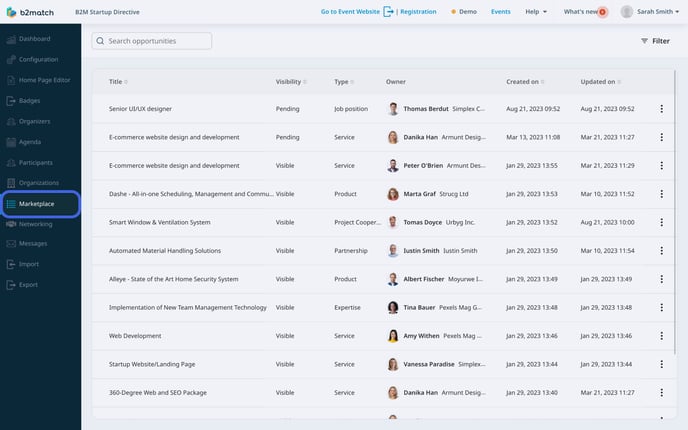
Before participants can create marketplace opportunities, you, as the event organizer, must first [**enable the marketplace feature**](https://support.b2match.com/en/enabling-the-marketplace?hsLang=en). Once enabled, you can then choose which [**opportunity types**](https://support.b2match.com/en/configuring-opportunity-types?hsLang=en) to make available for the event.
### What does the Marketplace page look like?
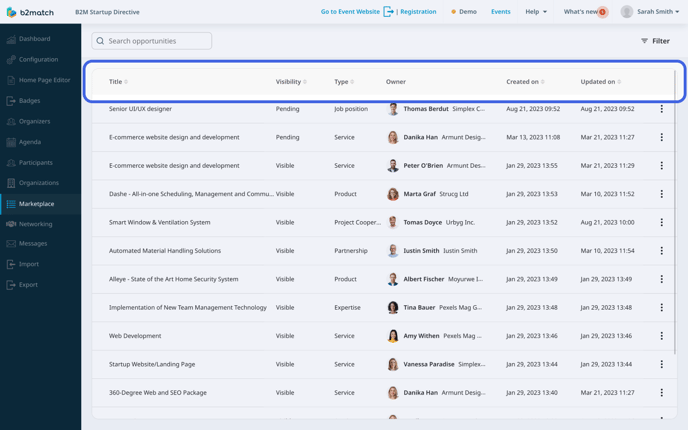
The **Marketplace page** displays a table, showcasing all the opportunities your participants have created.
- The **Title column** displays opportunity names.
- The **Visibility column** indicates the opportunities visibility status (visible, hidden, pending).
- The **Type column** shows the opportunity's type.
- The **Owner column** presents the opportunity creator's name, avatar, and organization.
- The **Created on** column displays the exact date and time when the opportunity was created.
- The **Updated on** column shows when the opportunity was last updated.
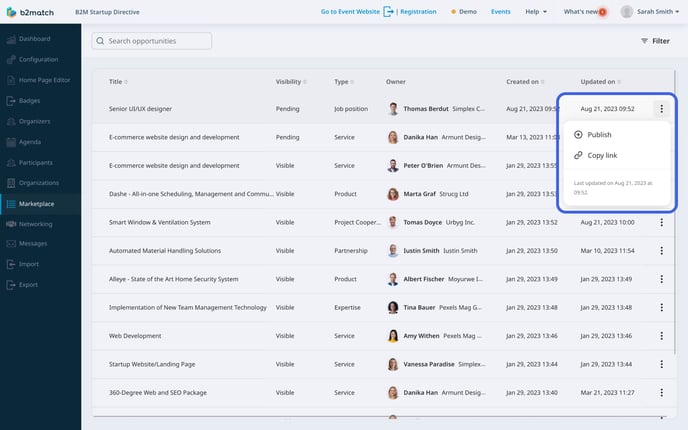
Next to each opportunity, you will notice **3 dots**. Clicking on these ***3 dots***, a drop-down menu will appear. From here, you can validate the opportunity or copy its link.
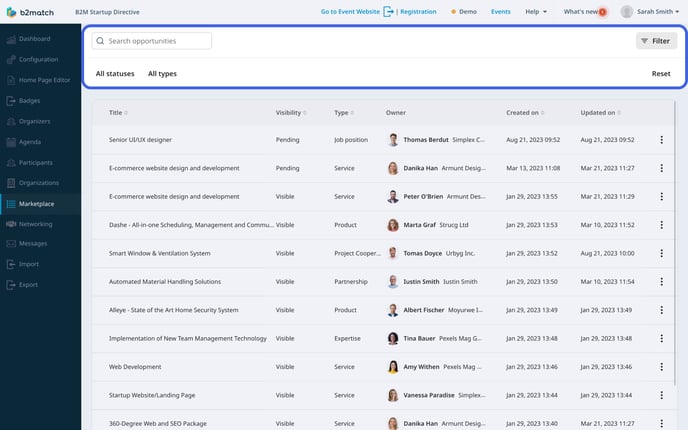
In the upper left corner of the screen, you can search for opportunities by typing the opportunity's title.
In the upper right corner, you'll see the **Filter button**.
Clicking on the ***Filter button*** shows two options for filtering.
You can filter marketplace opportunities by their status (all statuses, visible, hidden, pending) or by their type (all types, and specific types you enabled for the event).
### Opportunity info sidebar
On the **Marketplace page**, you have the ability to edit each opportunity within the **Opportunity info sidebar**.
To access this sidebar, just click on any ***opportunity*** in the table list.
In the **Title field**, you can edit the opportunity's name.
In the **Short description field**, offer a brief overview of the opportunity within a maximum of 255 characters, which will appear on the opportunity card on the Marketplace page on the event website.
In the **Full description field**, you can edit the opportunity's description using up to 5000 characters, which will be visible on the single Opportunity page on the event website.
Below the Full description field, you'll notice the **Show on the organization page toggle switch**. Click on the ***toggle switch*** to display the opportunity on the participant's organization page, provided the participant is associated with an organization.
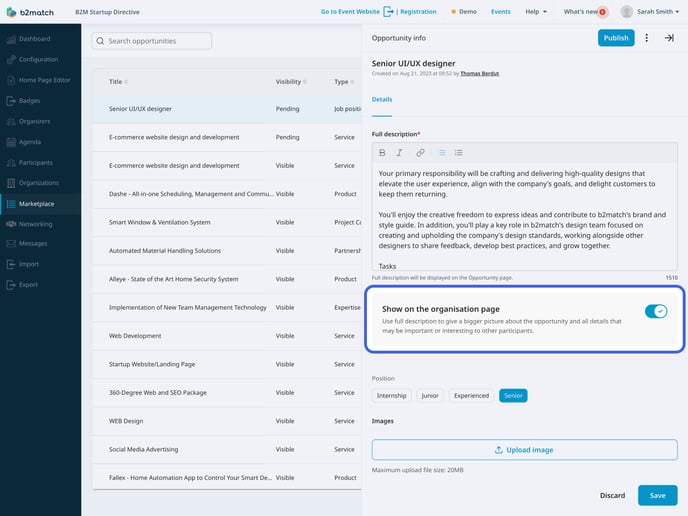
Next, you'll find a section tailored to each [**opportunity type**](https://support.b2match.com/en/configuring-opportunity-types?hsLang=en), displaying different information depending on the opportunity type you are editing. For example, if you're editing an opportunity categorized as Product, you'll find fields like **What are you looking for?** and **Market application keywords**, together with the information you provided when configuring the opportunity type.
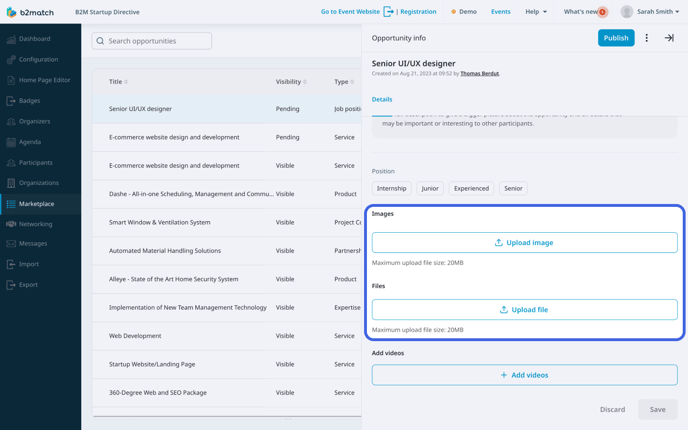
In the **Images section**, you can add images by clicking the ***Upload image button***.
For adding files, click the ***Upload file button*** in the **Files section**.
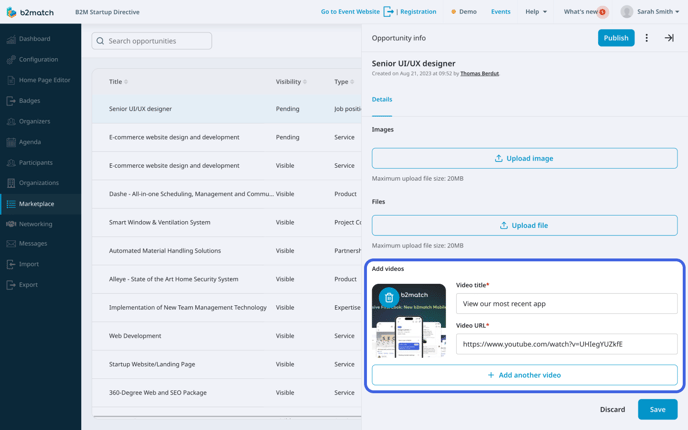
In the **Add videos section**, select the ***Add videos button*** to reveal two more fields.
Fill in the **Video title field** with the video's title, and in the **Video URL field**, paste the link of the video you wish to upload. If you need to delete a video, just click on the ***bin icon*** on the video's thumbnail.
*If you didn't find an answer to your questions, please get in touch with the Support Team* [***here***](https://www.b2match.com/contact-us/organizer-support?utm_source=knowledgebase&utm_medium=link&utm_content=knowledgebase_article)*.*
- [Organizer Guide](https://support.b2match.com/organizer-guide?hsLang=en#main-content)
- [Your Organizer Account](https://support.b2match.com/organizer-guide?hsLang=en#your-organizer-account)
- [Managing Organizers](https://support.b2match.com/organizer-guide?hsLang=en#managing-organizers)
- [Workspace Management](https://support.b2match.com/organizer-guide?hsLang=en#workspace-management)
- [Event Management](https://support.b2match.com/organizer-guide?hsLang=en#event-management)
- [Home Page Editor](https://support.b2match.com/organizer-guide?hsLang=en#home-page-editor)
- [Event Settings](https://support.b2match.com/organizer-guide?hsLang=en#event-settings)
- [Event Components](https://support.b2match.com/organizer-guide?hsLang=en#event-components)
- [Branding](https://support.b2match.com/organizer-guide?hsLang=en#branding)
- [Registration Settings](https://support.b2match.com/organizer-guide?hsLang=en#registration-settings)
- [Custom Questions](https://support.b2match.com/organizer-guide?hsLang=en#custom-questions)
- [Participant Types](https://support.b2match.com/organizer-guide?hsLang=en#participant-types)
- [Ticketing](https://support.b2match.com/organizer-guide?hsLang=en#ticketing)
- [Agenda: Sessions](https://support.b2match.com/organizer-guide?hsLang=en#agenda-sessions)
- [Agenda: Session Locations](https://support.b2match.com/organizer-guide?hsLang=en#agenda-session-locations)
- [Agenda: Tracks](https://support.b2match.com/organizer-guide?hsLang=en#agenda-tracks)
- [Agenda: Topics](https://support.b2match.com/organizer-guide?hsLang=en#agenda-topics)
- [Agenda: Live Streams](https://support.b2match.com/organizer-guide?hsLang=en#agenda-live-streams)
- [Participants: Managing participants](https://support.b2match.com/organizer-guide?hsLang=en#participants-managing-participants)
- [Participants: Participant Types](https://support.b2match.com/organizer-guide?hsLang=en#participants-participant-types)
- [Participants: Speakers](https://support.b2match.com/organizer-guide?hsLang=en#participants-speakers)
- [Organizations: Managing Organizations](https://support.b2match.com/organizer-guide?hsLang=en#organizations-managing-organizations)
- [Organizations: Organization Types](https://support.b2match.com/organizer-guide?hsLang=en#organizations-organization-types)
- [Organizations: Areas of Activity](https://support.b2match.com/organizer-guide?hsLang=en#organizations-areas-of-activity)
- [Organizations: Sponsors](https://support.b2match.com/organizer-guide?hsLang=en#organizations-sponsors)
- [Meetings](https://support.b2match.com/organizer-guide?hsLang=en#meetings)
- [Meetings: Settings](https://support.b2match.com/organizer-guide?hsLang=en#meetings-settings)
- [Meetings: Meeting Blocks](https://support.b2match.com/organizer-guide?hsLang=en#meetings-meeting-blocks)
- [Meetings: Meeting Locations](https://support.b2match.com/organizer-guide?hsLang=en#meetings-meeting-locations)
- [Marketplace](https://support.b2match.com/organizer-guide?hsLang=en#marketplace)
- [Emails & Notifications: Outbox Emails](https://support.b2match.com/organizer-guide?hsLang=en#emails-notifications-outbox-emails)
- [Emails & Notifications: Automated Email Notifications](https://support.b2match.com/organizer-guide?hsLang=en#emails-notifications-automated-email-notifications)
- [Emails & Notifications: Announcements](https://support.b2match.com/organizer-guide?hsLang=en#emails-notifications-announcements)
- [Advanced Search](https://support.b2match.com/organizer-guide?hsLang=en#advanced-search)
- [Data Import & Export](https://support.b2match.com/organizer-guide?hsLang=en#data-import-export)
- [In-Person Participant Management: Badges](https://support.b2match.com/organizer-guide?hsLang=en#in-person-participant-management-badges)
- [In-Person Participant Management: Check-In App](https://support.b2match.com/organizer-guide?hsLang=en#in-person-participant-management-check-in-app)
- [In-Person Participant Management: On-Site Support](https://support.b2match.com/organizer-guide?hsLang=en#in-person-participant-management-on-site-support)
- [Mobile Event App](https://support.b2match.com/organizer-guide?hsLang=en#mobile-event-app)
- [Community Management Platform](https://support.b2match.com/organizer-guide?hsLang=en#community-management-platform)
- [Registration Form](https://support.b2match.com/organizer-guide?hsLang=en#registration-form)
- [Participant Guide](https://support.b2match.com/participant-guide?hsLang=en#main-content)
- [Getting Started](https://support.b2match.com/participant-guide?hsLang=en#getting-started)
- [Account Settings](https://support.b2match.com/participant-guide?hsLang=en#account-settings)
- [Event Settings](https://support.b2match.com/participant-guide?hsLang=en#event-settings)
- [Profile](https://support.b2match.com/participant-guide?hsLang=en#profile)
- [Agenda](https://support.b2match.com/participant-guide?hsLang=en#agenda)
- [Networking: Meetings](https://support.b2match.com/participant-guide?hsLang=en#networking-meetings)
- [Networking: Conversations](https://support.b2match.com/participant-guide?hsLang=en#networking-conversations)
- [Marketplace](https://support.b2match.com/participant-guide?hsLang=en#marketplace)
- [Feedback](https://support.b2match.com/participant-guide?hsLang=en#feedback)
[](https://www.b2match.com)
Need more help? Contact us at support@b2match.com
[mailto:support@b2match.com](mailto:support@b2match.com)
Copyright © 2025, b2match GmbH