---
title: Unpublishing & Deleting Micro Events
description: When fostering a community and organizing one-day events, it’s crucial to keep track of the different events that will take place. Creating micro events and ensuring members have access to all the nec
---
[Skip to content](https://support.b2match.com/unpublishing-deleting-micro-events#main-content)
[](https://www.b2match.com/)
- [Log in](https://admin.b2match.com/cp/log-in)
Open main navigation
Close main navigation
- [Log in](https://admin.b2match.com/cp/log-in)
- [Contact us](http://www.b2match.com/contact-us)
[Contact us](http://www.b2match.com/contact-us)
How can we help you?
- There are no suggestions because the search field is empty.
1. [Help Center](https://support.b2match.com/?hsLang=en)
2. [Organizer Guide](https://support.b2match.com/organizer-guide?hsLang=en)
3. [Community Management Platform](https://support.b2match.com/organizer-guide?hsLang=en#community-management-platform)
# Unpublishing & Deleting Micro Events
When fostering a community and organizing one-day events, it’s crucial to keep track of the different events that will take place. Creating micro events and ensuring members have access to all the necessary information about them is one of the primary responsibilities of an event organizer.
Once you’ve [**created an event**](https://support.b2match.com/en/creating-micro-events?hsLang=en), you have the option to keep it published or unpublish it.
### What is the difference between an unpublished and a published event?
If an event is **published**, it means that it will be displayed on the community webpage's program, which your members can see. This allows members to plan in advance and decide which events they want to attend.
On the other hand, an **unpublished** event won’t be visible to the members. While you, as an organizer, can see the event in the Organizer's tool, it won't appear on the program until it's published.
Tip: The unpublished status is useful when information is incomplete or pending, like an unfinalized agenda for the event. It's advisable to publish an event only after all the information is available to prevent last-minute changes or confusion for the members. Keep in mind that the default status of your event is **published**.
### How can I unpublish an event?
#### Unpublish an event from the Events tab
First, click on ***Program*** on the **left sidebar**. Next, from the events list, find the event you want to unpublish.
Click on the ***3 dots*** next to the event.
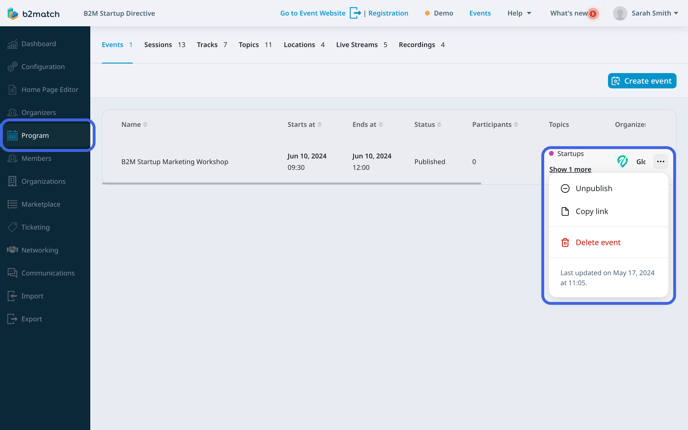
From the **drop-down menu**, click on ***Unpublish***.
#### Unpublish an event from the Event info sidebar
Open the ***Program*** from the **left sidebar**.
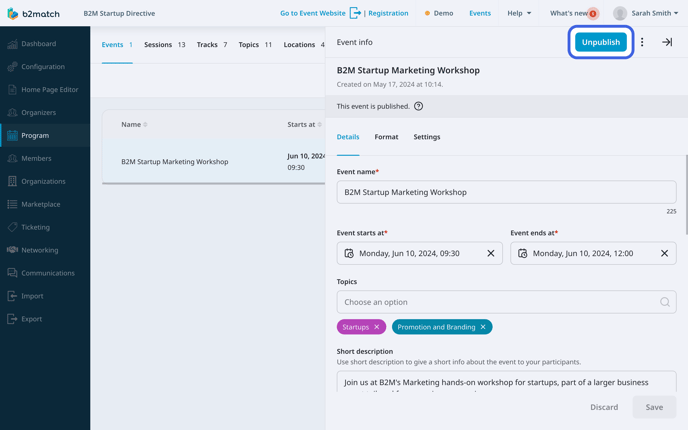
Click on the published event you want to unpublish to open the **Event info sidebar**.
In the upper right corner of the Event info sidebar, click on the ***Unpublish button***.
### Where can I check if an event is published?
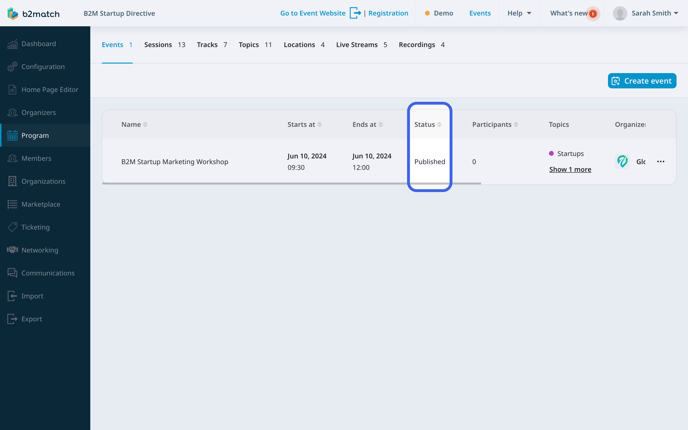
To check whether an event is published or not, go to the ***Program*** from the left sidebar.
In the **Events tab**, you'll find a list of all the events you've created. You can easily determine whether an event is published by looking at the **Status column**, which indicates whether it's published or unpublished.
### How can I delete a micro event?
Whether you need to remove an event due to scheduling conflicts, or other unforeseen circumstances, being able to delete a one-day event is a crucial part of community management.
There are two ways of deleting an event.
#### Deleting an event from the Events tab
First, access the **Events tab** by clicking on ***Program*** in the left sidebar.
Next, find the event you want to delete, and click on the ***3 dots***.
From the drop-down menu, select ***Delete event***.
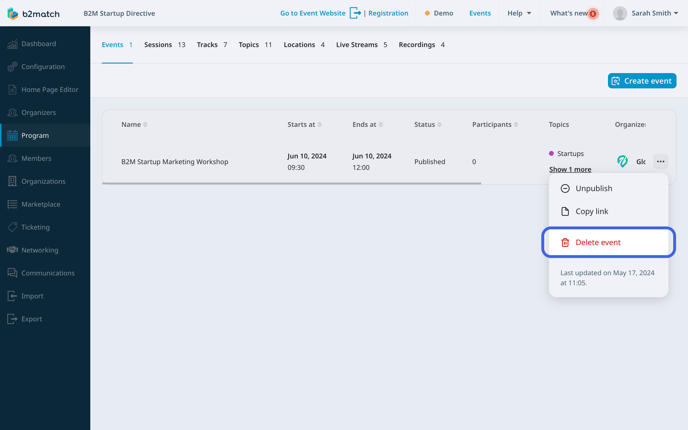
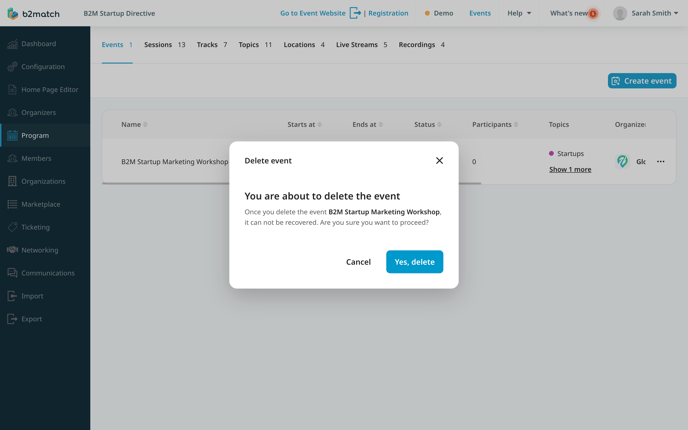
This will open the **Delete event modal** to ensure you are aware of the consequences of deleting a session. Here, click on ***Yes, delete***.
#### Deleting an event from the Events info sidebar
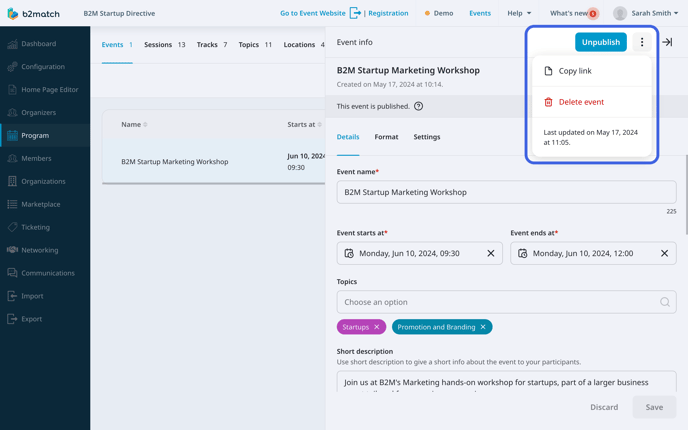
In the **Events tab**, find the event you want to delete and click on it to open the **Event info sidebar**.
In the **Event info sidebar**, click on the ***3 dots*** next to the **Publish/Unpublish button**, and from the drop-down menu, choose ***Delete event***.
Note: Keep in mind that deleting a micro event is an irreversible action. Once you delete it, it cannot be recovered, and you must create a new one.
*If you didn't find an answer to your questions, please get in touch with the Support Team* [***here***](https://www.b2match.com/contact-us/organizer-support?utm_source=knowledgebase&utm_medium=link&utm_content=knowledgebase_article)*.*
- [Organizer Guide](https://support.b2match.com/organizer-guide?hsLang=en#main-content)
- [Your Organizer Account](https://support.b2match.com/organizer-guide?hsLang=en#your-organizer-account)
- [Managing Organizers](https://support.b2match.com/organizer-guide?hsLang=en#managing-organizers)
- [Workspace Management](https://support.b2match.com/organizer-guide?hsLang=en#workspace-management)
- [Event Management](https://support.b2match.com/organizer-guide?hsLang=en#event-management)
- [Home Page Editor](https://support.b2match.com/organizer-guide?hsLang=en#home-page-editor)
- [Event Settings](https://support.b2match.com/organizer-guide?hsLang=en#event-settings)
- [Event Components](https://support.b2match.com/organizer-guide?hsLang=en#event-components)
- [Branding](https://support.b2match.com/organizer-guide?hsLang=en#branding)
- [Registration Settings](https://support.b2match.com/organizer-guide?hsLang=en#registration-settings)
- [Custom Questions](https://support.b2match.com/organizer-guide?hsLang=en#custom-questions)
- [Participant Types](https://support.b2match.com/organizer-guide?hsLang=en#participant-types)
- [Ticketing](https://support.b2match.com/organizer-guide?hsLang=en#ticketing)
- [Agenda: Sessions](https://support.b2match.com/organizer-guide?hsLang=en#agenda-sessions)
- [Agenda: Session Locations](https://support.b2match.com/organizer-guide?hsLang=en#agenda-session-locations)
- [Agenda: Tracks](https://support.b2match.com/organizer-guide?hsLang=en#agenda-tracks)
- [Agenda: Topics](https://support.b2match.com/organizer-guide?hsLang=en#agenda-topics)
- [Agenda: Live Streams](https://support.b2match.com/organizer-guide?hsLang=en#agenda-live-streams)
- [Participants: Managing participants](https://support.b2match.com/organizer-guide?hsLang=en#participants-managing-participants)
- [Participants: Participant Types](https://support.b2match.com/organizer-guide?hsLang=en#participants-participant-types)
- [Participants: Speakers](https://support.b2match.com/organizer-guide?hsLang=en#participants-speakers)
- [Organizations: Managing Organizations](https://support.b2match.com/organizer-guide?hsLang=en#organizations-managing-organizations)
- [Organizations: Organization Types](https://support.b2match.com/organizer-guide?hsLang=en#organizations-organization-types)
- [Organizations: Areas of Activity](https://support.b2match.com/organizer-guide?hsLang=en#organizations-areas-of-activity)
- [Organizations: Sponsors](https://support.b2match.com/organizer-guide?hsLang=en#organizations-sponsors)
- [Meetings](https://support.b2match.com/organizer-guide?hsLang=en#meetings)
- [Meetings: Settings](https://support.b2match.com/organizer-guide?hsLang=en#meetings-settings)
- [Meetings: Meeting Blocks](https://support.b2match.com/organizer-guide?hsLang=en#meetings-meeting-blocks)
- [Meetings: Meeting Locations](https://support.b2match.com/organizer-guide?hsLang=en#meetings-meeting-locations)
- [Marketplace](https://support.b2match.com/organizer-guide?hsLang=en#marketplace)
- [Emails & Notifications: Outbox Emails](https://support.b2match.com/organizer-guide?hsLang=en#emails-notifications-outbox-emails)
- [Emails & Notifications: Automated Email Notifications](https://support.b2match.com/organizer-guide?hsLang=en#emails-notifications-automated-email-notifications)
- [Emails & Notifications: Announcements](https://support.b2match.com/organizer-guide?hsLang=en#emails-notifications-announcements)
- [Advanced Search](https://support.b2match.com/organizer-guide?hsLang=en#advanced-search)
- [Data Import & Export](https://support.b2match.com/organizer-guide?hsLang=en#data-import-export)
- [In-Person Participant Management: Badges](https://support.b2match.com/organizer-guide?hsLang=en#in-person-participant-management-badges)
- [In-Person Participant Management: Check-In App](https://support.b2match.com/organizer-guide?hsLang=en#in-person-participant-management-check-in-app)
- [In-Person Participant Management: On-Site Support](https://support.b2match.com/organizer-guide?hsLang=en#in-person-participant-management-on-site-support)
- [Mobile Event App](https://support.b2match.com/organizer-guide?hsLang=en#mobile-event-app)
- [Community Management Platform](https://support.b2match.com/organizer-guide?hsLang=en#community-management-platform)
- [Registration Form](https://support.b2match.com/organizer-guide?hsLang=en#registration-form)
- [Participant Guide](https://support.b2match.com/participant-guide?hsLang=en#main-content)
- [Getting Started](https://support.b2match.com/participant-guide?hsLang=en#getting-started)
- [Account Settings](https://support.b2match.com/participant-guide?hsLang=en#account-settings)
- [Event Settings](https://support.b2match.com/participant-guide?hsLang=en#event-settings)
- [Profile](https://support.b2match.com/participant-guide?hsLang=en#profile)
- [Agenda](https://support.b2match.com/participant-guide?hsLang=en#agenda)
- [Networking: Meetings](https://support.b2match.com/participant-guide?hsLang=en#networking-meetings)
- [Networking: Conversations](https://support.b2match.com/participant-guide?hsLang=en#networking-conversations)
- [Marketplace](https://support.b2match.com/participant-guide?hsLang=en#marketplace)
- [Feedback](https://support.b2match.com/participant-guide?hsLang=en#feedback)
[](https://www.b2match.com)
Need more help? Contact us at support@b2match.com
[mailto:support@b2match.com](mailto:support@b2match.com)
Copyright © 2025, b2match GmbH