---
title: Rejecting Participant Registrations
description: In addition to adding participants to your event, another important element of effective event management is the ability to reject participant registrations when the situation calls for it. Sometimes
---
[Skip to content](https://support.b2match.com/rejecting-participant-registrations#main-content)
[](https://www.b2match.com/)
- [Log in](https://admin.b2match.com/cp/log-in)
Open main navigation
Close main navigation
- [Log in](https://admin.b2match.com/cp/log-in)
- [Contact us](http://www.b2match.com/contact-us)
[Contact us](http://www.b2match.com/contact-us)
How can we help you?
- There are no suggestions because the search field is empty.
1. [Help Center](https://support.b2match.com/?hsLang=en)
2. [Organizer Guide](https://support.b2match.com/organizer-guide?hsLang=en)
3. [Participants: Managing participants](https://support.b2match.com/organizer-guide?hsLang=en#participants-managing-participants)
# Rejecting Participant Registrations
In addition to [**adding participants**](https://help.b2match.com/en-US/274711-41223a68788b4d299ac30bf975dc2dea?hsLang=en) to your event, another important element of effective event management is the ability to reject participant registrations when the situation calls for it.
Sometimes certain unforeseen circumstances or capacity limitations require the rejection of some registrations. While it is regrettable, being prepared to handle such scenarios is essential for ensuring a smooth and well-managed event.
### How can I reject participant’s registration?
First, click on ***Participants*** on the **left sidebar** of the Organizer’s Tool.
This will open the **Participant’s list**.
Locate the participant whose registration you wish to reject and click on their name to access their **profile overview**.
In the upper right corner, you will find ***3 dots***. Click on these dots to reveal a drop-down menu.
From the **drop-down menu**, select ***Cancel Participation***.
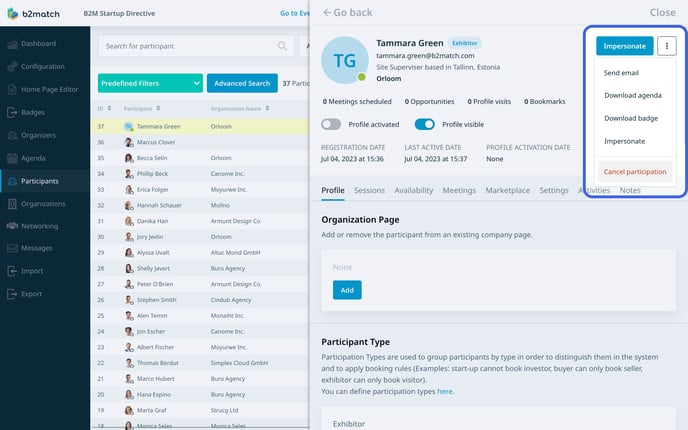
This action will open a web notification informing you that all meetings with this participant will be cancelled. Confirm your action by clicking ***OK***.
Note: After rejecting a participant's registration, they will no longer appear on the Participants list on the website, and will be unable to participate in meetings.
Once the registration is rejected, you will see the exact date and time of the cancelation in the participant's profile overview.
In the participant's list, you will notice a **Canceled** tag in the **Sessions column**, indicating that the registration for that participant has been canceled.
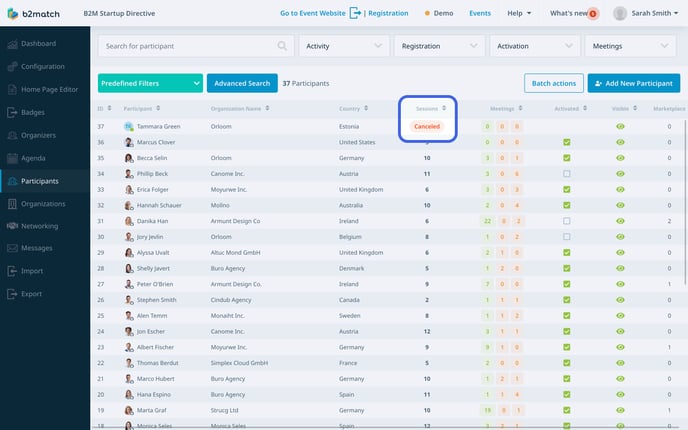
If you reject the registration of a participant who already had scheduled meetings, please be aware that these meetings will be canceled.
Note: The participant whose registration you rejected will receive an [**automated email notification**](https://help.b2match.com/en-US/understanding-b2match-email-notifications-251471?hsLang=en) regarding the rejected registration. However, keep in mind that the meeting partners of the rejected participant will not receive automatic notifications about the cancellation of their scheduled meetings.
### How can I revoke a participant’s registration?
Even if you have rejected a participant's registration, you still have the option to revoke their participation if needed.
First, locate the participant with the **Canceled tag** in the participant's list and click on their name to access their **profile overview**.
Here, click on the ***3 dots*** in the upper right corner to open the drop-down menu.
From the **drop-down menu**, select ***Revoke Participation***. This action will revoke the participant's registration.
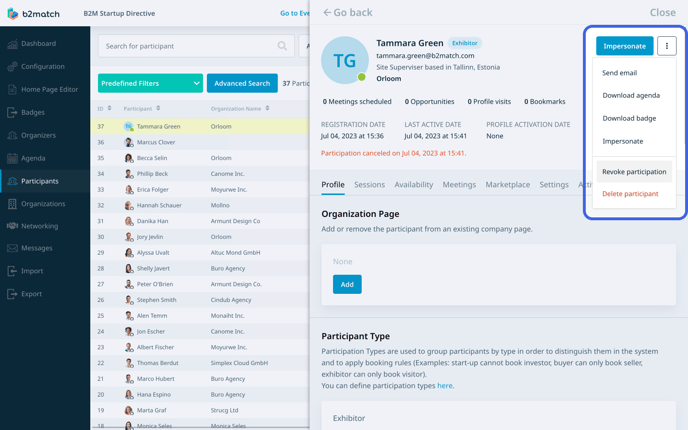
Even though you revoke the participant's registration, any meetings that were scheduled before you rejected them will still be canceled. The participant will need to reschedule their meetings accordingly.
Note: Keep in mind that it is necessary to notify the participant of their revoked registration since they will not receive automatic notifications in this case.
### How can I delete a participant from the event?
When a participant's registration is rejected, their name will still appear on the participant list in the Organizer's Tool with the **Canceled tag**. Nevertheless, you can completely remove the participant from the Organizer's Tool, ensuring they no longer appear on the participant list.
Start by clicking on ***Participants*** on the **left sidebar** of the Organizer's tool to access the participant's list.
Locate the participant with the **Canceled tag** and click on their ***name*** to open their [**profile overview**](https://help.b2match.com/en-US/273574-3a705de4e4b24ac7859146b5dd414f50?hsLang=en).
Click on the ***3 dots*** in the upper right corner, and from the **drop-down menu** choose ***Delete Participant***.
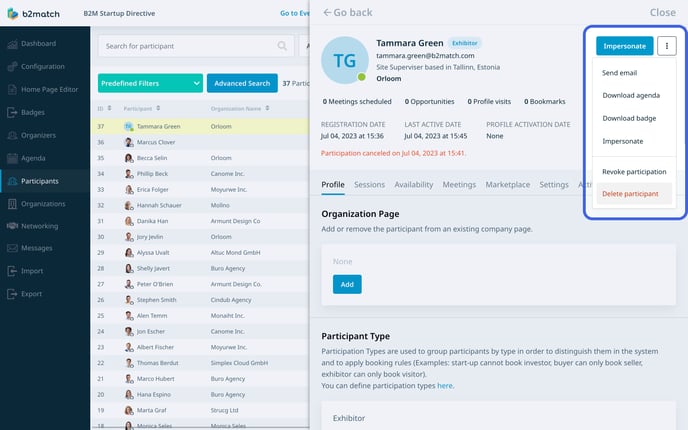
This will trigger a web notification asking if you are certain about deleting the participant.
Click ***OK*** to proceed and delete the participant from the event.
Note: Keep in mind that deleting a participant from the event is a permanent action and cannot be reversed.
*If you didn't find an answer to your questions, please get in touch with the Support Team* [***here***](https://www.b2match.com/contact-us/organizer-support?utm_source=knowledgebase&utm_medium=link&utm_content=knowledgebase_article)*.*
- [Organizer Guide](https://support.b2match.com/organizer-guide?hsLang=en#main-content)
- [Your Organizer Account](https://support.b2match.com/organizer-guide?hsLang=en#your-organizer-account)
- [Managing Organizers](https://support.b2match.com/organizer-guide?hsLang=en#managing-organizers)
- [Workspace Management](https://support.b2match.com/organizer-guide?hsLang=en#workspace-management)
- [Event Management](https://support.b2match.com/organizer-guide?hsLang=en#event-management)
- [Home Page Editor](https://support.b2match.com/organizer-guide?hsLang=en#home-page-editor)
- [Event Settings](https://support.b2match.com/organizer-guide?hsLang=en#event-settings)
- [Event Components](https://support.b2match.com/organizer-guide?hsLang=en#event-components)
- [Branding](https://support.b2match.com/organizer-guide?hsLang=en#branding)
- [Registration Settings](https://support.b2match.com/organizer-guide?hsLang=en#registration-settings)
- [Custom Questions](https://support.b2match.com/organizer-guide?hsLang=en#custom-questions)
- [Participant Types](https://support.b2match.com/organizer-guide?hsLang=en#participant-types)
- [Ticketing](https://support.b2match.com/organizer-guide?hsLang=en#ticketing)
- [Agenda: Sessions](https://support.b2match.com/organizer-guide?hsLang=en#agenda-sessions)
- [Agenda: Session Locations](https://support.b2match.com/organizer-guide?hsLang=en#agenda-session-locations)
- [Agenda: Tracks](https://support.b2match.com/organizer-guide?hsLang=en#agenda-tracks)
- [Agenda: Topics](https://support.b2match.com/organizer-guide?hsLang=en#agenda-topics)
- [Agenda: Live Streams](https://support.b2match.com/organizer-guide?hsLang=en#agenda-live-streams)
- [Participants: Managing participants](https://support.b2match.com/organizer-guide?hsLang=en#participants-managing-participants)
- [Participants: Participant Types](https://support.b2match.com/organizer-guide?hsLang=en#participants-participant-types)
- [Participants: Speakers](https://support.b2match.com/organizer-guide?hsLang=en#participants-speakers)
- [Organizations: Managing Organizations](https://support.b2match.com/organizer-guide?hsLang=en#organizations-managing-organizations)
- [Organizations: Organization Types](https://support.b2match.com/organizer-guide?hsLang=en#organizations-organization-types)
- [Organizations: Areas of Activity](https://support.b2match.com/organizer-guide?hsLang=en#organizations-areas-of-activity)
- [Organizations: Sponsors](https://support.b2match.com/organizer-guide?hsLang=en#organizations-sponsors)
- [Meetings](https://support.b2match.com/organizer-guide?hsLang=en#meetings)
- [Meetings: Settings](https://support.b2match.com/organizer-guide?hsLang=en#meetings-settings)
- [Meetings: Meeting Blocks](https://support.b2match.com/organizer-guide?hsLang=en#meetings-meeting-blocks)
- [Meetings: Meeting Locations](https://support.b2match.com/organizer-guide?hsLang=en#meetings-meeting-locations)
- [Marketplace](https://support.b2match.com/organizer-guide?hsLang=en#marketplace)
- [Emails & Notifications: Outbox Emails](https://support.b2match.com/organizer-guide?hsLang=en#emails-notifications-outbox-emails)
- [Emails & Notifications: Automated Email Notifications](https://support.b2match.com/organizer-guide?hsLang=en#emails-notifications-automated-email-notifications)
- [Emails & Notifications: Announcements](https://support.b2match.com/organizer-guide?hsLang=en#emails-notifications-announcements)
- [Advanced Search](https://support.b2match.com/organizer-guide?hsLang=en#advanced-search)
- [Data Import & Export](https://support.b2match.com/organizer-guide?hsLang=en#data-import-export)
- [In-Person Participant Management: Badges](https://support.b2match.com/organizer-guide?hsLang=en#in-person-participant-management-badges)
- [In-Person Participant Management: Check-In App](https://support.b2match.com/organizer-guide?hsLang=en#in-person-participant-management-check-in-app)
- [In-Person Participant Management: On-Site Support](https://support.b2match.com/organizer-guide?hsLang=en#in-person-participant-management-on-site-support)
- [Mobile Event App](https://support.b2match.com/organizer-guide?hsLang=en#mobile-event-app)
- [Community Management Platform](https://support.b2match.com/organizer-guide?hsLang=en#community-management-platform)
- [Registration Form](https://support.b2match.com/organizer-guide?hsLang=en#registration-form)
- [Participant Guide](https://support.b2match.com/participant-guide?hsLang=en#main-content)
- [Getting Started](https://support.b2match.com/participant-guide?hsLang=en#getting-started)
- [Account Settings](https://support.b2match.com/participant-guide?hsLang=en#account-settings)
- [Event Settings](https://support.b2match.com/participant-guide?hsLang=en#event-settings)
- [Profile](https://support.b2match.com/participant-guide?hsLang=en#profile)
- [Agenda](https://support.b2match.com/participant-guide?hsLang=en#agenda)
- [Networking: Meetings](https://support.b2match.com/participant-guide?hsLang=en#networking-meetings)
- [Networking: Conversations](https://support.b2match.com/participant-guide?hsLang=en#networking-conversations)
- [Marketplace](https://support.b2match.com/participant-guide?hsLang=en#marketplace)
- [Feedback](https://support.b2match.com/participant-guide?hsLang=en#feedback)
[](https://www.b2match.com)
Need more help? Contact us at support@b2match.com
[mailto:support@b2match.com](mailto:support@b2match.com)
Copyright © 2025, b2match GmbH