---
title: Understanding b2match Workspaces
description: b2match workspaces are unique spaces where your team can collaborate to host events or build communities. These workspaces allow you to create and manage these events efficiently. An organization's wo
---
[Skip to content](https://support.b2match.com/understanding-b2match-workspaces#main-content)
[](https://www.b2match.com/)
- [Log in](https://admin.b2match.com/cp/log-in)
Open main navigation
Close main navigation
- [Log in](https://admin.b2match.com/cp/log-in)
- [Contact us](http://www.b2match.com/contact-us)
[Contact us](http://www.b2match.com/contact-us)
How can we help you?
- There are no suggestions because the search field is empty.
1. [Help Center](https://support.b2match.com/?hsLang=en)
2. [Organizer Guide](https://support.b2match.com/organizer-guide?hsLang=en)
3. [Workspace Management](https://support.b2match.com/organizer-guide?hsLang=en#workspace-management)
# Understanding b2match Workspaces
b2match workspaces are unique spaces where your team can collaborate to host events or build communities. These workspaces allow you to create and manage these events efficiently.
### How does a workspace look?
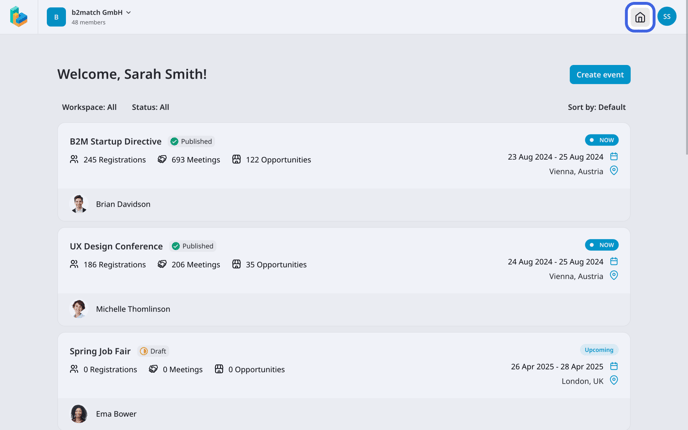
An organization's workspace displays **all your events** with relevant detail.
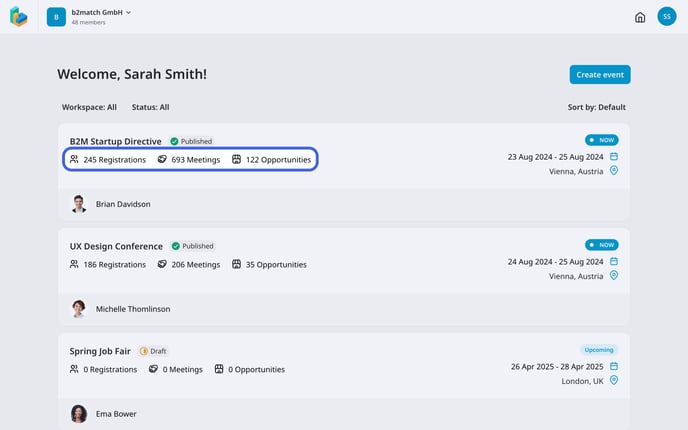
Each **event card** shows the event’s name, status, number of participants, number of meetings and marketplace opportunities.
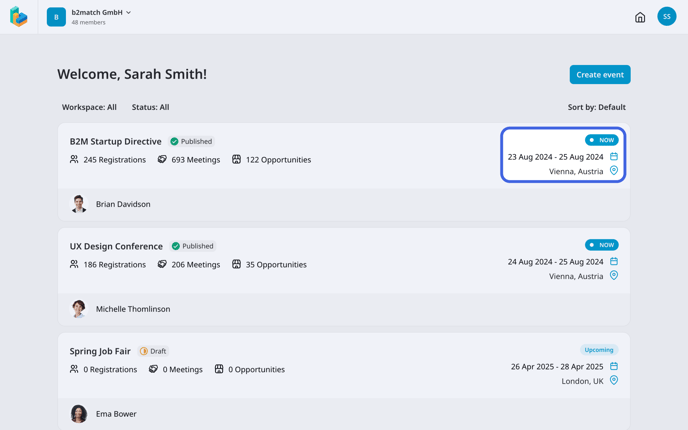
On the right side, you can see whether your event is happening now, upcoming or past. Below that, you will find the event's date and location.
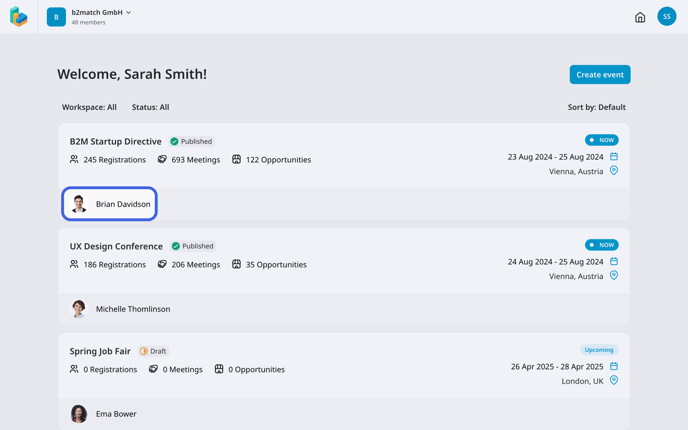
On the event card you can also check who the **owner** of the event is.
#### Filtering Events
Your events can be filtered by **workspace** and **status**.
To filter your events, click on the desired ***filter***, and choose from available filtering options. After applying the filter, only events matching the selected criteria will be visible in the workspace.
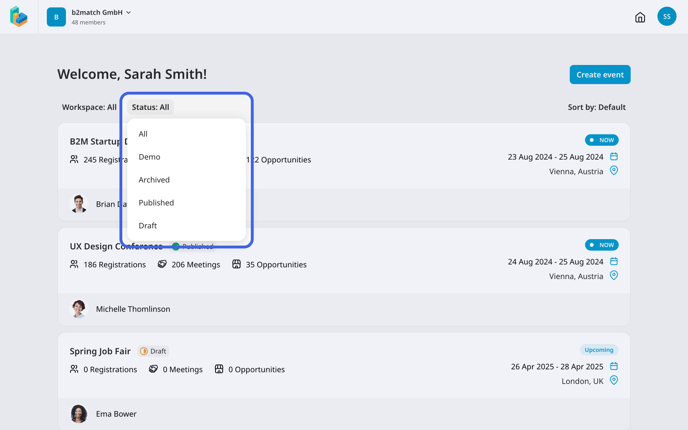
Warning: Currently, multiple filters cannot be applied simultaneously. You can only choose one filter option at a time.
#### Sorting Events
For more efficient organization, you can sort your events by several options.
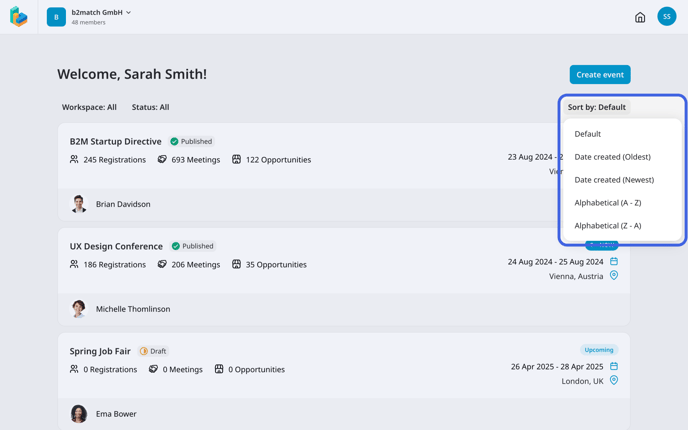
The **Default option** sorts events by their status, first showing those happening now.
The **Date created option** sorts events based on the creation date. You can either choose from oldest to newest.
The **Alphabetical option** sorts events by their name, either from A-Z or to Z-A.
### Workspace header
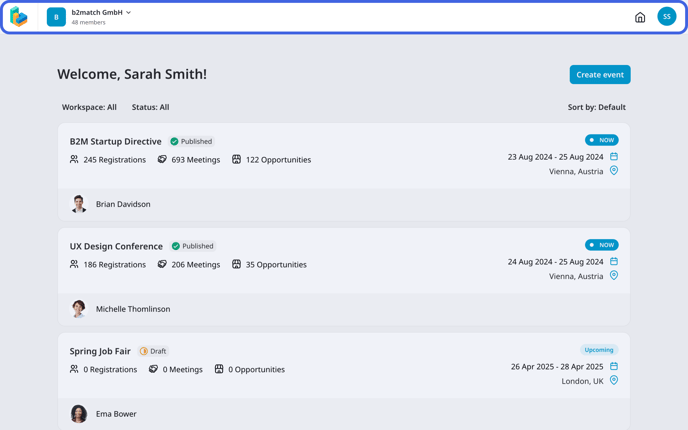
In the workspace header you will notice four icons: the b2match logo, workspace icon and name, home icon, and your avatar.
#### b2match logo
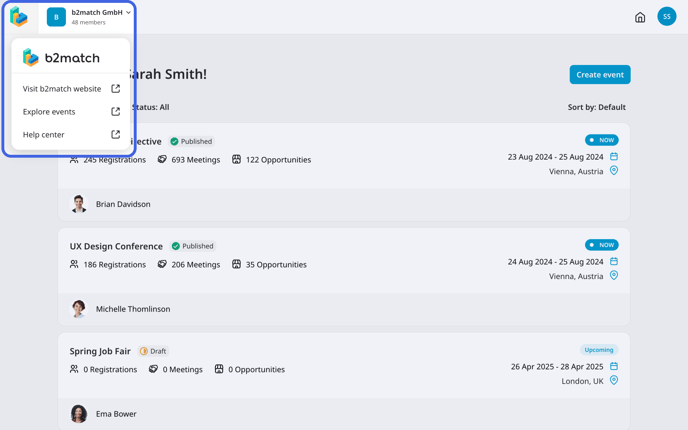
Clicking on the ***b2match logo*** opens a **drop-down menu** with links to various b2match website pages.
You can visit the [**b2match website**](https://www.b2match.com/?utm_source=knowledgebase&utm_medium=articleworkspaces&utm_campaign=&utm_content=textlink), the [**explore events page**](https://www.b2match.com/explore?utm_source=knowledgebase&utm_medium=articleworkspaces&utm_campaign=&utm_content=textlink) to browse public events hosted on the platform, and access the [**help center**](https://support.b2match.com/en?hsLang=en), where you’ll find in-depth articles explaining each feature and providing answers to your questions.
#### Workspaces
Next to the b2match logo you will find your **workspace’s logo and name**, along with the number of members collaborating in the workspace.
Click on the ***icon*** to open a **drop-down menu** with options to view and [**manage members**](https://support.b2match.com/en/understanding-members-and-guests?hsLang=en), [**edit the workspace details**](https://support.b2match.com/en/editing-workspace-details?hsLang=en), and switch to another workspace.
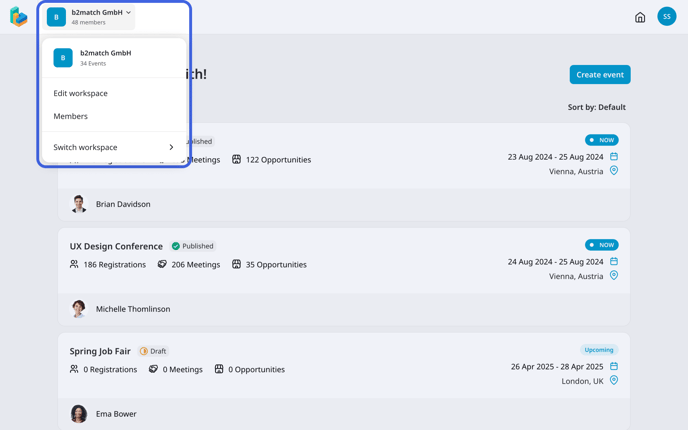
Note: Only workspace owners can edit a workspace.
If you need to create a new workspace, please contact our [**Customer Support Team**](https://www.b2match.com/contact-us/organizer-support?utm_source=knowledgebase&utm_medium=link&utm_content=knowledgebase_article).
#### Home icon
The **home icon** allows you to quickly return to the main screen of the workspace from any other page.
#### Avatar
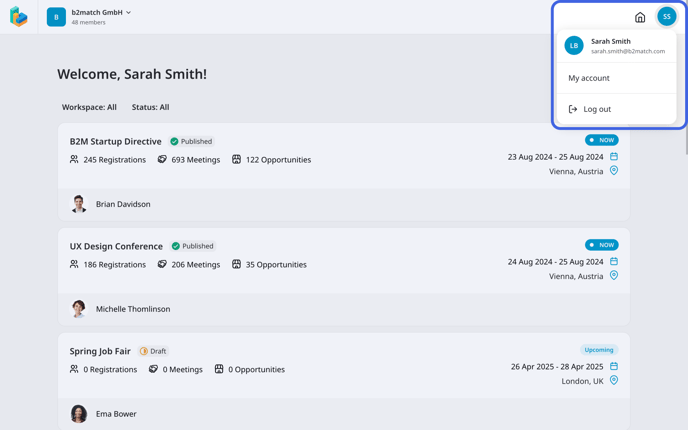
Your **avatar** is right next to the home icon and displays your profile image.
Click on your ***avatar*** to [**edit your account settings**](https://support.b2match.com/en/editing-your-account-settings?hsLang=en) or log out.
*If you didn't find an answer to your questions, please get in touch with the Support Team* [***here***](https://www.b2match.com/contact-us/organizer-support?utm_source=knowledgebase&utm_medium=link&utm_content=knowledgebase_article)*.*
- [Organizer Guide](https://support.b2match.com/organizer-guide?hsLang=en#main-content)
- [Your Organizer Account](https://support.b2match.com/organizer-guide?hsLang=en#your-organizer-account)
- [Managing Organizers](https://support.b2match.com/organizer-guide?hsLang=en#managing-organizers)
- [Workspace Management](https://support.b2match.com/organizer-guide?hsLang=en#workspace-management)
- [Event Management](https://support.b2match.com/organizer-guide?hsLang=en#event-management)
- [Home Page Editor](https://support.b2match.com/organizer-guide?hsLang=en#home-page-editor)
- [Event Settings](https://support.b2match.com/organizer-guide?hsLang=en#event-settings)
- [Event Components](https://support.b2match.com/organizer-guide?hsLang=en#event-components)
- [Branding](https://support.b2match.com/organizer-guide?hsLang=en#branding)
- [Registration Settings](https://support.b2match.com/organizer-guide?hsLang=en#registration-settings)
- [Custom Questions](https://support.b2match.com/organizer-guide?hsLang=en#custom-questions)
- [Participant Types](https://support.b2match.com/organizer-guide?hsLang=en#participant-types)
- [Ticketing](https://support.b2match.com/organizer-guide?hsLang=en#ticketing)
- [Agenda: Sessions](https://support.b2match.com/organizer-guide?hsLang=en#agenda-sessions)
- [Agenda: Session Locations](https://support.b2match.com/organizer-guide?hsLang=en#agenda-session-locations)
- [Agenda: Tracks](https://support.b2match.com/organizer-guide?hsLang=en#agenda-tracks)
- [Agenda: Topics](https://support.b2match.com/organizer-guide?hsLang=en#agenda-topics)
- [Agenda: Live Streams](https://support.b2match.com/organizer-guide?hsLang=en#agenda-live-streams)
- [Participants: Managing participants](https://support.b2match.com/organizer-guide?hsLang=en#participants-managing-participants)
- [Participants: Participant Types](https://support.b2match.com/organizer-guide?hsLang=en#participants-participant-types)
- [Participants: Speakers](https://support.b2match.com/organizer-guide?hsLang=en#participants-speakers)
- [Organizations: Managing Organizations](https://support.b2match.com/organizer-guide?hsLang=en#organizations-managing-organizations)
- [Organizations: Organization Types](https://support.b2match.com/organizer-guide?hsLang=en#organizations-organization-types)
- [Organizations: Areas of Activity](https://support.b2match.com/organizer-guide?hsLang=en#organizations-areas-of-activity)
- [Organizations: Sponsors](https://support.b2match.com/organizer-guide?hsLang=en#organizations-sponsors)
- [Meetings](https://support.b2match.com/organizer-guide?hsLang=en#meetings)
- [Meetings: Settings](https://support.b2match.com/organizer-guide?hsLang=en#meetings-settings)
- [Meetings: Meeting Blocks](https://support.b2match.com/organizer-guide?hsLang=en#meetings-meeting-blocks)
- [Meetings: Meeting Locations](https://support.b2match.com/organizer-guide?hsLang=en#meetings-meeting-locations)
- [Marketplace](https://support.b2match.com/organizer-guide?hsLang=en#marketplace)
- [Emails & Notifications: Outbox Emails](https://support.b2match.com/organizer-guide?hsLang=en#emails-notifications-outbox-emails)
- [Emails & Notifications: Automated Email Notifications](https://support.b2match.com/organizer-guide?hsLang=en#emails-notifications-automated-email-notifications)
- [Emails & Notifications: Announcements](https://support.b2match.com/organizer-guide?hsLang=en#emails-notifications-announcements)
- [Advanced Search](https://support.b2match.com/organizer-guide?hsLang=en#advanced-search)
- [Data Import & Export](https://support.b2match.com/organizer-guide?hsLang=en#data-import-export)
- [In-Person Participant Management: Badges](https://support.b2match.com/organizer-guide?hsLang=en#in-person-participant-management-badges)
- [In-Person Participant Management: Check-In App](https://support.b2match.com/organizer-guide?hsLang=en#in-person-participant-management-check-in-app)
- [In-Person Participant Management: On-Site Support](https://support.b2match.com/organizer-guide?hsLang=en#in-person-participant-management-on-site-support)
- [Mobile Event App](https://support.b2match.com/organizer-guide?hsLang=en#mobile-event-app)
- [Community Management Platform](https://support.b2match.com/organizer-guide?hsLang=en#community-management-platform)
- [Registration Form](https://support.b2match.com/organizer-guide?hsLang=en#registration-form)
- [Participant Guide](https://support.b2match.com/participant-guide?hsLang=en#main-content)
- [Getting Started](https://support.b2match.com/participant-guide?hsLang=en#getting-started)
- [Account Settings](https://support.b2match.com/participant-guide?hsLang=en#account-settings)
- [Event Settings](https://support.b2match.com/participant-guide?hsLang=en#event-settings)
- [Profile](https://support.b2match.com/participant-guide?hsLang=en#profile)
- [Agenda](https://support.b2match.com/participant-guide?hsLang=en#agenda)
- [Networking: Meetings](https://support.b2match.com/participant-guide?hsLang=en#networking-meetings)
- [Networking: Conversations](https://support.b2match.com/participant-guide?hsLang=en#networking-conversations)
- [Marketplace](https://support.b2match.com/participant-guide?hsLang=en#marketplace)
- [Feedback](https://support.b2match.com/participant-guide?hsLang=en#feedback)
[](https://www.b2match.com)
Need more help? Contact us at support@b2match.com
[mailto:support@b2match.com](mailto:support@b2match.com)
Copyright © 2025, b2match GmbH